Sys.setenv(LANGUAGE = "en")   # messages in English

library(tidyverse)
library(here)
library(scales)
library(patchwork)
library(plotly)
library(crosstalk)

source(here("R", "theme_cours.R"))   # theme_cours(), pal_cours, pal_regions

wdi <- read_csv(here("data", "wdi_panel.csv"), show_col_types = FALSE)

# CAF life expectancy is unreliable in this WDI release (14.7 in 2009, 18.8 in 2022): exclude every year
wdi <- wdi |> mutate(life_exp = if_else(iso3c == "CAF", NA_real_, life_exp))

# Cross-section used in most examples: latest year with good coverage
wdi_2022 <- wdi |>
  filter(year == 2022) |>
drop_na(gdp_pc_ppp, life_exp, region)Session 6: Advanced visualisation and Quarto reports
Facets, themes, annotations, patchwork, interactivity, Shiny, and your first reproducible report
Session objectives
- Split a chart into small multiples with
facet_wrap()andfacet_grid(), and know when free scales mislead. - Understand how
theme()works and build your own theme on top of the course theme. - Annotate a chart (text, reference lines) so that it carries its message.
- Combine several plots into one figure with patchwork and export it with
ggsave(). - Make a chart interactive with plotly and link two charts with crosstalk.
- Read a small Shiny app, and write and render a minimal Quarto report.
- Produce the figure for the “note au ministre” (capstone).
Prepare your R session
Packages used today: tidyverse, here, scales, patchwork, plotly, crosstalk (and shiny, optional). If one is missing, run install.packages("name") once in the Console.
As in Session 4 (§“Check extremes first”), the Central African Republic’s life-expectancy series is set to missing for every year: it is unreliable in this WDI release, so every life-expectancy chart and mean below leaves CAF out.
Script of this session: download seance-6.R, all the code of this page in one file.
We keep the running question of the course: growth, health and inequality, what do the data say about developing countries? All charts use the World Bank panel data/wdi_panel.csv (country × year, 2000–2023).
Pacing. The core path takes about 180 minutes, exercises included. Parts marked Optional: going further (custom theme and Exercise 6.2, crosstalk, Shiny) add about 40 minutes: do them if time allows, or at home.
Why 2022? Sessions 5 and 6 use 2022, the latest year with good country coverage (Session 4 used 2019, the last year before COVID-19).
Faceting: small multiples
≈ 30 min, Exercise 6.1 included After this section you can split any chart into comparable panels, and tell when free scales mislead.
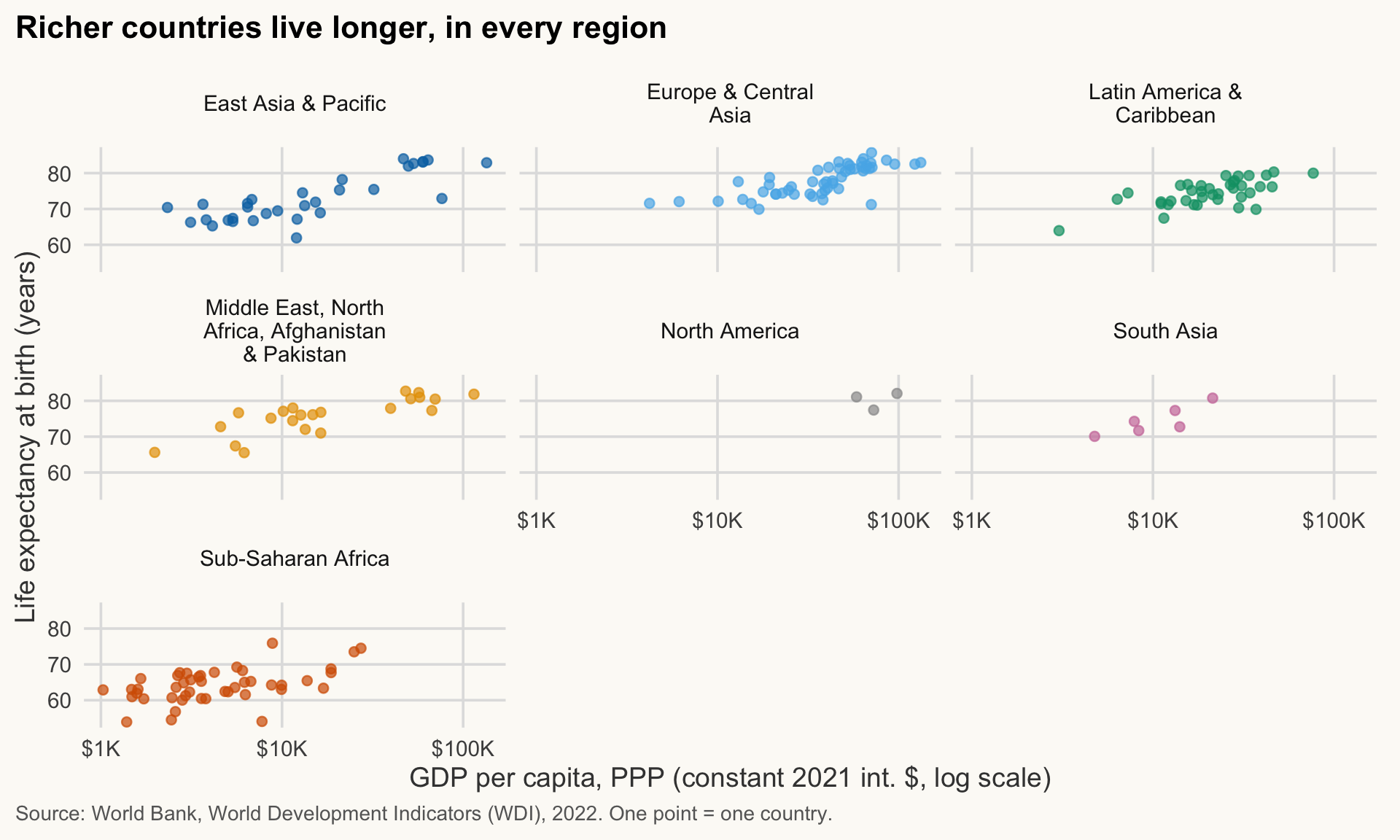
A facet splits one chart into panels, one per value of a categorical variable. Every panel uses the same axes, so the eye compares shapes at once. It is often better than 7 overlapping colours.
NoteIn plain words
Think of a comic strip: the same drawing frame repeated, one panel per character. Because the frame never changes, you can see at a glance what differs between panels.
facet_wrap(): one variable, panels wrapped in a grid
ggplot(wdi_2022, aes(x = gdp_pc_ppp, y = life_exp)) +
  geom_point(aes(colour = region), alpha = 0.7, show.legend = FALSE) +
  scale_colour_manual(values = pal_regions) +
  scale_x_log10(breaks = c(1e3, 1e4, 1e5),
                labels = label_dollar(scale_cut = cut_short_scale())) +
  facet_wrap(~ region, ncol = 3, labeller = label_wrap_gen(20)) +
  labs(
    title = "Richer countries live longer, in every region",
    x = "GDP per capita, PPP (constant 2021 int. $, log scale)",
    y = "Life expectancy at birth (years)",
    caption = "Source: World Bank, World Development Indicators (WDI), 2022. One point = one country."
  )
NoteHow to read this chart
- Each panel is one World Bank region; each point is one country.
- Compare the slope of the cloud between panels: the upward trend appears everywhere.
- Compare the position of the clouds: panels sit at different heights, because the axes are shared (fixed).
Notes:
-
~ regionis a formula: “split byregion”.ncol/nrowcontrol the layout;label_wrap_gen(20)wraps long panel titles. - The legend is redundant (the panel title already names the region), so
show.legend = FALSE. - Using the same
pal_regionscolours as everywhere else keeps a region recognisable across the whole course.
Time trends by panel
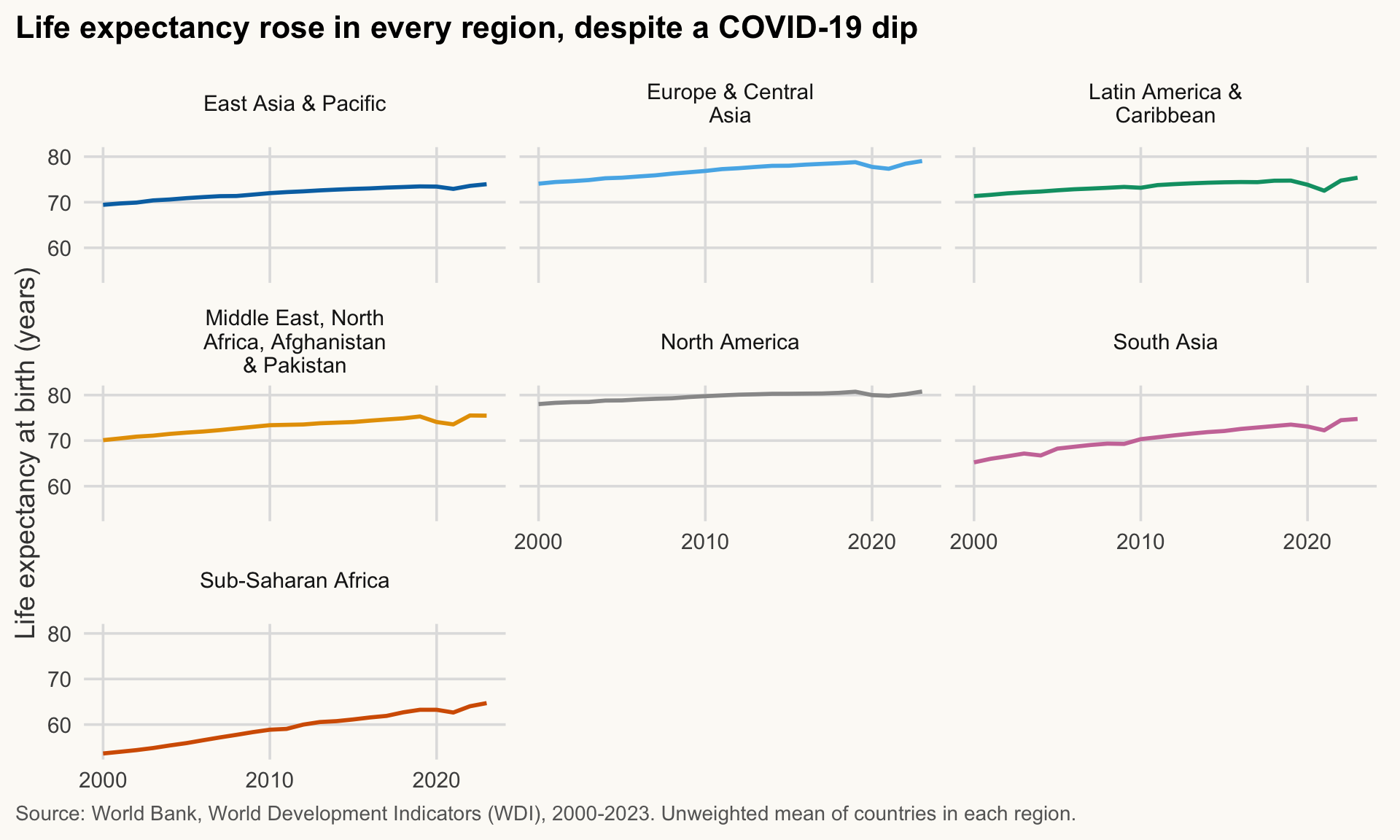
Facets work well for time series. Here is the average life expectancy by region (a simple mean of countries, not population-weighted).
trend_region <- wdi |>
  drop_na(life_exp, region) |>
  summarise(life_exp = mean(life_exp), .by = c(region, year))

ggplot(trend_region, aes(x = year, y = life_exp)) +
  geom_line(aes(colour = region), linewidth = 1, show.legend = FALSE) +
  scale_colour_manual(values = pal_regions) +
  scale_x_continuous(breaks = c(2000, 2010, 2020)) +
  facet_wrap(~ region, ncol = 3, labeller = label_wrap_gen(20)) +
  labs(
    title = "Life expectancy rose in every region, despite a COVID-19 dip",
    x = NULL, y = "Life expectancy at birth (years)",
    caption = "Source: World Bank, World Development Indicators (WDI), 2000-2023. Unweighted mean of countries in each region."
  )
ImportantKey idea
Small multiples replace one cluttered chart with many simple ones that share the same axes. Same axes means the eye can compare.
facet_grid(): two variables, rows × columns
facet_grid(rows ~ columns) crosses two variables. Here: income group (rows) and two years (columns). The income column is the World Bank’s current income classification, applied to every year: a country appears in today’s group in 2000 as well, even if it has since changed group. The same holds for Exercise 6.1.
income_levels <- c("Low income", "Lower middle income",
                   "Upper middle income", "High income")

wdi |>
  filter(year %in% c(2000, 2022), income %in% income_levels) |>
  drop_na(gdp_pc_ppp, life_exp) |>
  mutate(income = factor(income, levels = income_levels)) |>
  ggplot(aes(x = gdp_pc_ppp, y = life_exp)) +
  geom_point(colour = pal_cours[["principal"]], alpha = 0.6) +
  scale_x_log10(breaks = c(1e3, 1e4, 1e5),
                labels = label_dollar(scale_cut = cut_short_scale())) +
  facet_grid(income ~ year, labeller = label_wrap_gen(10)) +
  labs(
    title = str_wrap("Within income groups, the income-health link looks weaker", 60),
    x = "GDP per capita, PPP (constant 2021 int. $, log scale)",
    y = "Life expectancy at birth (years)",
    caption = str_wrap("Source: World Bank, World Development Indicators (WDI), 2000 and 2022. One point = one country. Rows: income group (current World Bank classification).", 95)
  )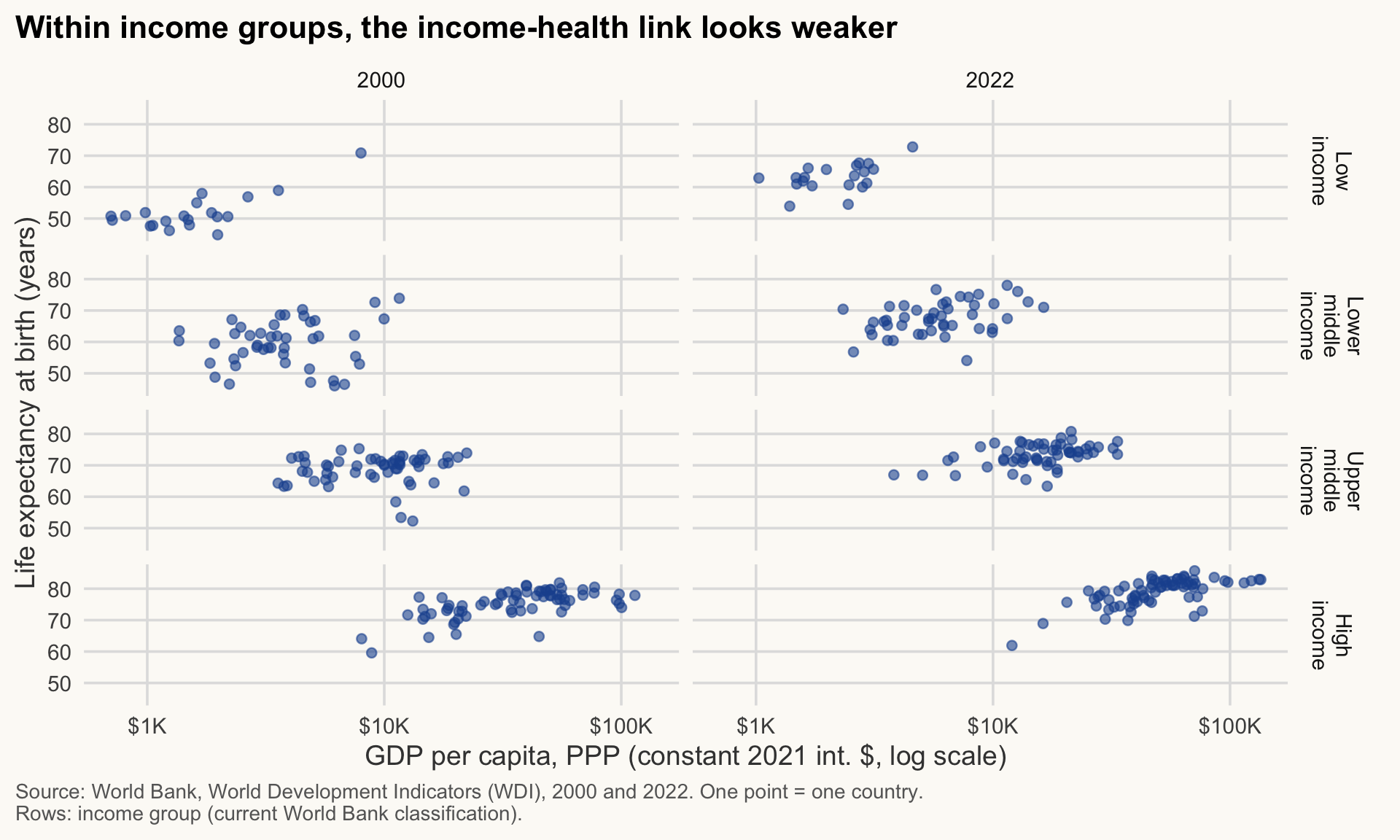
Note the factor(..., levels = ...): it puts the income groups in their natural order instead of alphabetical order.
Free scales: when (not) to use them
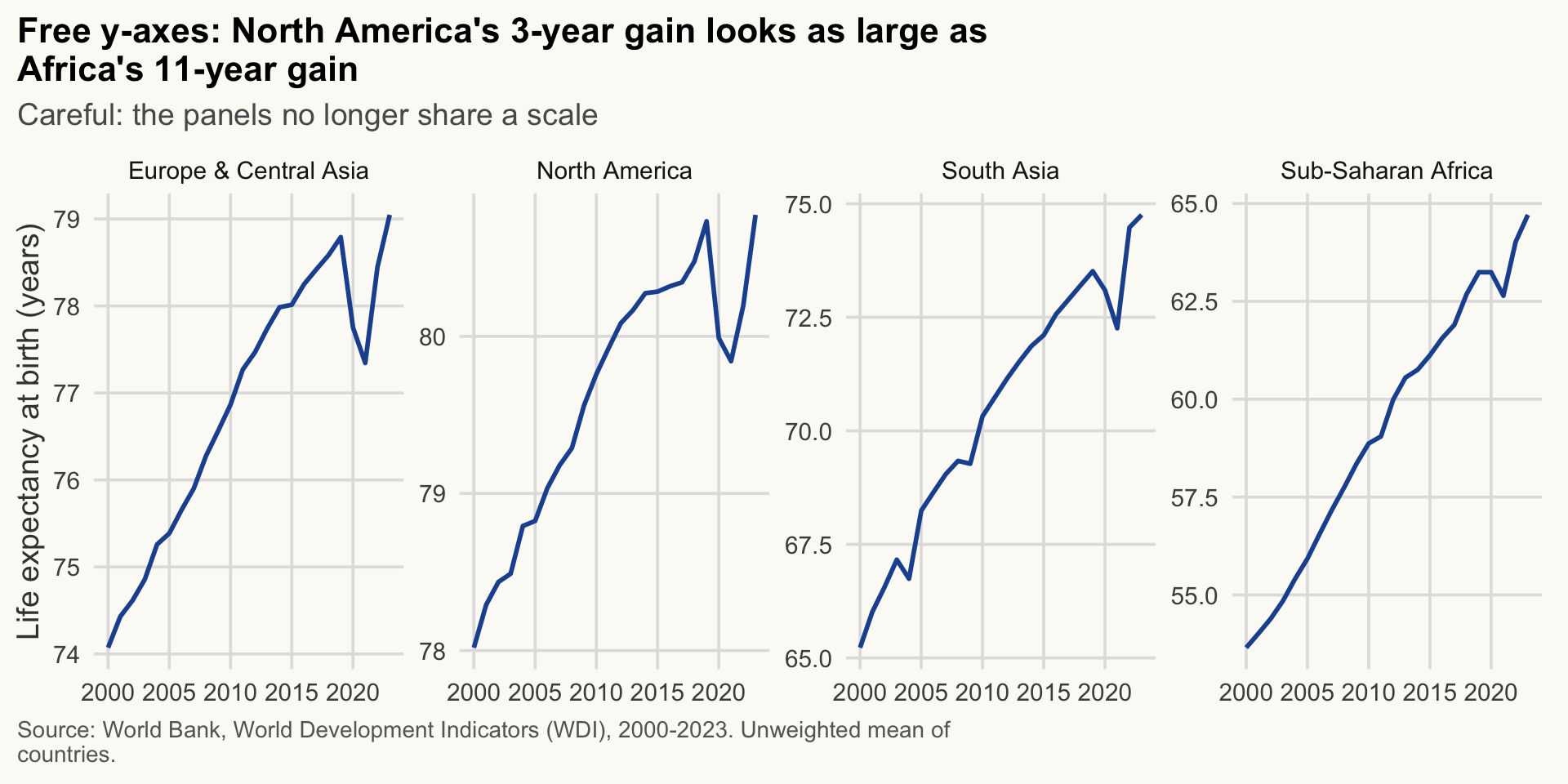
By default all panels share the same axes (scales = "fixed"). You can free them with scales = "free", "free_x" or "free_y".
trend_region |>
  filter(region %in% c("Sub-Saharan Africa", "North America",
                       "South Asia", "Europe & Central Asia")) |>
  ggplot(aes(x = year, y = life_exp)) +
  geom_line(linewidth = 1, colour = pal_cours[["principal"]]) +
  facet_wrap(~ region, scales = "free_y", nrow = 1) +
  labs(
    title = str_wrap("Free y-axes: North America's 3-year gain looks as large as Africa's 11-year gain", 60),
    subtitle = str_wrap("Careful: the panels no longer share a scale", 75),
    x = NULL, y = "Life expectancy at birth (years)",
    caption = str_wrap("Source: World Bank, World Development Indicators (WDI), 2000-2023. Unweighted mean of countries.", 95)
  )
For comparison, here are the same four regions with the default fixed scale.
trend_region |>
  filter(region %in% c("Sub-Saharan Africa", "North America",
                       "South Asia", "Europe & Central Asia")) |>
  ggplot(aes(x = year, y = life_exp)) +
  geom_line(linewidth = 1, colour = pal_cours[["principal"]]) +
  facet_wrap(~ region, nrow = 1) +
  labs(
    title = "Fixed y-axes: the regions differ in level, and Africa and South Asia gain most",
    x = NULL, y = "Life expectancy at birth (years)",
    caption = "Source: World Bank, World Development Indicators (WDI), 2000-2023. Unweighted mean of countries."
  )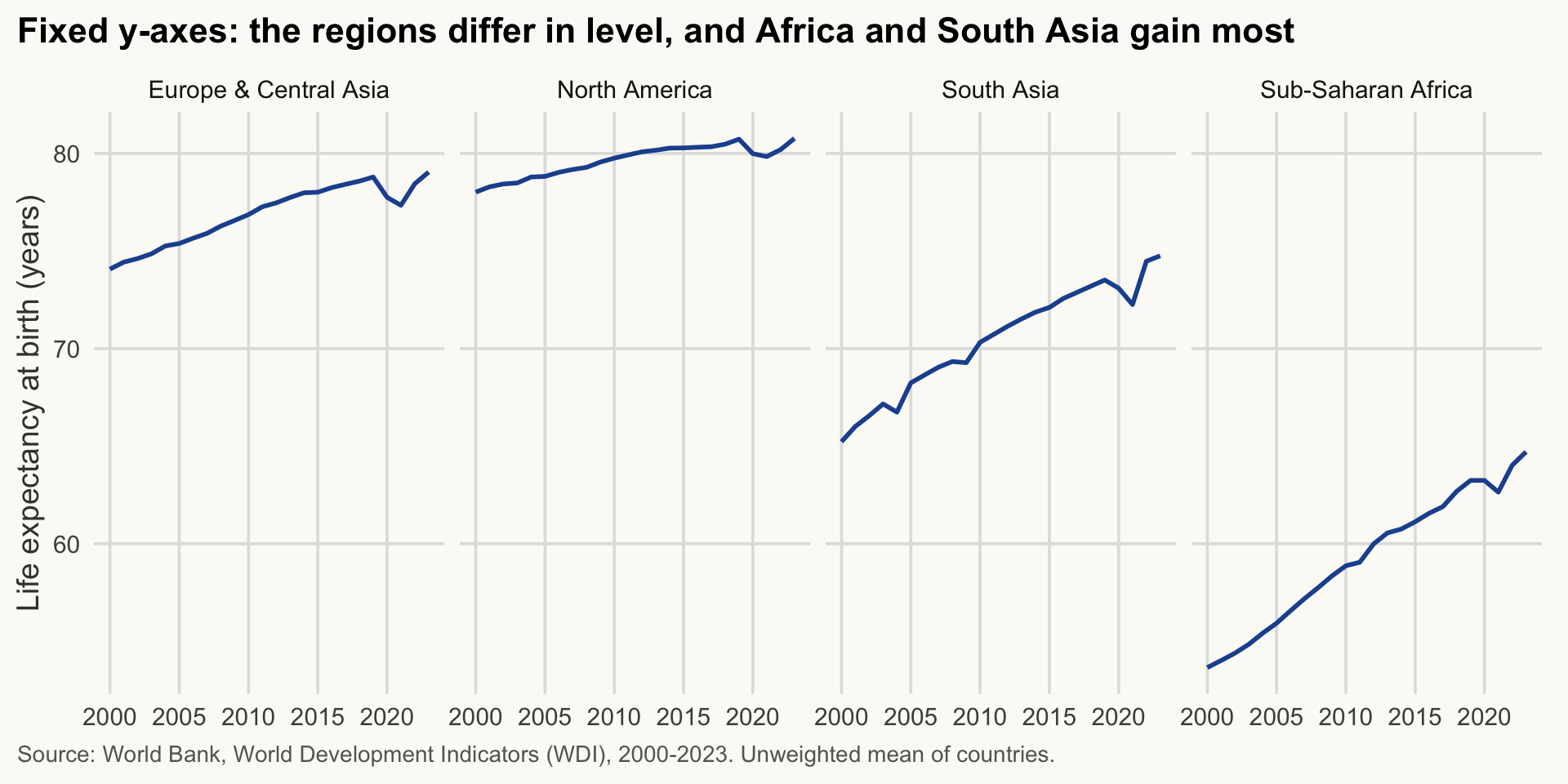
Same data, two stories: the free-scale version hides the gaps in level and magnifies small changes. North America gained about 3 years from 2000 to 2023 and Sub-Saharan Africa about 11, yet both lines fill their panel; and a COVID-19 dip of about one year in North America and 1.5 years in Europe & Central Asia looks like a crash.
WarningCommon mistake
Free scales make every panel fill its box, so a small change looks as large as a big one. Use them only to compare shapes (timing, turning points), never levels or magnitudes. If readers must compare levels, keep the scales fixed (the default). If you do free the axes, say so in the subtitle. How to spot it: panels with different tick values on the y-axis.
TipExercise 6.1
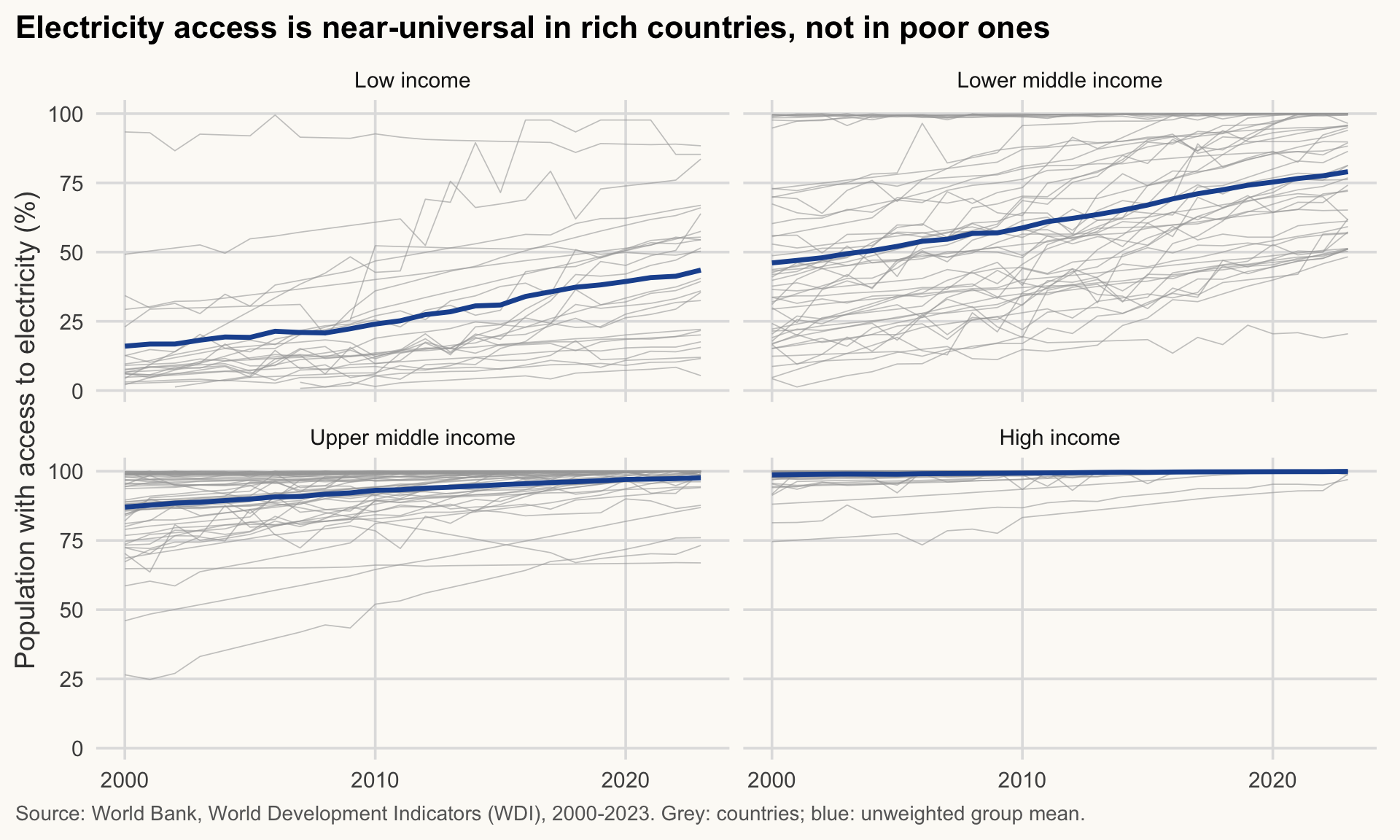
Using wdi, draw the share of the population with access to electricity (elec_access) against year for the four income groups (facet_wrap(~ income)), with one thin grey line per country and the group mean in pal_cours[["principal"]]. Choose a title that states the message. Hint: use group = iso3c for the country lines, and a second geom_line() on a summarised data frame.
NoteShow solution
elec <- wdi |>
  filter(income %in% income_levels) |>
  drop_na(elec_access) |>
  mutate(income = factor(income, levels = income_levels))

elec_mean <- elec |>
  summarise(elec_access = mean(elec_access), .by = c(income, year))

ggplot(elec, aes(x = year, y = elec_access)) +
  geom_line(aes(group = iso3c), colour = pal_cours[["gris"]],
            linewidth = 0.3, alpha = 0.6) +
  geom_line(data = elec_mean, colour = pal_cours[["principal"]], linewidth = 1.2) +
  scale_x_continuous(breaks = c(2000, 2010, 2020)) +
  facet_wrap(~ income, labeller = label_wrap_gen(20)) +
  labs(
    title = "Electricity access is near-universal in rich countries, not in poor ones",
    x = NULL, y = "Population with access to electricity (%)",
    caption = "Source: World Bank, World Development Indicators (WDI), 2000-2023. Grey: countries; blue: unweighted group mean."
  )
Themes: controlling the look
≈ 20 min After this section you can restyle any chart, and set one look for a whole project.
Before and after: what the techniques buy
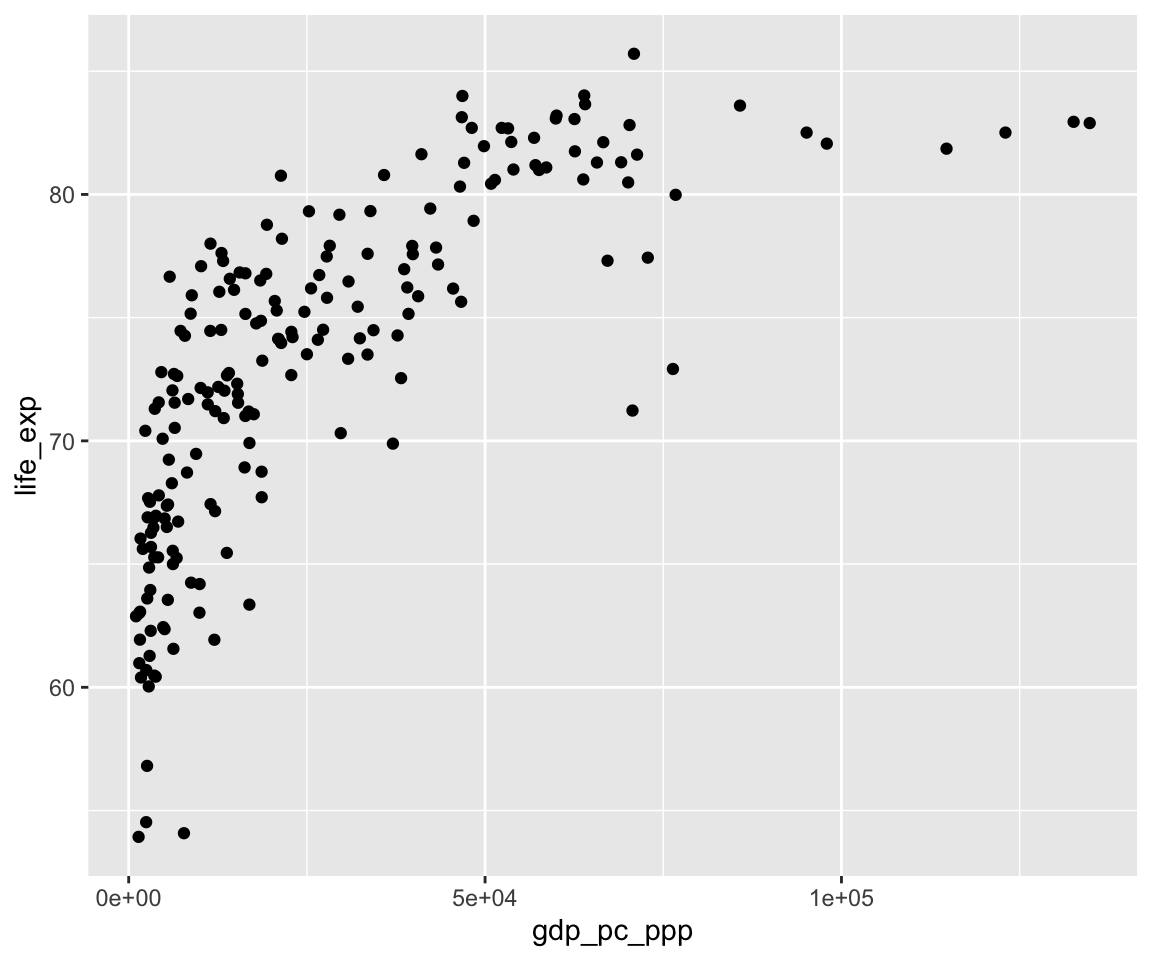
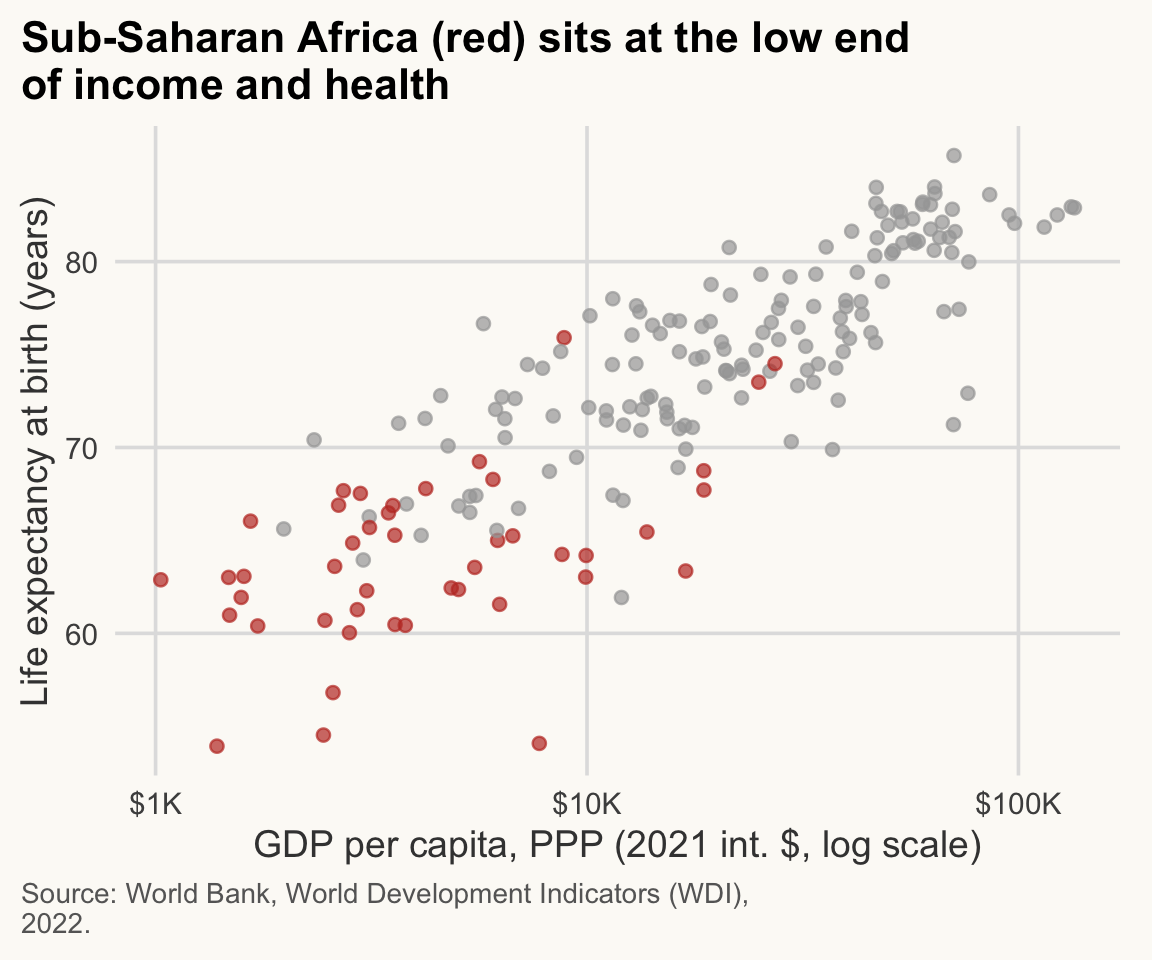
Left, a chart with ggplot’s defaults. Right, the same data after this session’s techniques: a message title, units, one highlighted group, a source. The data and the geometry are identical; only the communication changed.
# Before: defaults only
ggplot(wdi_2022, aes(x = gdp_pc_ppp, y = life_exp)) +
  geom_point() +
  theme_gray()
# After: message title, units, emphasis, source
wdi_2022 |>
  mutate(focus = region == "Sub-Saharan Africa") |>
  ggplot(aes(x = gdp_pc_ppp, y = life_exp, colour = focus)) +
  geom_point(alpha = 0.7) +
  scale_colour_manual(values = c("FALSE" = pal_cours[["gris"]],
                                 "TRUE"  = pal_cours[["accent"]]),
                      guide = "none") +
  scale_x_log10(labels = label_dollar(scale_cut = cut_short_scale())) +
  labs(
    title = str_wrap("Sub-Saharan Africa (red) sits at the low end of income and health", 45),
    x = "GDP per capita, PPP (2021 int. $, log scale)",
    y = "Life expectancy at birth (years)",
    caption = str_wrap("Source: World Bank, World Development Indicators (WDI), 2022.", 55)
  )
ImportantKey idea
A theme controls how a chart looks; the title, units and emphasis control what it says. A good figure needs both, and neither changes the data.
How theme() works
A theme is a list of settings for every non-data element: text, axes, grid, legend, background. You change an element with theme(element = element_*(...)), where the constructor depends on the type of element:
| Constructor | Used for | Example |
|---|---|---|
element_text() |
any text | plot.title = element_text(face = "bold") |
element_line() |
lines, grid | panel.grid.major = element_line(colour = "grey90") |
element_rect() |
backgrounds, borders | panel.background = element_rect(fill = "white") |
element_blank() |
remove an element | panel.grid.minor = element_blank() |
Settings are inherited: axis.title controls axis.title.x and axis.title.y, and text controls everything. Two useful rules:
- A theme added last overrides earlier settings.
- A complete theme (
theme_minimal(),theme_cours()) must come before your owntheme()tweaks, otherwise it erases them.
WarningCommon mistake
Adding theme_minimal() or theme_cours() after your own theme() tweaks: the complete theme overwrites them and your changes seem to be ignored. Fix: complete theme first, tweaks last.
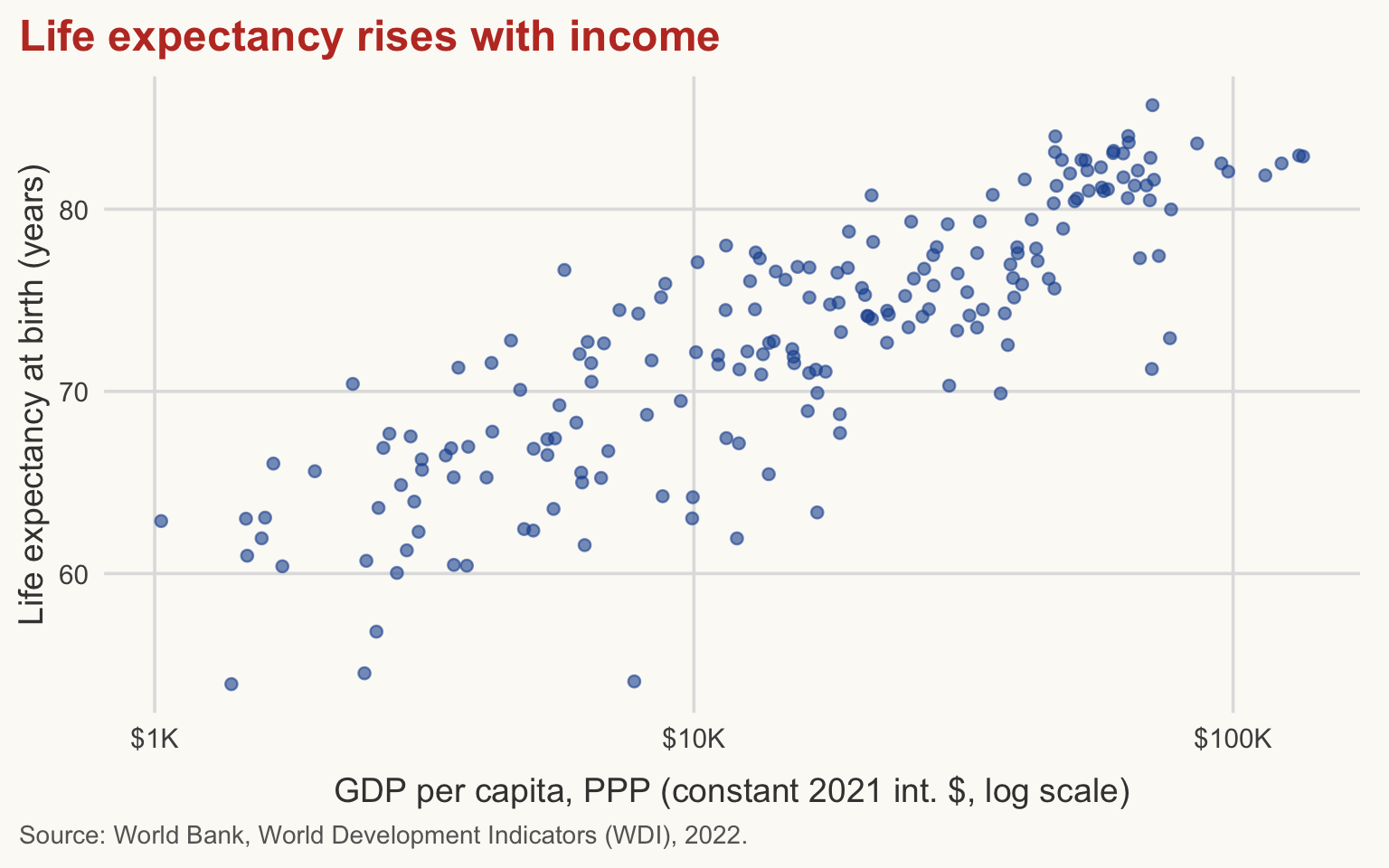
p_base <- ggplot(wdi_2022, aes(x = gdp_pc_ppp, y = life_exp)) +
  geom_point(colour = pal_cours[["principal"]], alpha = 0.6) +
  scale_x_log10(labels = label_dollar(scale_cut = cut_short_scale())) +
  labs(
    title = "Life expectancy rises with income",
    x = "GDP per capita, PPP (constant 2021 int. $, log scale)",
    y = "Life expectancy at birth (years)",
    caption = "Source: World Bank, World Development Indicators (WDI), 2022."
  )

p_base +
  theme(
    plot.title = element_text(colour = pal_cours[["accent"]], size = 18),
    panel.grid.minor = element_blank(),
    axis.title.x = element_text(margin = margin(t = 10))
  )
Build a small custom theme (Optional: going further, ≈ 10 min)
A custom theme is a function that returns a theme. Build it on top of theme_cours() and change only what you need. Do not set a family = for fonts unless you are sure the font exists on every machine: an unavailable font silently falls back to a default or triggers warnings. The generic families "sans", "serif" and "mono" always exist.
theme_cours_dark <- function(base_size = 14) {
  theme_cours(base_size = base_size) +
    theme(
      plot.background  = element_rect(fill = "#1b2733", colour = NA),
      panel.background = element_rect(fill = "#1b2733", colour = NA),
      text             = element_text(colour = "grey90"),
      plot.title       = element_text(colour = "white"),
      plot.subtitle    = element_text(colour = "grey80"),
      plot.caption     = element_text(colour = "grey70"),
      axis.text        = element_text(colour = "grey80"),
      axis.title       = element_text(colour = "grey85"),
      panel.grid.major = element_line(colour = "grey30")
    )
}

p_base + geom_point(colour = "#56B4E9", alpha = 0.7) + theme_cours_dark()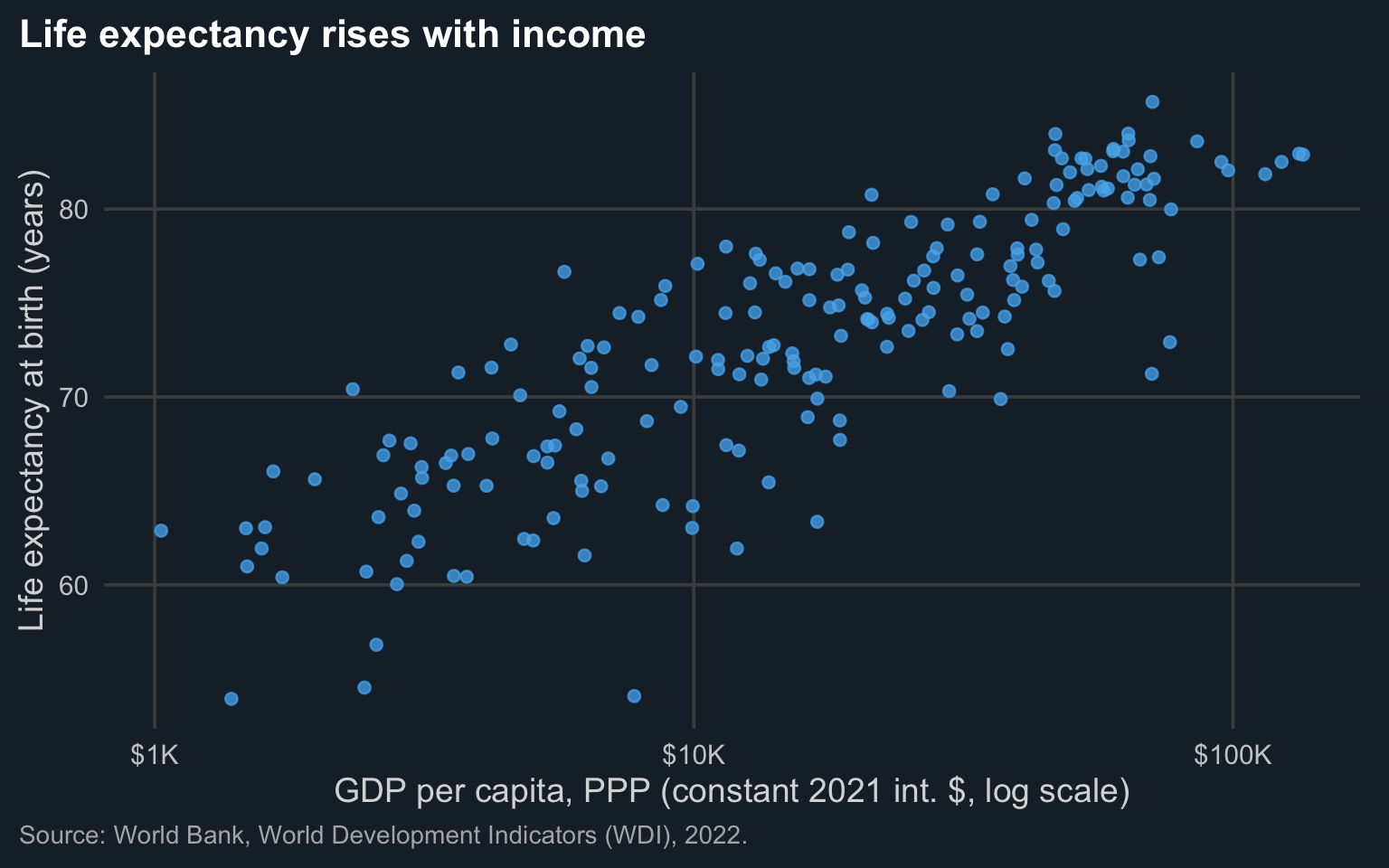
Note
A dark background suits slides in a dark room. For a printed note, prefer white. This example is about how to build a theme, not a design recommendation.
The course theme: setting a theme once
Open R/theme_cours.R in the project. It does three things:
- defines the palettes
pal_cours(named colours) andpal_regions(one fixed colour per World Bank region); - defines
theme_cours(), a function that starts fromtheme_minimal()and sets title position, bold titles, grey caption, light grid, legend at the bottom; - ends with
theme_set(theme_cours()), which makes it the default theme for every plot drawn afterwards in the session.
That last line is why the plots on this page need no + theme_...(). In your own projects, put a theme file in R/, source() it at the top of each script, and all your figures share one look. Changing the style later means editing one place.
# What is the current default theme? (a theme is a list of settings: print one of them)
theme_get()$legend.position
[1] "bottom"You can set a default for a single plot with + theme_minimal(), or restore the ggplot2 default with theme_set(theme_grey()).
TipExercise 6.2 (Optional: going further)
Write a function theme_cours_print() based on theme_cours() that (i) uses base_size = 12, (ii) puts the legend at the top, and (iii) removes all grid lines except the horizontal major ones. Apply it to the scatterplot p_base coloured by region (use pal_regions).
NoteShow solution
theme_cours_print <- function(base_size = 12) {
  theme_cours(base_size = base_size) +
    theme(
      legend.position    = "top",
      panel.grid.major.x = element_blank(),
      panel.grid.minor   = element_blank()
    )
}

ggplot(wdi_2022, aes(x = gdp_pc_ppp, y = life_exp, colour = region)) +
  geom_point(alpha = 0.7) +
  scale_colour_manual(values = pal_regions, name = NULL) +
  scale_x_log10(labels = label_dollar(scale_cut = cut_short_scale())) +
  guides(colour = guide_legend(nrow = 3)) +
  labs(
    title = "Life expectancy rises with income in every region",
    x = "GDP per capita, PPP (constant 2021 int. $, log scale)",
    y = "Life expectancy at birth (years)",
    caption = "Source: World Bank, World Development Indicators (WDI), 2022."
  ) +
  theme_cours_print() +
  theme(legend.text = element_text(size = 9))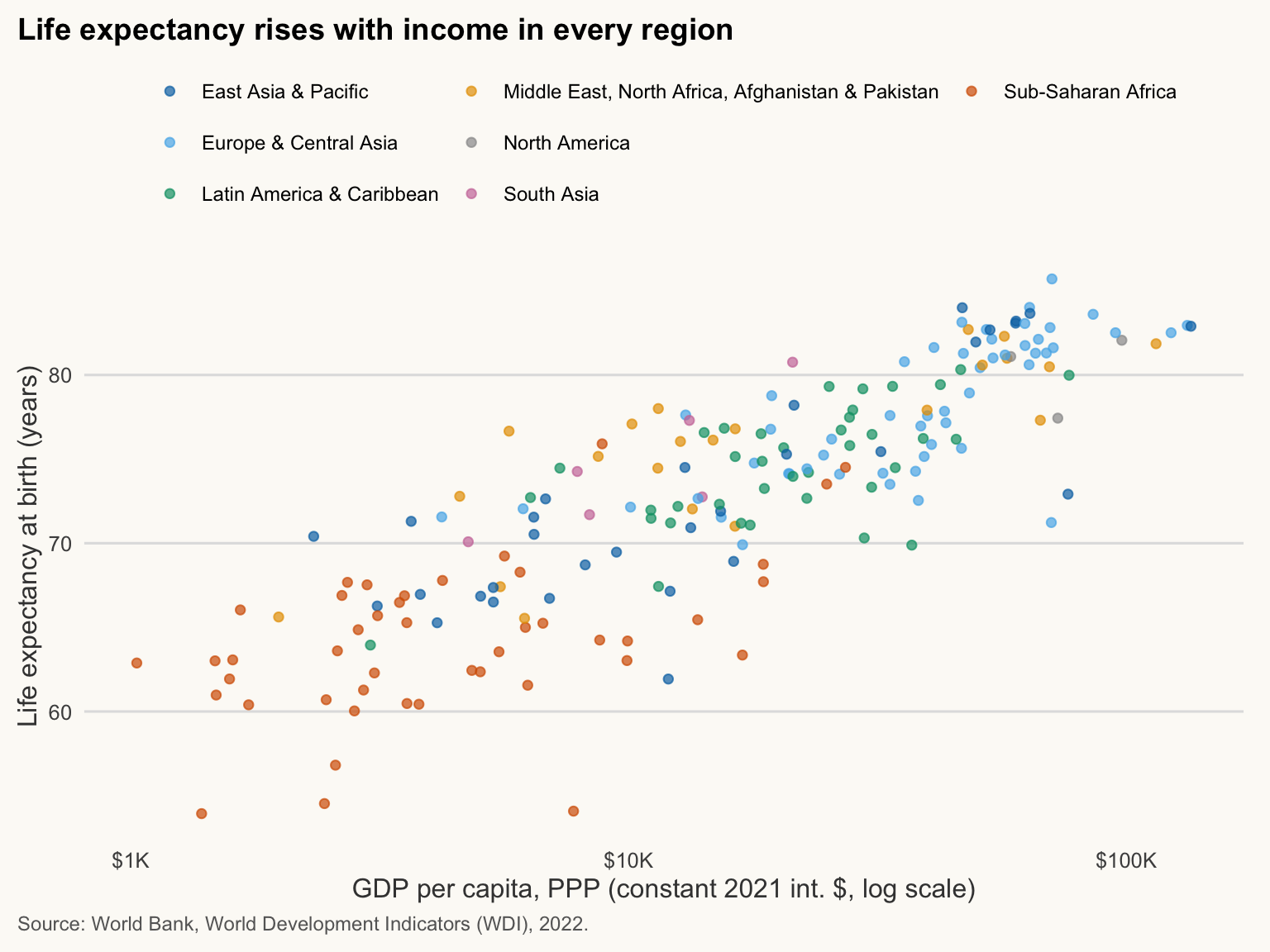
Annotations and reference lines
≈ 15 min After this section you can point the reader to the finding with lines, labels and shaded zones.
A chart that carries a message says it. Annotations point the reader to what matters. Three tools:
-
geom_vline()/geom_hline(): reference lines at a given x or y; -
annotate("text", x, y, label): a text label at coordinates in data units; -
annotate("rect", ...)orannotate("segment", ...): shaded zones and arrows.
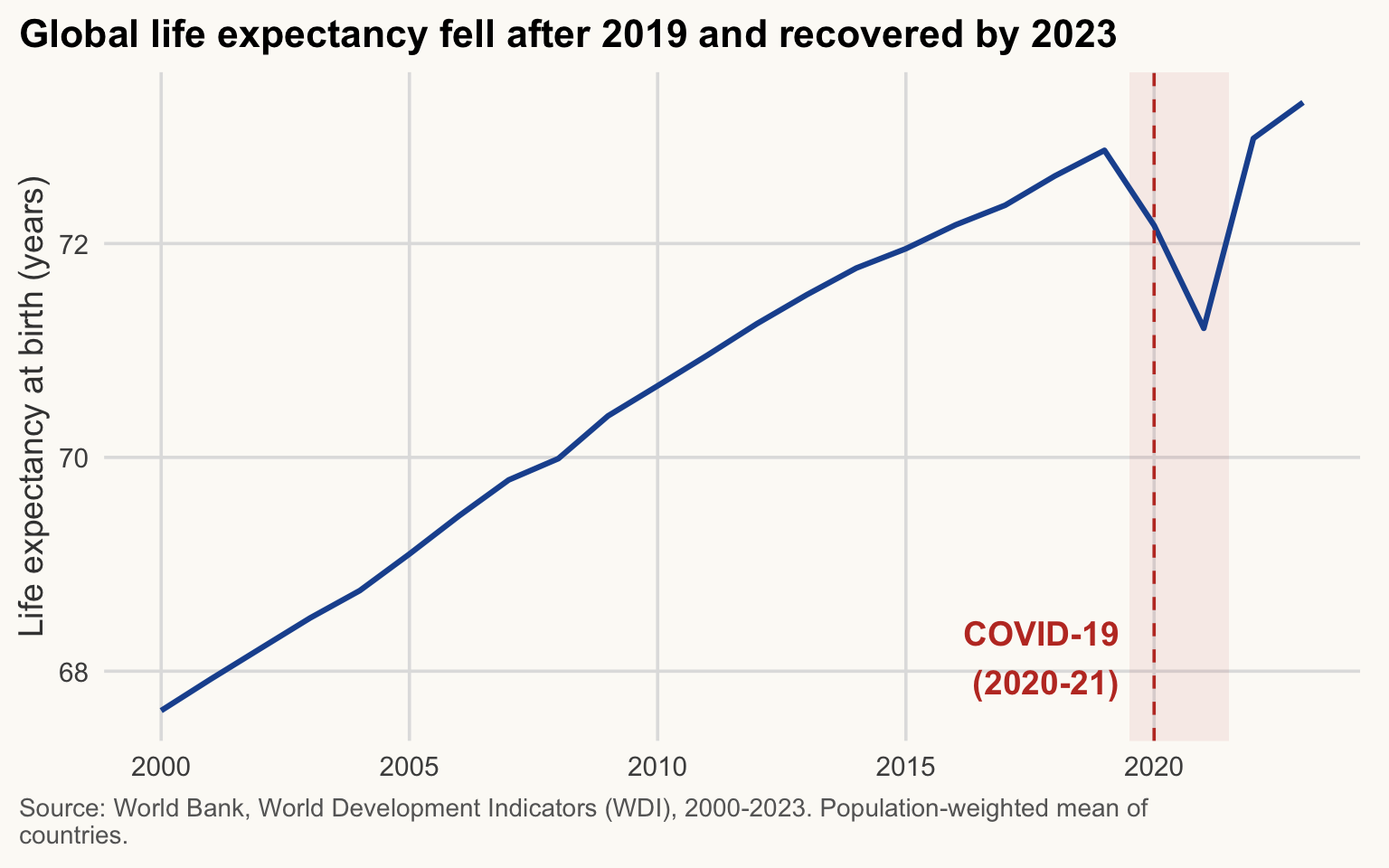
Example: global life expectancy around the COVID-19 pandemic. We use the population-weighted world mean, since an unweighted mean of countries counts Tuvalu like India.
life_world <- wdi |>
  drop_na(life_exp, population) |>
  summarise(life_exp = weighted.mean(life_exp, w = population), .by = year)

le_2019_2021 <- life_world |>
  filter(year %in% c(2019, 2021, 2023)) |>
  arrange(year) |>
  pull(life_exp)

ggplot(life_world, aes(x = year, y = life_exp)) +
  annotate("rect", xmin = 2019.5, xmax = 2021.5, ymin = -Inf, ymax = Inf,
           fill = pal_cours[["accent"]], alpha = 0.08) +
  geom_line(linewidth = 1.1, colour = pal_cours[["principal"]]) +
  geom_vline(xintercept = 2020, linetype = "dashed", colour = pal_cours[["accent"]]) +
  annotate("text", x = 2019.3, y = min(life_world$life_exp) + 0.5,
           label = "COVID-19\n(2020-21)", hjust = 1,
           colour = pal_cours[["accent"]], fontface = "bold") +
  labs(
    title = str_wrap("Global life expectancy fell after 2019 and recovered by 2023", 60),
    x = NULL, y = "Life expectancy at birth (years)",
    caption = str_wrap("Source: World Bank, World Development Indicators (WDI), 2000-2023. Population-weighted mean of countries.", 95)
  )
NoteHow to read this chart
- The blue line is the world’s population-weighted life expectancy, year by year.
- The shaded band and dashed line mark the pandemic years (2020-21).
- Look at the size of the dip against the long upward trend before it: the 2021 level is close to that of 2011, so the pandemic erased about ten years of progress; the line is back above its 2019 level from 2022.
Between 2019 and 2021 the weighted mean moved from 72.9 to 71.2 years; in 2023 it stood at 73.3 years.
WarningCommon mistake
Dishonest axes. A line chart does not need to start at zero, but be aware that the y-axis range changes the visual impression of the fall. Here the axis follows the data; state the numbers (as in the sentence above) so that readers are not misled by the slope alone.
Combining plots with patchwork
≈ 25 min After this section you can combine several charts into one labelled figure.
patchwork assembles several ggplot objects with arithmetic operators:
| Operator | Meaning |
|---|---|
p1 \| p2 |
side by side |
p1 / p2 |
stacked |
(p1 \| p2) / p3 |
grouping with parentheses |
Then plot_annotation() adds a global title, caption and panel tags, and plot_layout() controls widths, heights and guides. (There is also cowplot; one tool is enough, we only use patchwork.)
p_scatter <- ggplot(wdi_2022, aes(x = gdp_pc_ppp, y = life_exp, colour = region)) +
  geom_point(alpha = 0.7) +
  scale_colour_manual(values = pal_regions, name = NULL) +
  scale_x_log10(labels = label_dollar(scale_cut = cut_short_scale())) +
  labs(x = "GDP per capita, PPP (2021 int. $, log)", y = "Life exp. (years)")

p_box <- wdi_2022 |>
  ggplot(aes(x = fct_reorder(region, life_exp), y = life_exp, fill = region)) +
  geom_boxplot(show.legend = FALSE) +
  scale_fill_manual(values = pal_regions) +
  coord_flip() +
  labs(x = NULL, y = "Life expectancy (years)")

p_hist <- ggplot(wdi_2022, aes(x = life_exp)) +
  geom_histogram(binwidth = 2, fill = pal_cours[["principal"]], colour = "white") +
  labs(x = "Life expectancy (years)", y = "Count")

((p_scatter | p_box) / p_hist) +
  plot_layout(guides = "collect", heights = c(2, 1)) +
  plot_annotation(
    title = "Life expectancy in 2022: rising with income, with large regional gaps",
    caption = "Source: World Bank, World Development Indicators (WDI), 2022. One observation = one country.",
    tag_levels = "A"
  ) &
  theme(legend.position = "bottom", legend.text = element_text(size = 9))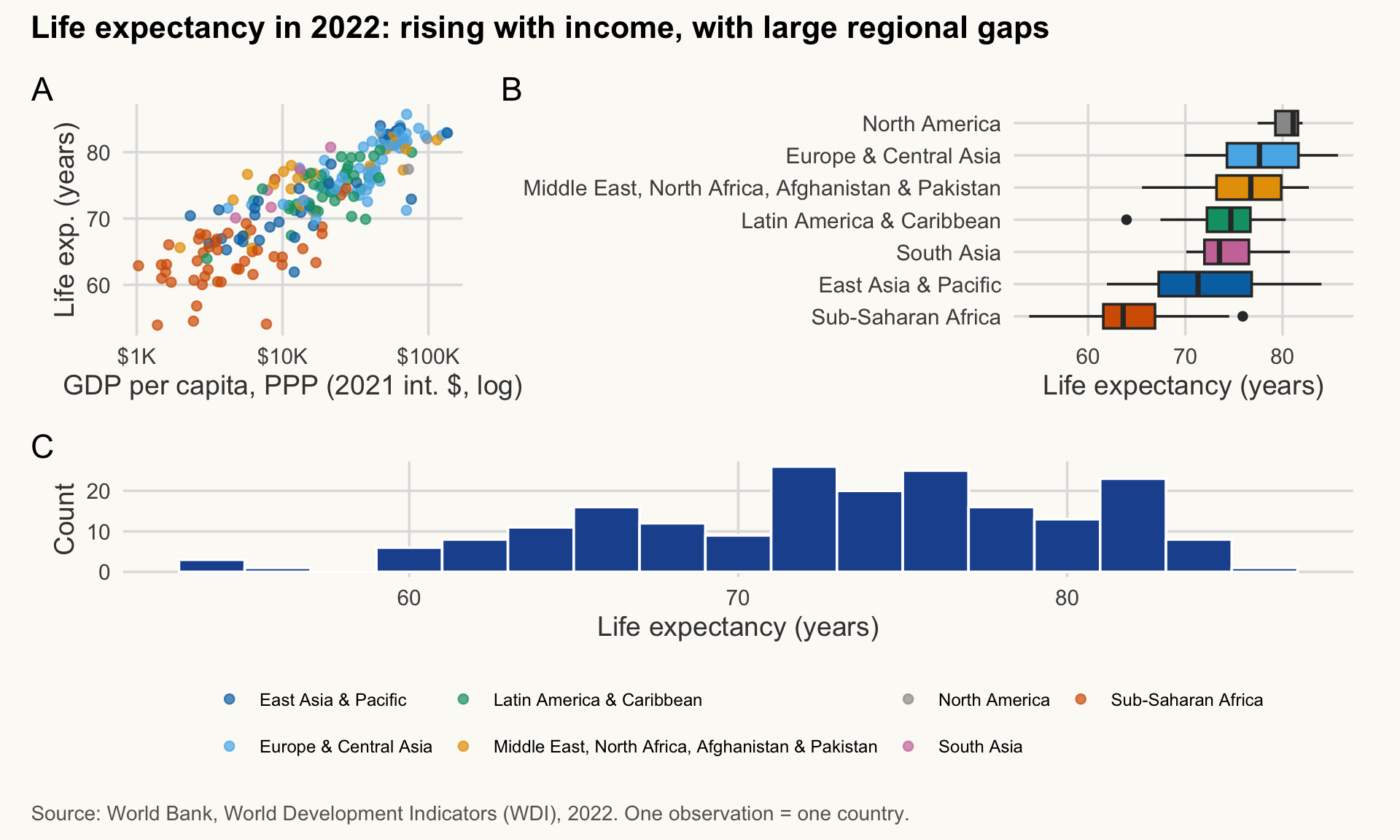
NoteHow to read this chart
- A (scatter): the income-health relationship, one point per country.
- B (boxplots): the same outcome by region, ordered by median; the boxes show how much regions differ and overlap.
- C (histogram): the overall distribution of life expectancy across countries.
- Together: the shape of the relationship (A), where regions sit (B), and the overall spread (C).
-
plot_layout(guides = "collect")merges identical legends into one; -
plot_annotation(tag_levels = "A")labels the panels A, B, C (to refer to them in the text); -
&applies a setting to all sub-plots (+would only touch the last one).
In a report you write “Figure 1B shows…” and the reader finds it immediately.
ImportantKey idea
One figure, one message. Patchwork combines panels that support the same message; it is not a way to fit unrelated charts on one page.
TipExercise 6.3
Build a two-panel figure side by side: (A) the life expectancy time series by region (trend_region, one coloured line per region with pal_regions), (B) a scatterplot of elec_access vs gdp_pc_ppp in 2021 (log x). Collect the legend (on the right, with wrapped labels), tag the panels, and add a title.
NoteShow solution
# Only panel B keeps a legend: both panels use the same colours
pA <- ggplot(trend_region, aes(x = year, y = life_exp, colour = region)) +
  geom_line(linewidth = 1, show.legend = FALSE) +
  scale_colour_manual(values = pal_regions) +
  labs(x = NULL, y = "Life expectancy (years)")

pB <- wdi |>
  filter(year == 2021) |>
  drop_na(elec_access, gdp_pc_ppp, region) |>
  ggplot(aes(x = gdp_pc_ppp, y = elec_access, colour = region)) +
  geom_point(alpha = 0.7) +
  scale_colour_manual(values = pal_regions, name = NULL,
                      labels = label_wrap(24)) +
  scale_x_log10(breaks = c(1e3, 1e4, 1e5),
                labels = label_dollar(scale_cut = cut_short_scale())) +
  labs(x = "GDP per capita, PPP (2021 int. $, log)",
       y = "Access to electricity (% of population)")

(pA | pB) +
  plot_layout(guides = "collect") +
  plot_annotation(
    title = "Health improved everywhere; electricity access depends on income",
    caption = str_wrap("Source: World Bank, World Development Indicators (WDI). A: unweighted regional means, 2000-2023; B: countries, 2021.", 100),
    tag_levels = "A"
  ) &
  theme(legend.position = "right", legend.text = element_text(size = 9))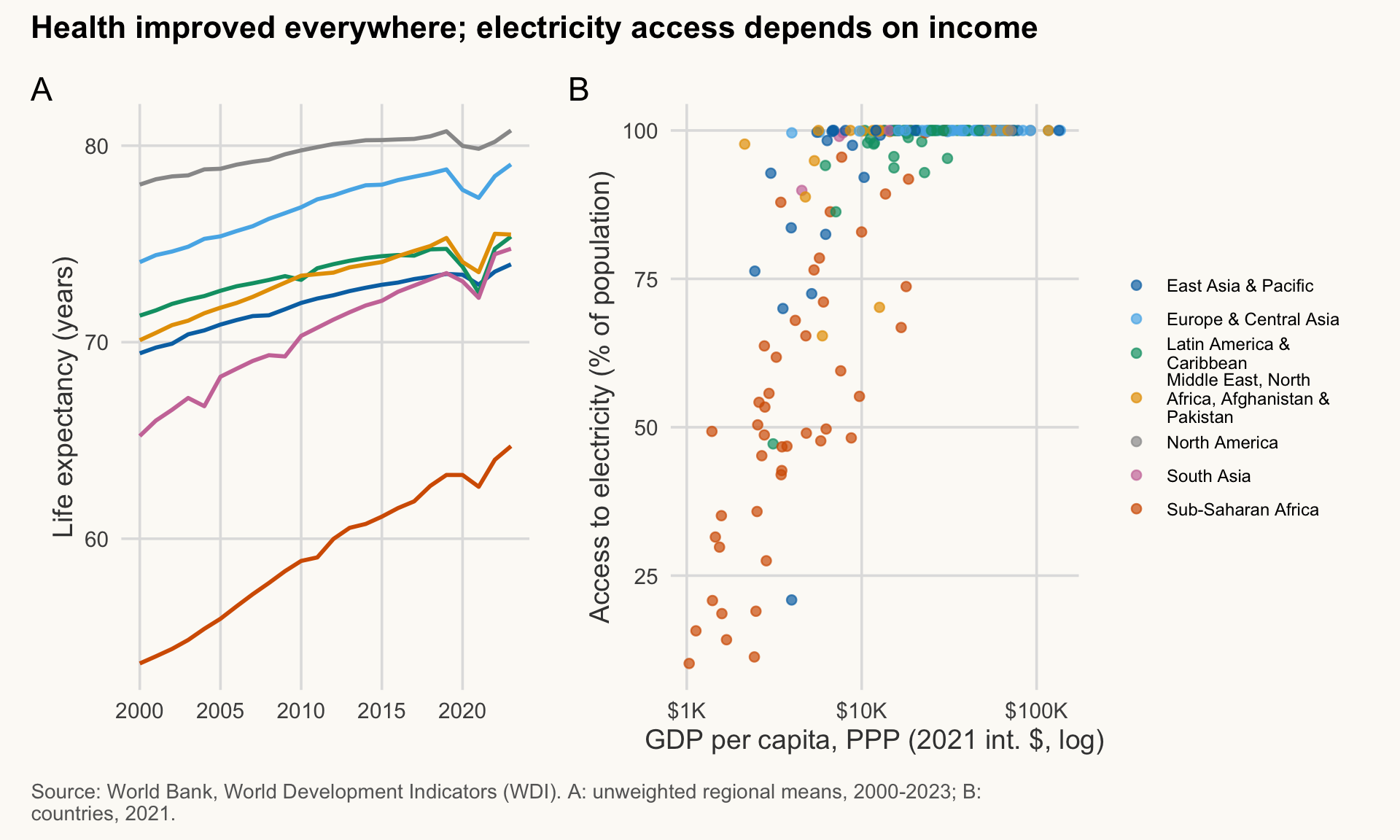
Exporting figures with ggsave()
≈ 5 min After this section you can export a figure from code at the exact size you need.
Never export by screenshot. ggsave() writes a file at an exact size and resolution, from code, so the figure is reproducible.
dir.create(here("output"), showWarnings = FALSE)

fig <- p_scatter + labs(title = "Life expectancy rises with income",
                        caption = "Source: World Bank, World Development Indicators (WDI), 2022.")

# Raster for Word / the web: PNG at 300 dpi
ggsave(here("output", "life_exp_income.png"), plot = fig,
       width = 16, height = 10, units = "cm", dpi = 300)

# Vector for LaTeX / print: PDF (scales without blur)
ggsave(here("output", "life_exp_income.pdf"), plot = fig,
       width = 16, height = 10, units = "cm")
Rules of thumb for sizes:
| Destination | Size | Format | Text size |
|---|---|---|---|
| Word / PDF note (portrait page) | 14–16 cm wide, 9–11 cm high | PNG 300 dpi or PDF |
base_size 11–12 |
| Slides (16:9) | 24–25 cm wide, 13–14 cm high | PNG 300 dpi |
base_size 16–20 |
WarningCommon mistake
Exporting at 25 cm and shrinking to 15 cm in Word: the text becomes unreadable. Rule: at final size, titles and axis titles at least 11 pt, and no text (tick labels, caption) below 8 pt. With theme_cours(base_size = 11) exported at the final size you get exactly that: title about 13 pt, axis titles 11 pt, tick labels about 9 pt. Export at the final size, then check the text.
Sizing is a design decision: if you export a chart at 25 cm and shrink it to 15 cm in Word, the text becomes unreadable. Export at the final printed size, with base_size set to match (theme_cours(base_size = 11)).
These chunks use eval: false: running them on this page would write files. Run them in your own project; the files appear in output/.
Interactivity with plotly
≈ 15 min, Exercise 6.4 included After this section you can make a chart interactive for the web, and know when not to.
ggplotly() converts a ggplot into an interactive HTML widget: hover, zoom, click on the legend to hide a group. It works in HTML pages and in the RStudio Viewer, not in Word or PDF.
The tooltip is controlled by an aesthetic that carries its text, here label. We build a label with the country name and values, map it with label = tip, then select it with tooltip = "label".
wdi_hover <- wdi_2022 |>
  mutate(
    tip = paste0(
      "<b>", country, "</b><br>",
      "GDP per capita: ", label_dollar()(round(gdp_pc_ppp)), "<br>",
      "Life expectancy: ", round(life_exp, 1), " years"
    )
  )

p_int <- ggplot(wdi_hover, aes(x = gdp_pc_ppp, y = life_exp,
                               colour = region, label = tip)) +
  geom_point(alpha = 0.7) +
  scale_colour_manual(values = pal_regions, name = NULL) +
  scale_x_log10(labels = label_dollar(scale_cut = cut_short_scale())) +
  labs(
    title = "Hover over a point to identify the country",
    x = "GDP per capita, PPP (2021 int. $, log scale)",
    y = "Life expectancy at birth (years)"
  )

ggplotly(p_int, tooltip = "label") |>
  layout(height = 520, legend = list(orientation = "h", x = 0, y = -0.25),
         margin = list(b = 140, t = 60), font = list(family = "IBM Plex Sans"),
         paper_bgcolor = "#fcfaf6", plot_bgcolor = "#fcfaf6")
Notes:
-
label = tipcarries the tooltip text (plotly accepts HTML tags such as<b>and<br>). Thetextaesthetic also works, but triggers a ggplot2 “unknown aesthetic” warning, so we uselabel. -
tooltip = "label"shows only that field, instead of the default x, y, colour. - The legend and title are rendered by plotly: the source caption is not carried over, so put the source in the surrounding text of the page.
Linked charts with crosstalk (Optional: going further, ≈ 10 min)
crosstalk connects widgets that share the same data. Below, a drop-down filters two charts at once, and selecting points in one highlights them in the other.
shared_wdi <- SharedData$new(wdi_hover, key = ~iso3c)

p_left <- plot_ly(shared_wdi, x = ~gdp_pc_ppp, y = ~life_exp,
                  color = ~region, colors = unname(pal_regions),
                  text = ~tip, hoverinfo = "text",
                  type = "scatter", mode = "markers") |>
  layout(xaxis = list(title = "GDP per capita, PPP (2021 int. $)", type = "log"),
         yaxis = list(title = "Life expectancy (years)"),
         showlegend = FALSE)

p_right <- plot_ly(shared_wdi, x = ~elec_access, y = ~life_exp,
                   color = ~region, colors = unname(pal_regions),
                   text = ~tip, hoverinfo = "text",
                   type = "scatter", mode = "markers") |>
  layout(xaxis = list(title = "Access to electricity (% of population)"),
         yaxis = list(title = "Life expectancy (years)"),
         showlegend = FALSE)

bscols(
  widths = c(12, 6, 6),
  filter_select("region", "Region", shared_wdi, ~region),
  p_left, p_right
)SharedData$new() wraps the data; key identifies each country across charts; filter_select() creates the drop-down; bscols() lays out the pieces in a 12-column grid. (Use the box-select tool in the plotly toolbar to select several countries: they stay highlighted in the other chart.)
WarningCommon mistake
Interactive does not mean better. Interactive charts are a complement, not a replacement. A policy note is read on paper or in Word: it needs a good static figure. Use interactivity for exploration and for web dashboards.
NoteWhy it matters for development economics
Policy audiences read paper notes, but analysts exploring 200 countries need to ask “which dot is that?”. Use hover to explore, then publish a static figure that makes the point.
TipExercise 6.4
Turn the faceted chart of life expectancy against GDP per capita (section “Faceting”, facet_wrap(~ region)) into an interactive one with plotly. The tooltip must show the country name, GDP per capita and life expectancy.
NoteShow solution
p_facet_int <- ggplot(wdi_hover, aes(x = gdp_pc_ppp, y = life_exp,
                                     colour = region, label = tip)) +
  geom_point(alpha = 0.7, show.legend = FALSE) +
  scale_colour_manual(values = pal_regions) +
  scale_x_log10(breaks = c(1e3, 1e4, 1e5),
                labels = label_dollar(scale_cut = cut_short_scale())) +
  facet_wrap(~ region, ncol = 3, labeller = label_wrap_gen(20)) +
  labs(x = "GDP per capita, PPP (2021 int. $, log scale)",
       y = "Life expectancy (years)")

ggplotly(p_facet_int, tooltip = "label")
Shiny: an app is a function of its inputs (Optional: going further, ≈ 15 min)
After this section you can read a Shiny app and say what each part does.
Shiny builds web applications in R. An app has two parts: a ui (what the user sees: menus, sliders, plot area) and a server (R code that recomputes outputs when an input changes).
flowchart LR
  A[User moves a control] --> B[input$year, input$region]
  B --> C[server recomputes]
  C --> D[output$scatter redraws]
  D --> A
ImportantKey idea
A Shiny app needs a running R process behind it. It cannot run on this page, which is static HTML. The chunk below is displayed but not executed: copy it to try it on your computer.
To run it locally: install Shiny (install.packages("shiny"), once, in the Console: Shiny is not installed with the tidyverse), save the code below as a file named app.R at the root of your project (next to the folder data/), open app.R in RStudio and click Run App.
library(shiny)
library(tidyverse)
library(here)

wdi <- read_csv(here("data", "wdi_panel.csv"), show_col_types = FALSE)

num_vars <- c(
  "GDP per capita (PPP)"         = "gdp_pc_ppp",
  "Life expectancy (years)"      = "life_exp",
  "Gini index"                   = "gini",
  "Access to electricity (%)"    = "elec_access"
)

ui <- fluidPage(
  titlePanel("WDI explorer"),
  sidebarLayout(
    sidebarPanel(
      selectInput("xvar", "X-axis", choices = num_vars, selected = "gdp_pc_ppp"),
      selectInput("yvar", "Y-axis", choices = num_vars, selected = "life_exp"),
      selectInput("region", "Region",
                  choices = c("All", sort(unique(wdi$region)))),
      sliderInput("year", "Year", min = 2000, max = 2023, value = 2022,
                  step = 1, sep = "")
    ),
    mainPanel(plotOutput("scatter"))
  )
)

server <- function(input, output) {

  # Reactive: recomputed only when region or year changes
  wdi_sel <- reactive({
    wdi |>
      filter(year == input$year,
             input$region == "All" | region == input$region)
  })

  output$scatter <- renderPlot({
    # .data[[ ]] reads a column whose NAME is stored in a string
    # (this replaces the deprecated aes_string())
    ggplot(wdi_sel(), aes(x = .data[[input$xvar]], y = .data[[input$yvar]])) +
      geom_point(colour = "#1f4e79", alpha = 0.7, na.rm = TRUE) +
      labs(
        title = paste(names(num_vars)[num_vars == input$yvar], "vs",
                      names(num_vars)[num_vars == input$xvar]),
        x = names(num_vars)[num_vars == input$xvar],
        y = names(num_vars)[num_vars == input$yvar],
        caption = "Source: World Bank, WDI."
      ) +
      theme_minimal(base_size = 14)
  })
}

shinyApp(ui = ui, server = server)
What to read in this code:
-
selectInput(),sliderInput()create the controls; their values arrive ininput$xvar,input$year, etc. -
reactive()defines a data frame that is recomputed only when the inputs it uses change; you call it like a function:wdi_sel(). -
renderPlot()redraws when an input changes;plotOutput("scatter")in the UI displays it. -
aes(x = .data[[input$xvar]])is the modern way to map a column chosen by name.
Shiny apps are deployed on a server (shinyapps.io, Posit Connect) to be shared: out of scope here.
Reproducible reports with Quarto
Why a literate document?
≈ 25 min After this section you can write a report that regenerates its own numbers and figures.
Without it, the workflow is: run a script, copy a figure into Word, retype the numbers. When the data or the code changes, you redo everything by hand, and a stale number slips through. In a literate document, text, code, figures and numbers live in the same file: you render it, and everything is regenerated from the data. The report is its own audit trail.
Quarto (.qmd) combines three things:
- a YAML header (title, author, output format);
- text in Markdown;
- code chunks and inline code, run at render time.
This course website is itself built with Quarto.
flowchart LR
  A[".qmd file"] --> B["knitr runs the R code"]
  B --> C["Markdown with results"]
  C --> D["pandoc converts"]
  D --> E["HTML, PDF or Word"]
ImportantKey idea
Rendering re-runs all the code. Numbers in the text come from the data, so the report cannot disagree with the analysis.
Anatomy of a .qmd file
YAML header: the block between two --- lines at the top. It holds the title, author, date and output formats.
Text: ordinary Markdown (## headings, bold, lists). Inline code (see below) inserts a computed value.
Code chunk: R code between ```{r} fences, with options such as #| fig-cap:. Output (tables, figures) appears right below.
A minimal report
Create a new file with File > New File > Quarto Document, save it as report.qmd in your project, and paste the template below. The markdown fence below only shows the file, it is not run.
---
title: "Life expectancy and income: a note"
author: "Your name"
date: today
format:
  html: default
  docx: default
execute:
  echo: false
  warning: false
---

```{r}
#| label: setup
library(tidyverse)
library(here)

wdi <- read_csv(here("data", "wdi_panel.csv"), show_col_types = FALSE)
# CAF life expectancy is unreliable in this WDI release (14.7 in 2009, 18.8 in 2022): exclude every year
wdi <- wdi |> mutate(life_exp = if_else(iso3c == "CAF", NA_real_, life_exp))
wdi_2022 <- wdi |> filter(year == 2022) |> drop_na(gdp_pc_ppp, life_exp)
```

## Main result

In 2022, the average life expectancy across 198 countries was
73.1 years. Figure @fig-income shows its
relationship with income.

```{r}
#| label: fig-income
#| fig-cap: "Life expectancy rises with income (log scale). Source: World Bank, WDI (2022)."
#| fig-width: 7
#| fig-height: 4.5
ggplot(wdi_2022, aes(x = gdp_pc_ppp, y = life_exp)) +
  geom_point(alpha = 0.6) +
  scale_x_log10() +
  labs(x = "GDP per capita, PPP (log scale)", y = "Life expectancy (years)")
```
Points to notice:
-
format:lists the outputs:html(web) anddocx(Word).pdfalso works if LaTeX is installed (tinytex::install_tinytex()). -
198is inline code: R computes the value when rendering, so the text can never disagree with the data. -
#| fig-cap:gives the caption;#| label: fig-...lets you refer to it with@fig-income. -
execute: echo: falsehides the code in the output, as in a note for a non-technical reader. Keepecho: truefor a methods appendix. - Use
here()for paths, as in the rest of the course; the report is rendered from the project folder.
Render
- In RStudio: click Render. The output file appears next to the
.qmd. - From the Console or terminal:
quarto render report.qmd(all formats), orquarto render report.qmd --to docx.
WarningCommon mistake
Rendering from the wrong folder, so here() or relative paths fail. Fix: keep report.qmd inside the project (next to data/) and render from there.
TipExercise 6.5
Create report.qmd from the template above. Render it to HTML and to Word. Then change the year to 2010, render again, and check that the number of countries and the mean life expectancy in the text changed by themselves.
Capstone: the figure for the “note au ministre”
≈ 45 min After this section you can produce a policy-ready figure and check it against a six-point list.
The French dataviz workshop (Atelier dataviz) prepares a policy brief to a minister (“note au ministre”). Your task here is to produce its key figure.
TipExercise 6.6 (capstone)
Choose one indicator and one comparison that matter for a development topic of your choice (countries, regions or income groups; one year, or change over time). Draw one figure that passes this checklist (from the workshop):
Save it with ggsave() at a size suited to a Word note (16 × 10 cm, 300 dpi). Write two sentences below it: what the reader should retain, and one limit.
NoteShow solution (one possible answer)
Topic: energy access in Sub-Saharan Africa. Indicator: access to electricity. Comparison: 2000 versus 2022, for the 12 countries with the lowest access today.
elec_ssa <- wdi |>
  filter(region == "Sub-Saharan Africa", year %in% c(2000, 2022)) |>
  select(country, year, elec_access) |>
  pivot_wider(names_from = year, values_from = elec_access,
              names_prefix = "y") |>
  drop_na(y2000, y2022)

lowest12 <- elec_ssa |>
  slice_min(y2022, n = 12, with_ties = FALSE) |>
  mutate(country = fct_reorder(country, y2022),
         gain = y2022 - y2000)

mean_gain <- round(mean(lowest12$gain))

fig_note <- ggplot(lowest12, aes(y = country)) +
  geom_segment(aes(x = y2000, xend = y2022, yend = country),
               colour = pal_cours[["gris"]], linewidth = 1.2) +
  geom_point(aes(x = y2000, colour = "2000"), size = 3) +
  geom_point(aes(x = y2022, colour = "2022"), size = 3) +
  scale_colour_manual(
    values = c("2000" = pal_cours[["gris"]], "2022" = pal_cours[["accent"]]),
    name = NULL
  ) +
  scale_x_continuous(limits = c(0, 100), labels = label_percent(scale = 1)) +
  labs(
    title = str_wrap(paste0("Where access is lowest, coverage still grew by ",
                            mean_gain, " points on average since 2000"), 60),
    subtitle = str_wrap("Population with access to electricity, the 12 Sub-Saharan countries with the lowest access in 2022", 75),
    x = "Population with access to electricity (%)", y = NULL,
    caption = str_wrap(paste("Source: World Bank, World Development Indicators (WDI), 2000 and 2022.",
                             "Countries with data in both years; no population weighting."), 90)
  )

fig_note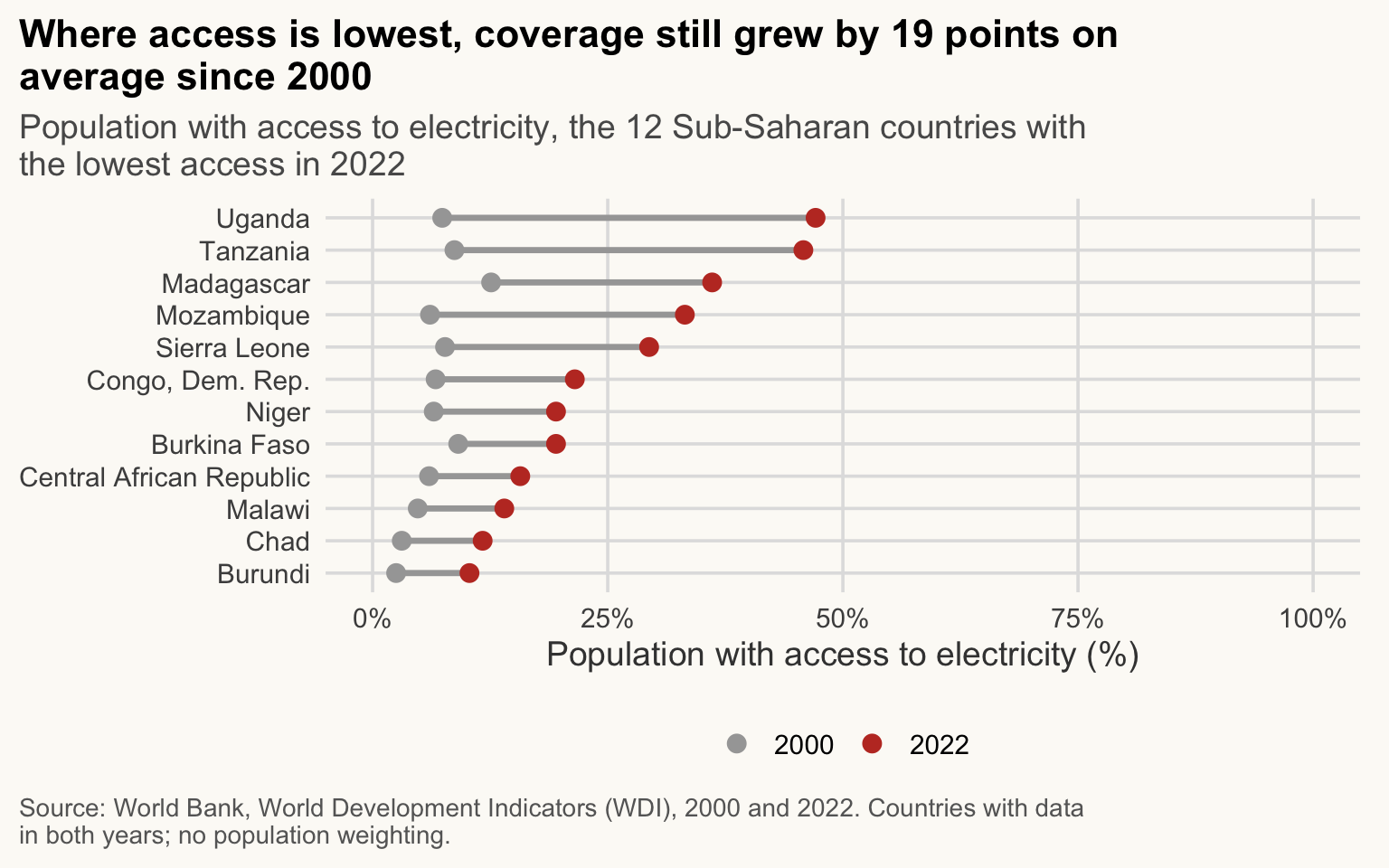
NoteHow to read this chart
- Each row is a country; the grey dot is 2000 and the red dot is 2022.
- The segment length is the gain in points: longer means faster progress.
- Countries are ordered by 2022 coverage, so the bottom of the chart is where access is lowest.
dir.create(here("output"), showWarnings = FALSE)
ggsave(here("output", "note_ministre_electricity.png"), plot = fig_note,
       width = 16, height = 11, units = "cm", dpi = 300)
What the reader retains: access has risen in all twelve countries, but in several it remains far below universal coverage. Limit: national averages hide the urban-rural gap, and the selection (lowest 12 in 2022) is defined on the end year, so it says nothing about the fastest improvers.
Checklist: message title (1); one indicator and one comparison (2); units in % (3); source and years (4); colour only for the focus year, ordered countries (5); selection rule and missing weighting stated (6).
Conclusion
NoteWhy it matters for development economics
A finding that the minister cannot read changes nothing. The figure is the last step of the analysis, and often the only one a decision-maker sees.
You started this course not knowing what a console is. You can now import and clean development data, join it correctly, describe and model it with honesty about limits, map and plot it, and wrap the whole thing in a report that regenerates from the code. The habits matter more than the functions: code in scripts, relative paths, one theme, numbers computed not typed, and a title that states the finding.
Going further
- Books (free online): R for Data Science (2nd ed., Wickham, Çetinkaya-Rundel, Grolemund) at r4ds.hadley.nz; ggplot2: Elegant Graphics for Data Analysis at ggplot2-book.org; Quarto documentation at quarto.org.
-
Next topics: panel regressions with
fixest, difference-in-differences, and text analysis. - Practice: pick a question, find the data, and write a two-page note in Quarto. That is how you really learn.
Links to other books, communities and tools are collected in the Resources page.
Key takeaways
-
facet_wrap()andfacet_grid()make small multiples; keep scales fixed unless you only compare shapes. -
theme()changes non-data elements withelement_text/line/rect/blank; a complete theme goes before your tweaks, andtheme_set()sets the default once. - A message needs annotations: a title that states the finding, reference lines and short labels.
- With patchwork,
|and/assemble plots,plot_layout(guides = "collect")merges legends,plot_annotation(tag_levels = "A")tags panels. - Export with
ggsave()at the final printed size: PNG 300 dpi for Word and slides, PDF for LaTeX. - plotly (hover, with a
labeltooltip) and, optionally, crosstalk (linked filters) work in HTML only; Shiny (optional) needs a running R session, so it cannot run on a static page. - A Quarto report regenerates text, figures and inline numbers from the data: that is reproducibility in practice.
This is the last session. Go back to any earlier one from the Sessions menu, and try the dataviz workshop to practise the capstone.