Sys.setenv(LANGUAGE = "en")   # R messages in English

library(tidyverse)
library(scales)
library(ggrepel)
library(sf)
library(rnaturalearth)
library(here)

source(here("R", "theme_cours.R"))   # theme_cours(), pal_cours, pal_regions

wdi <- read_csv(here("data", "wdi_panel.csv"), show_col_types = FALSE)

# One row per country for one year: the cross-section used below
wdi_2022 <- wdi |>
filter(year == 2022)Session 5: Visualising with ggplot2 (and maps)
From the grammar of graphics to a choropleth of the world, with the World Bank data
Session objectives
- Read any ggplot as a stack of layers: data, aesthetics, geoms, scales, labels, theme.
- Build the classic “Gapminder” scatter: life expectancy against income, with log scales and readable labels.
- Choose the right chart: line (change over time), bar (comparison), histogram and boxplot (distribution).
- Apply the “signal vs context” principle: highlight one series, grey out the others.
- Draw a world map with
sf, join it safely to the WDI data, and check what did not match. - Save a figure with explicit size and resolution.
Prepare your R session
Packages used today: tidyverse, scales, ggrepel, sf, rnaturalearth, rnaturalearthdata, here. Install any that are missing with install.packages().
Script of this session: download seance-5.R, all the code of this page in one file.
Everything in this session uses the full panel (wdi, about 217 countries, 2000-2023). When a chart needs one point per country, we take one year, 2022 (wdi_2022). This matters: a common mistake is to draw a histogram on pooled years (for instance 63 values from three countries). A chart is only as good as the question its data answer.
Why 2022? It is the latest year with good coverage for the variables we use (2023 has many more missing values). Session 4 used 2019, the last pre-COVID year, because it studied a relationship, not the present.
Pacing. The core path takes about 180 minutes, exercises included. Parts marked Optional: going further (the annotation part of Exercise 5.5, and Exercise 5.6) add about 20 minutes: do them if time allows, or at home.
Check extremes before plotting (≈ 5 min)
Before drawing anything, look at the extremes: one absurd value stretches an axis and hides everything else.
wdi_2022 |>
  drop_na(life_exp) |>
  slice_min(life_exp, n = 3) |>
  select(country, iso3c, life_exp)
# A tibble: 3 × 3
country iso3c life_exp
<chr> <chr> <dbl>
1 Central African Republic CAF 18.8
2 Somalia, Fed. Rep. SOM 53.9
3 Nigeria NGA 54.1The Central African Republic shows a life expectancy of 18.8 years in 2022. The next lowest country is at about 54. This value is implausible: it is a data artefact, not a finding. As Session 4 showed, it is not a one-year glitch: the whole CAF life-expectancy series is unreliable in this WDI release (it also reads 14.7 years in 2009). We never edit the raw file; we exclude the series explicitly, for every year, and say so, with the same line as in Session 4. Setting only life_exp to NA keeps the country’s other variables (for example electricity access, used in the map below).
# CAF life expectancy is unreliable in this WDI release (14.7 in 2009, 18.8 in 2022): exclude every year
wdi <- wdi |> mutate(life_exp = if_else(iso3c == "CAF", NA_real_, life_exp))

wdi_2022 <- filter(wdi, year == 2022)
The grammar of graphics
≈ 25 min After this section you can read any ggplot as a stack of layers and build one step by step.
A ggplot is not a “chart type”. It is a recipe with independent ingredients, added with +:
| Ingredient | Question it answers | Typical code |
|---|---|---|
| data | Which table? | ggplot(data = wdi_2022) |
| aesthetics | Which variable goes to which visual channel (x, y, colour, size)? | aes(x = gdp_pc_ppp, y = life_exp) |
| geom | Which shape draws the data? | geom_point() |
| scales | How is a value translated into a position / colour / size? |
scale_x_log10(), scale_colour_manual()
|
| labs | What does the reader see in words? | labs(title = , x = , y = , caption = ) |
| theme | How does everything non-data look? | theme_cours() |
Aesthetic: a visual channel (x, y, colour, fill, size, shape) that you link to a variable inside aes(). Geom: the shape that draws the data (point, line, bar…). Scale: the rule that translates a data value into a position or a colour. Facet: a small multiple, the same chart repeated for each group.
flowchart LR
  A[data] --> B[aes]
  B --> C[geom]
  C --> D[scales]
  D --> E[labs]
  E --> F[theme]
The rule to remember: aesthetics map variables, arguments set constants. aes(colour = region) colours by the data; colour = "red" outside aes() paints everything red.
ImportantKey idea
A ggplot is built by adding layers with +. You never ask for “a scatter plot”: you give data, say which variables go where, and choose a shape. Everything else (scales, labels, theme) refines the result.
Let us build one plot, one ingredient at a time. Steps 1 to 4 are shown side by side so you can see what each + adds; step 5 is the finished figure.
wdi_2022_ok <- wdi_2022 |>
  drop_na(gdp_pc_ppp, life_exp)        # a point needs both coordinates

ggplot(wdi_2022_ok, aes(x = gdp_pc_ppp, y = life_exp))
ggplot(wdi_2022_ok, aes(x = gdp_pc_ppp, y = life_exp)) +
  geom_point()
ggplot(wdi_2022_ok, aes(x = gdp_pc_ppp, y = life_exp)) +
  geom_point() +
  scale_x_log10(labels = label_dollar(scale_cut = cut_short_scale()))
ggplot(wdi_2022_ok, aes(x = gdp_pc_ppp, y = life_exp, colour = region)) +
  geom_point(alpha = 0.8) +
  scale_x_log10(labels = label_dollar(scale_cut = cut_short_scale())) +
  scale_colour_manual(values = pal_regions, guide = "none")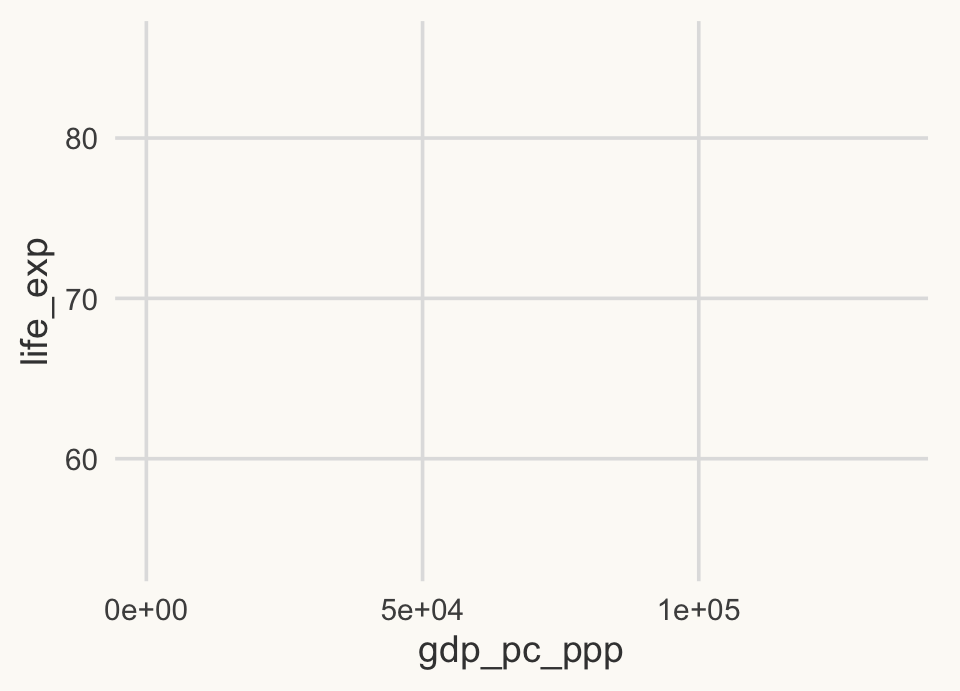
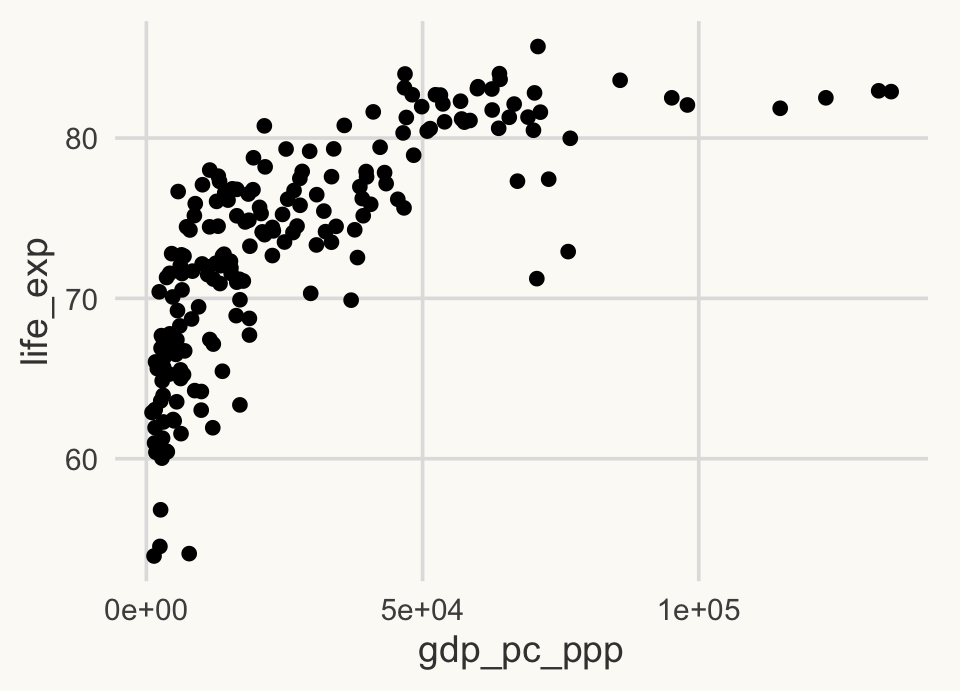
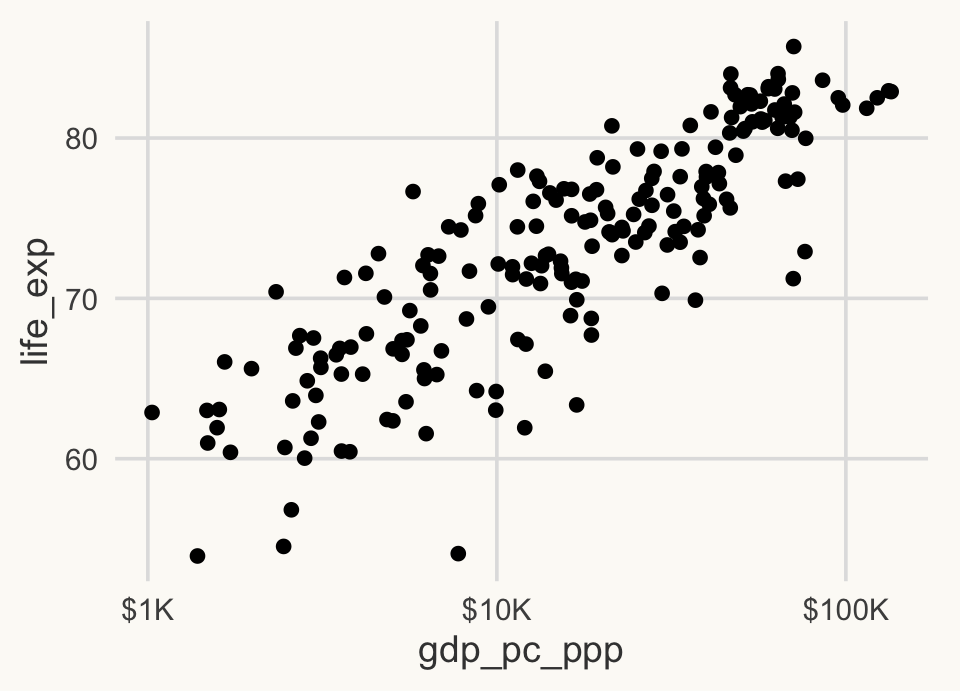
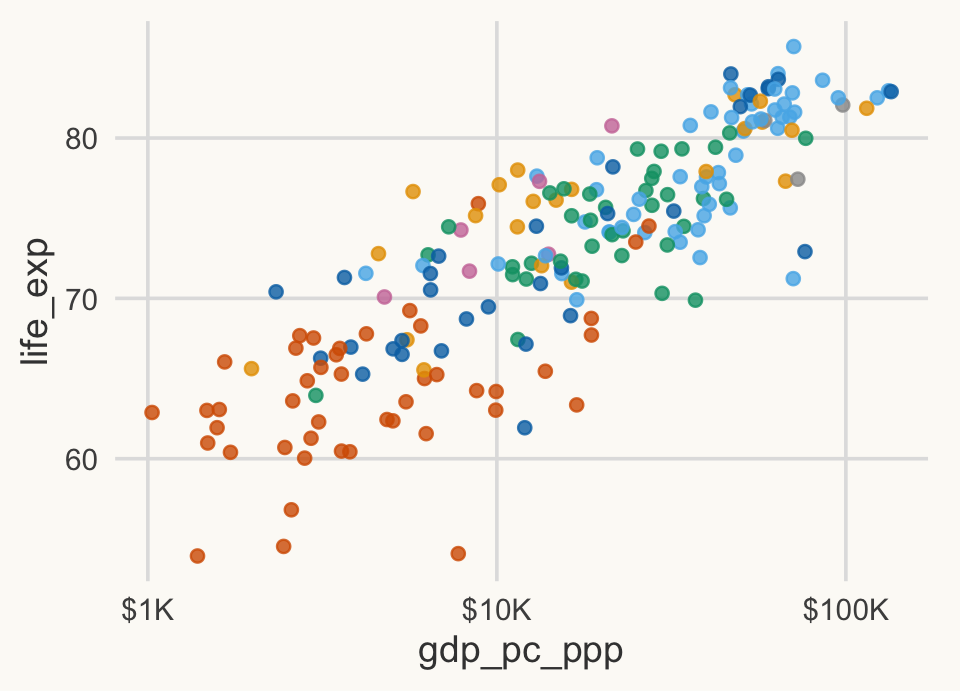
In step 2 most countries are squeezed on the left: income is very skewed, so a log scale (step 3) spreads them out. In step 4 the legend is hidden only to keep the small panel readable; step 5 brings it back.
Step 5. Labels and theme: the message in the title, units on the axes, the source.
ggplot(wdi_2022_ok, aes(x = gdp_pc_ppp, y = life_exp, colour = region)) +
  geom_point(alpha = 0.8) +
  scale_x_log10(labels = label_dollar(scale_cut = cut_short_scale())) +
  scale_colour_manual(values = pal_regions) +
  guides(colour = guide_legend(nrow = 4, title.position = "top")) +
  labs(
    title = str_wrap("Richer countries live longer, but gains flatten at the top", 60),
    x = "GDP per capita, PPP (constant 2021 international $, log scale)",
    y = "Life expectancy at birth (years)",
    colour = "Region",
    caption = "Source: World Bank, World Development Indicators (WDI), 2022."
  ) +
  theme_cours(base_size = 11)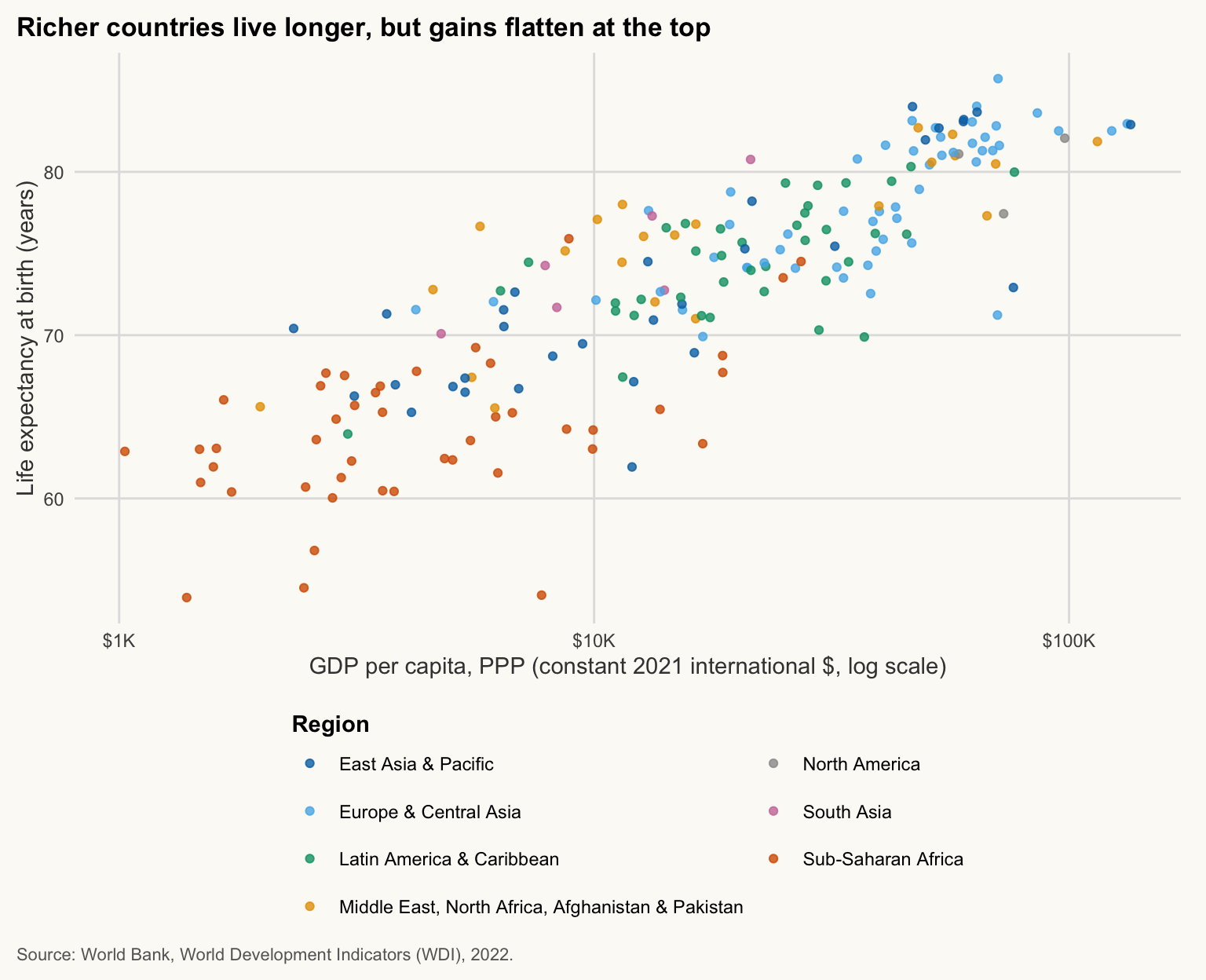
NoteWhy
theme_cours() already applies
R/theme_cours.R calls theme_set(theme_cours()), so every plot uses the course theme by default. Writing + theme_cours(base_size = 11) is only needed to change an argument (here, smaller text for small figures).
WarningCommon mistake
Writing aes(colour = "red") instead of colour = "red". Inside aes(), "red" is treated as a variable with one value, so ggplot invents a legend and picks its own colour (salmon, not red). Fixed colour: outside aes(). Colour by data: inside aes().
NoteIn plain words
Think of a ggplot as a sandwich: the data is the bread, each + adds a filling. You can add or remove one filling without rebuilding the rest.
The Gapminder scatter
≈ 25 min After this section you can combine four variables on one chart and label a few points without clutter.
This is the figure that made Hans Rosling famous: income, health, population and region on one plot. We add a fourth variable (population, as point size) and label a few countries with ggrepel, which moves labels so they do not overlap.
focus <- c("China", "India", "Nigeria", "United States")

ggplot(wdi_2022_ok, aes(x = gdp_pc_ppp, y = life_exp)) +
  geom_point(aes(size = population, colour = region), alpha = 0.7) +
  geom_text_repel(
    data = filter(wdi_2022_ok, country %in% focus),
    aes(label = country),
    min.segment.length = 0, box.padding = 1, point.padding = 0.5, seed = 1, size = 4.2,
    bg.color = "white", bg.r = 0.15
  ) +
  scale_x_log10(labels = label_dollar(scale_cut = cut_short_scale())) +
  scale_size_area(max_size = 14, breaks = c(1e7, 1e8, 1e9),
                  labels = c("10 M", "100 M", "1 B")) +
  scale_colour_manual(values = pal_regions) +
  guides(colour = guide_legend(nrow = 3, title.position = "top", order = 1,
                               override.aes = list(size = 4)),
         size = guide_legend(title.position = "top", order = 2)) +
  theme(legend.position = "bottom", legend.box = "vertical",
        legend.box.just = "left", legend.spacing.y = unit(2, "pt")) +
  labs(
    title = str_wrap("Income and life expectancy rise together, but similar incomes can hide a 20-year gap", 60),
    x = "GDP per capita, PPP (constant 2021 international $, log scale)",
    y = "Life expectancy at birth (years)",
    colour = "Region", size = "Population",
    caption = str_wrap("Source: World Bank, World Development Indicators (WDI), 2022. One point per country; countries with missing data are dropped.", 95)
  )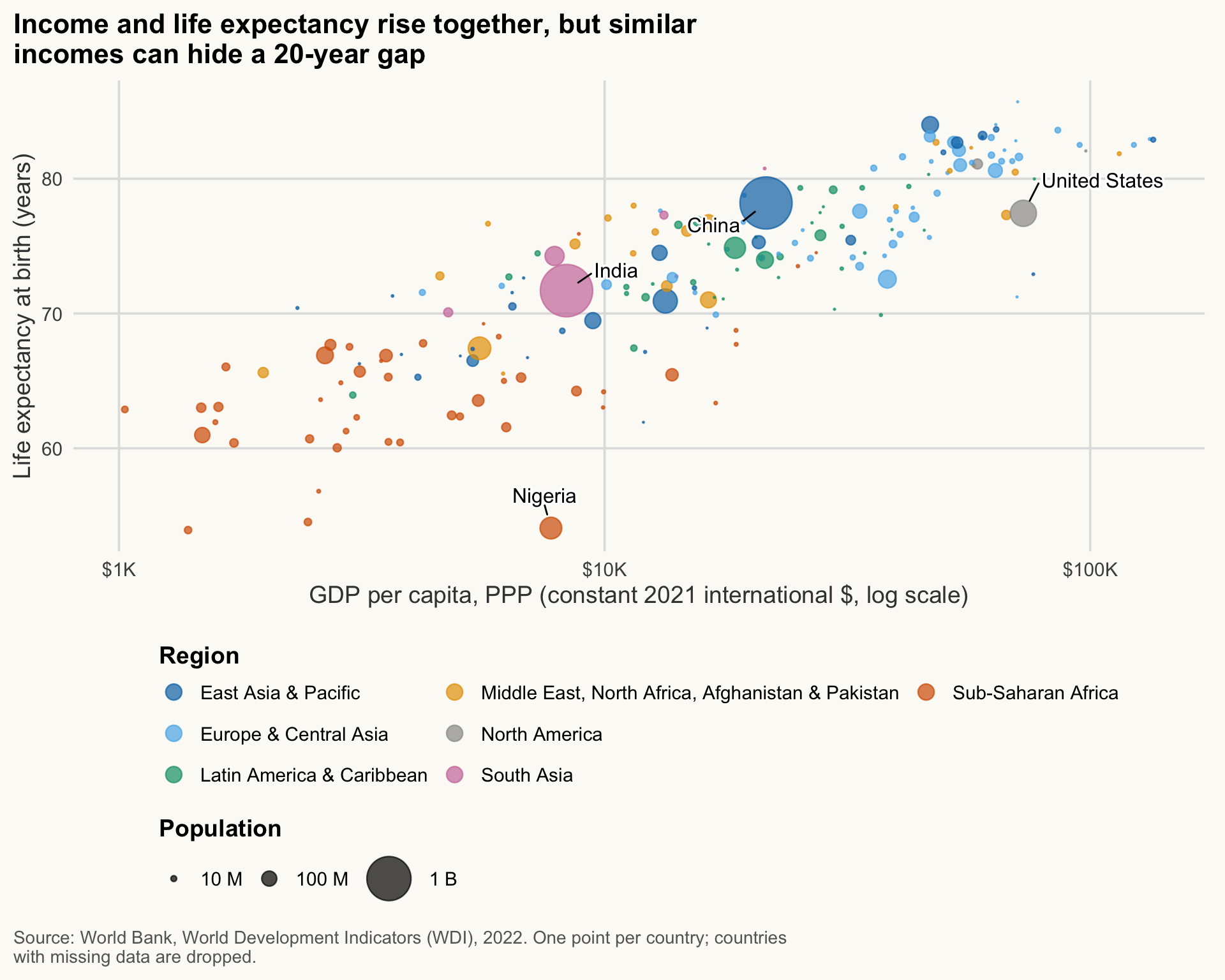
NoteHow to read this chart
- Each bubble is a country. Higher means longer life, further right means richer, bigger means more people.
- The cloud rises fast on the left and flattens on the right: an extra $10,000 matters a lot at $2,000, little at $40,000.
- At the same income, countries can differ by about 20 years: income is far from the whole story.
Reading tips:
- The x axis is logarithmic: equal distances mean equal percentage differences in income. A move from $2,000 to $4,000 counts as much as from $20,000 to $40,000.
-
scale_size_area()makes the area proportional to population. The defaultscale_size()is also area-based but does not start at zero, which exaggerates small countries. -
geom_text_repel(data = ...)takes its own data: only the four focus countries are labelled, the rest of the plot is unchanged. This is how you label a few points without clutter. - A scale is the rule from value to visual channel;
scale_size_area()is the scale of thesizeaesthetic,scale_x_log10()that ofx. - This is a cross-section, not a causal result: richer countries differ in many other ways (institutions, climate, disease burden). The curve describes, it does not say that money causes longevity.
WarningCommon mistake
Colour vs fill. colour paints outlines and points; fill paints areas (bars, boxes, polygons). Using colour = region on geom_col() gives coloured outlines and grey bars: switch to fill. For geom_point() the default shape has no inside, so colour is the right one.
TipExercise 5.1
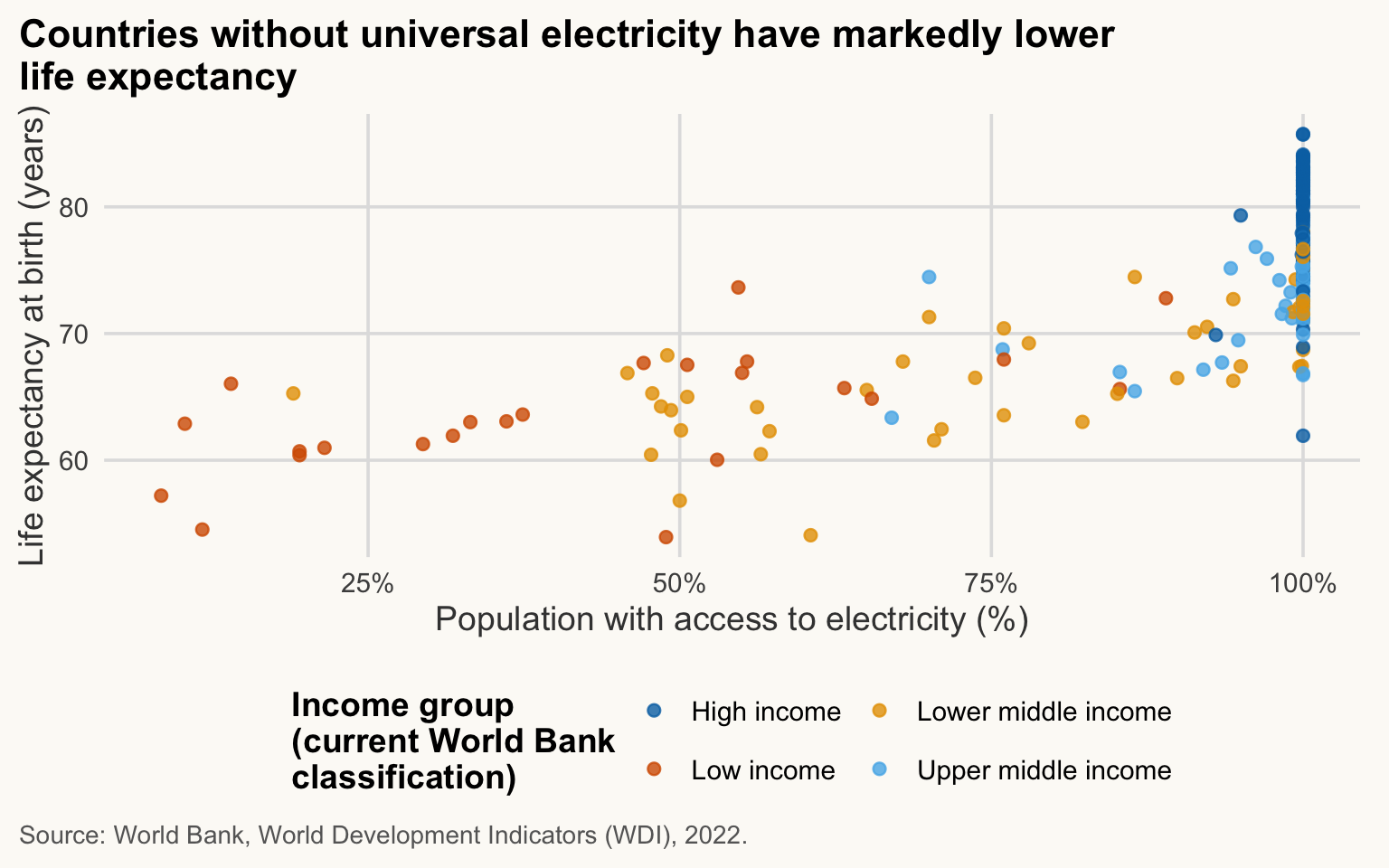
Using wdi_2022_ok, draw a scatter of life expectancy (y) against electricity access (x, % of population), coloured by income group. Drop missing values first, give it a message title and labelled axes.
NoteShow solution
wdi_2022 |>
  drop_na(elec_access, life_exp, income) |>
  ggplot(aes(x = elec_access, y = life_exp, colour = income)) +
  geom_point(alpha = 0.8, size = 2) +
  scale_x_continuous(labels = label_number(suffix = "%")) +
  scale_colour_manual(values = c("Low income" = "#D55E00", "Lower middle income" = "#E69F00",
                                 "Upper middle income" = "#56B4E9", "High income" = "#0072B2")) +
  guides(colour = guide_legend(nrow = 2)) +
  labs(
    title = str_wrap("Countries without universal electricity have markedly lower life expectancy", 60),
    x = "Population with access to electricity (%)",
    y = "Life expectancy at birth (years)",
    colour = str_wrap("Income group (current World Bank classification)", 25),
    caption = str_wrap("Source: World Bank, World Development Indicators (WDI), 2022.", 95)
  )
Lines: change over time
≈ 25 min After this section you can draw a time series that highlights one country and labels lines directly.
Before choosing a geom, ask which question you are answering:
ImportantKey idea: which chart for which question?
| Your question | Chart | Geom |
|---|---|---|
| Compare groups or countries | bars |
geom_col(), geom_bar()
|
| How is one variable spread? | histogram, density, boxplot |
geom_histogram(), geom_density(), geom_boxplot()
|
| Are two variables related? | scatter plot | geom_point() |
| How does it evolve over time? | line | geom_line() |
| Where is it? | map | geom_sf() |
A line connects observations in a meaningful order (here, years) for the same unit (here, a country). You must tell ggplot which points belong together with group (or with colour, which groups implicitly).
The dataviz principle of the workshop: signal versus context. If everything is coloured, nothing stands out. Draw the context in grey first, then the signal on top, in colour.
compare <- c("India", "China", "Nigeria", "Brazil", "United States", "Germany", "Japan", "Bangladesh")
highlight <- "India"

life_lines <- wdi |>
  filter(country %in% compare) |>
  drop_na(life_exp)

ggplot(life_lines, aes(x = year, y = life_exp, group = country)) +
  geom_line(data = filter(life_lines, country != highlight),
            colour = pal_cours[["gris"]], linewidth = 0.8) +
  geom_line(data = filter(life_lines, country == highlight),
            colour = pal_cours[["accent"]], linewidth = 1.6) +
  geom_text_repel(data = filter(life_lines, year == max(year)),
                  aes(label = country, colour = country == highlight),
                  hjust = 0, direction = "y", xlim = c(2023.4, NA), size = 4,
                  segment.color = NA, show.legend = FALSE, seed = 1) +
  scale_colour_manual(values = c(`TRUE` = pal_cours[["accent"]], `FALSE` = "grey40")) +
  scale_x_continuous(breaks = seq(2000, 2020, 5), expand = expansion(mult = c(0.02, 0.02))) +
  coord_cartesian(xlim = c(2000, 2027), clip = "off") +
  labs(
    title = str_wrap("India gained nine years of life expectancy since 2000; of these eight countries, only Bangladesh gained more", 60),
    x = "Year",
    y = "Life expectancy at birth (years)",
    caption = str_wrap("Source: World Bank, World Development Indicators (WDI), 2000-2023. India in red; seven comparison countries in grey.", 95)
  )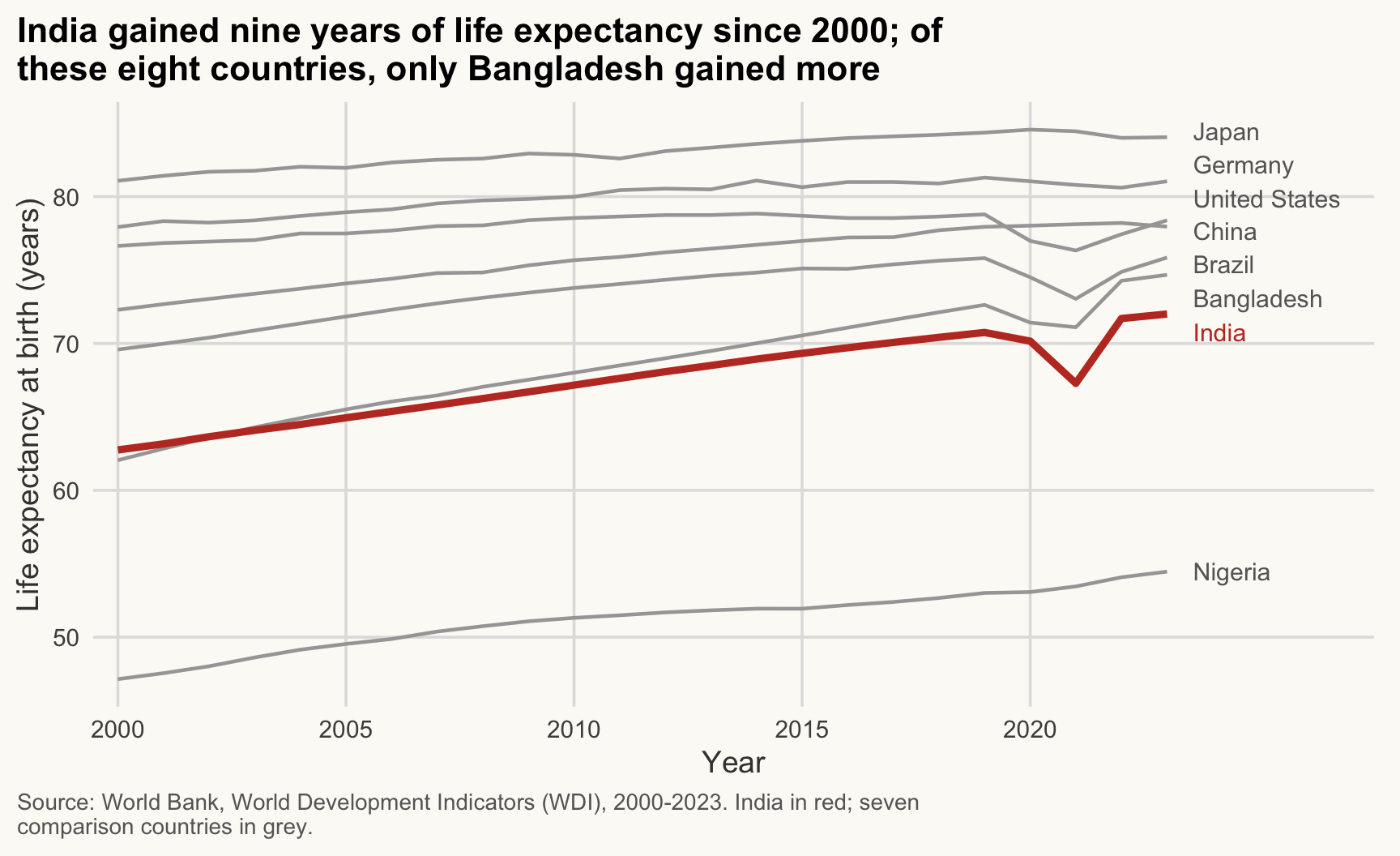
NoteHow to read this chart
- The red line is the signal (India); the grey lines are context. Compare the slopes, not only the endpoints.
- Lines that rise steadily mean steady gains; the small dip around 2020-2021 is a shock shared by several countries.
- Names at the right end replace the legend: follow a line to its label.
Points to notice:
- Two
geom_line()layers, each with its owndata: grey context first, red signal on top. - Labels sit at the end of the lines (
year == max(year)), so no legend is needed. Direct labelling is faster to read than a legend. -
coord_cartesian(xlim = ...)leaves room on the right for the labels, andgeom_text_repel(direction = "y")pushes them apart vertically so they do not overlap. - The 2020-2021 dip is visible for several countries: COVID-19 excess mortality.
- In current ggplot2 the line width argument is
linewidth =(notsize =).
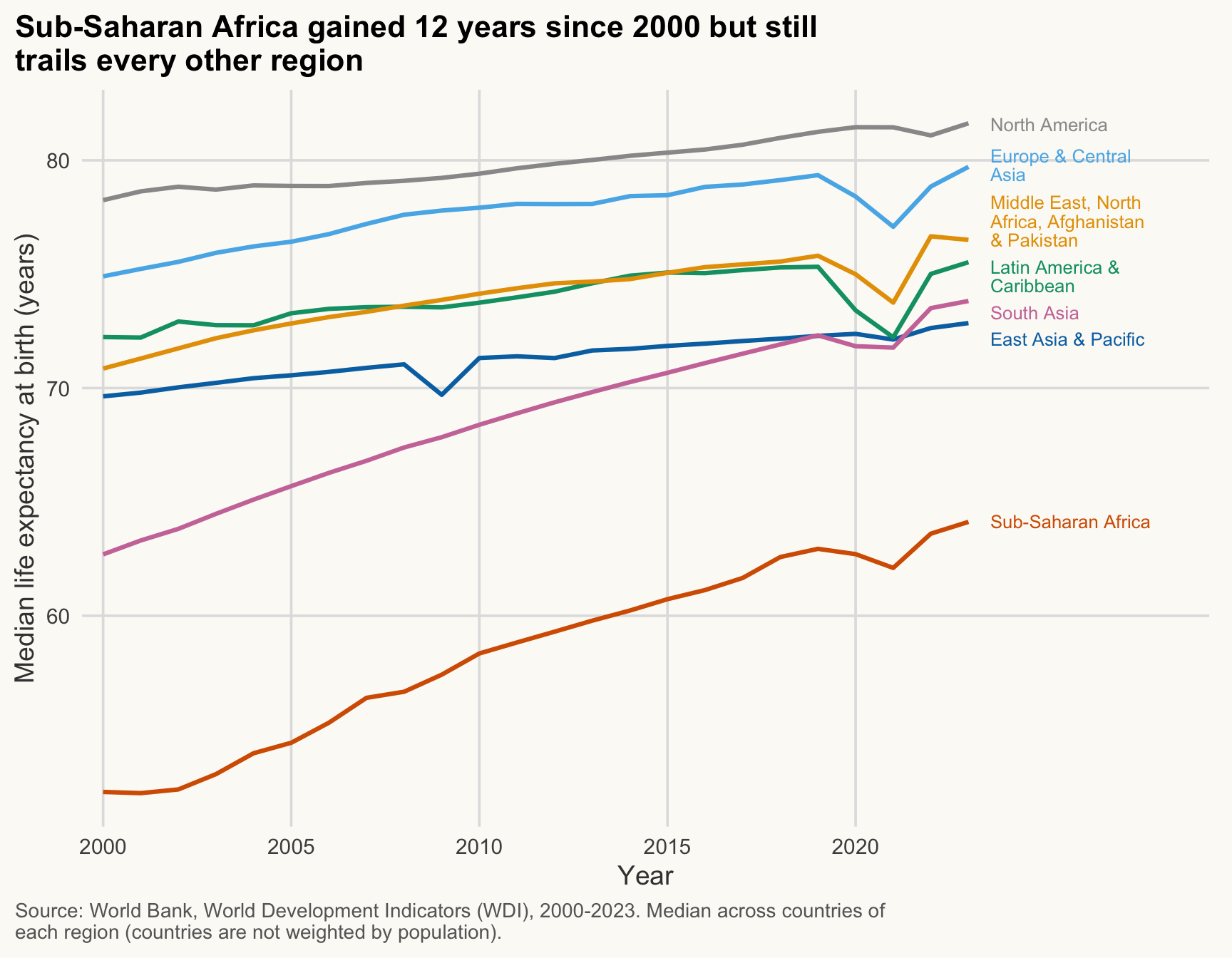
TipExercise 5.2
For each region, compute the median life expectancy per year (use wdi). Draw one line per region with the colours of pal_regions, labelled directly at the right end (no legend). Title: the message.
NoteShow solution
life_region <- wdi |>
  drop_na(life_exp) |>
  summarise(life_med = median(life_exp), .by = c(region, year))

ggplot(life_region, aes(x = year, y = life_med, colour = region)) +
  geom_line(linewidth = 1.1) +
  geom_text_repel(
    data = filter(life_region, year == max(year)),
    aes(label = str_wrap(region, 20)),
    hjust = 0, direction = "y", xlim = c(2023.4, NA), size = 3.4, lineheight = 0.85,
    segment.color = NA, show.legend = FALSE
  ) +
  scale_colour_manual(values = pal_regions, guide = "none") +
  scale_x_continuous(breaks = seq(2000, 2020, 5), expand = expansion(mult = c(0.02, 0.05))) +
  coord_cartesian(xlim = c(2000, 2028), clip = "off") +
  labs(
    title = str_wrap("Sub-Saharan Africa gained 12 years since 2000 but still trails every other region", 60),
    x = "Year",
    y = "Median life expectancy at birth (years)",
    caption = str_wrap("Source: World Bank, World Development Indicators (WDI), 2000-2023. Median across countries of each region (countries are not weighted by population).", 95)
  )
Bars: comparing groups
≈ 25 min After this section you can pick geom_col() or geom_bar() and produce honest, sorted bar charts.
Two different bar charts, two different geoms:
| You have… | Use | What it does |
|---|---|---|
| raw rows, you want counts | geom_bar() |
counts rows for you |
| an already computed number per group | geom_col() |
uses your y as the bar height |
(A common mistake is geom_bar(stat = "identity"). geom_col() is the same thing, clearer.)
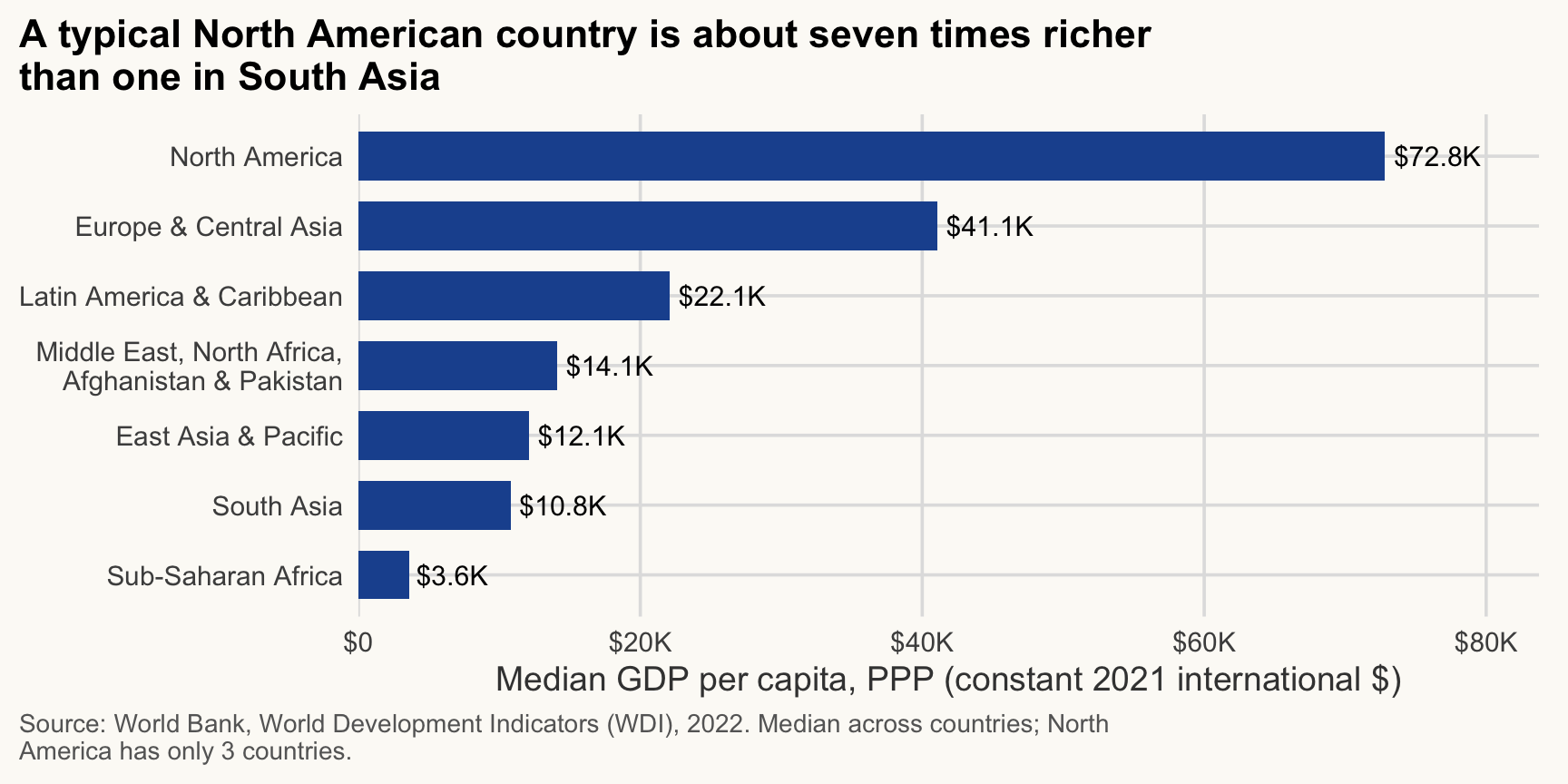
Values: median GDP per capita by region, sorted
Two rules for bar charts: start at zero, and sort the bars. For text categories, put the long labels on the vertical axis (horizontal bars). fct_reorder() sorts a factor by another variable.
gdp_region <- wdi_2022_ok |>
  summarise(gdp_med = median(gdp_pc_ppp), n_countries = n(), .by = region)

gdp_region |>
  mutate(region = fct_reorder(region, gdp_med)) |>
  ggplot(aes(x = gdp_med, y = region)) +
  geom_col(fill = pal_cours[["principal"]], width = 0.7) +
  geom_text(aes(label = label_dollar(accuracy = 0.1, scale_cut = cut_short_scale())(gdp_med)), hjust = -0.1, size = 4) +
  scale_x_continuous(labels = label_dollar(scale_cut = cut_short_scale()), expand = expansion(mult = c(0, 0.15))) +
  scale_y_discrete(labels = label_wrap(28)) +
  labs(
    title = str_wrap("A typical North American country is about seven times richer than one in South Asia", 60),
    x = "Median GDP per capita, PPP (constant 2021 international $)",
    y = NULL,
    caption = str_wrap("Source: World Bank, World Development Indicators (WDI), 2022. Median across countries; North America has only 3 countries.", 95)
  )
WarningCommon mistake
Truncated bar axes. A bar encodes a value by its length, so the axis must start at zero. Starting at 50 makes a difference of 10% look like a difference of 100%. If zero is not meaningful, use points or lines instead of bars. (Same logic: do not use 3D bars and do not leave bars in alphabetical order when the values can be ranked.)
Counts: number of countries by income group
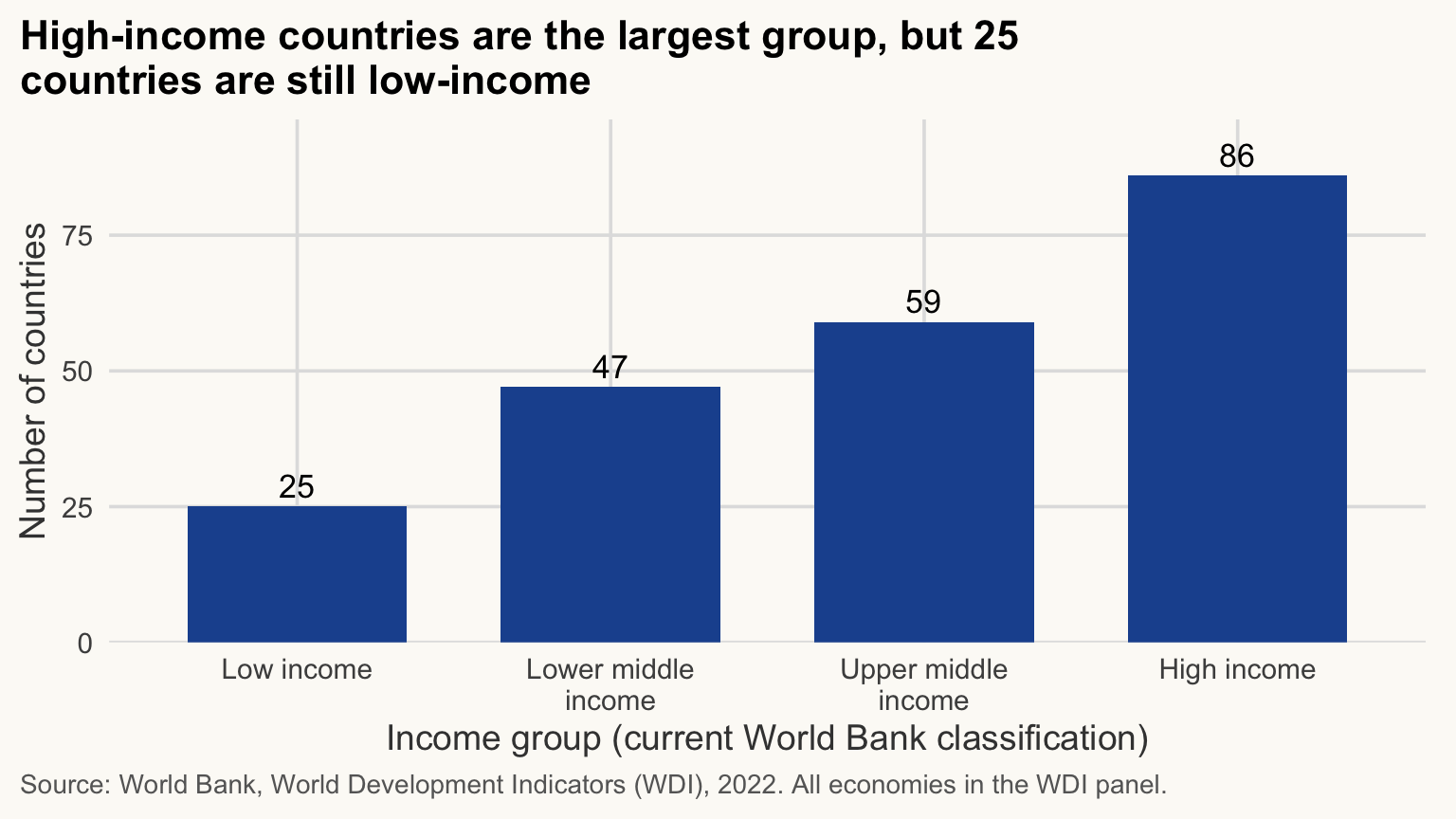
The income column is the income group (current World Bank classification): each country’s group today, applied to every year (see Session 4). The World Bank sets these groups from gross national income per capita (Atlas method, current US$), not from the GDP per capita in PPP that we plot.
Income groups have a natural order (low to high), so we turn the column into an ordered factor by hand. Alphabetical order would put “High income” first.
niveaux <- c("Low income", "Lower middle income", "Upper middle income", "High income")

wdi_2022 |>
  mutate(income = factor(income, levels = niveaux, ordered = TRUE)) |>
  ggplot(aes(x = income)) +
  geom_bar(fill = pal_cours[["principal"]], width = 0.7) +
  geom_text(aes(label = after_stat(count)), stat = "count", vjust = -0.4, size = 4.5) +
  scale_x_discrete(labels = label_wrap(14)) +
  scale_y_continuous(expand = expansion(mult = c(0, 0.12))) +
  labs(
    title = str_wrap("High-income countries are the largest group, but 25 countries are still low-income", 60),
    x = "Income group (current World Bank classification)",
    y = "Number of countries",
    caption = str_wrap("Source: World Bank, World Development Indicators (WDI), 2022. All economies in the WDI panel.", 95)
  )
TipExercise 5.3
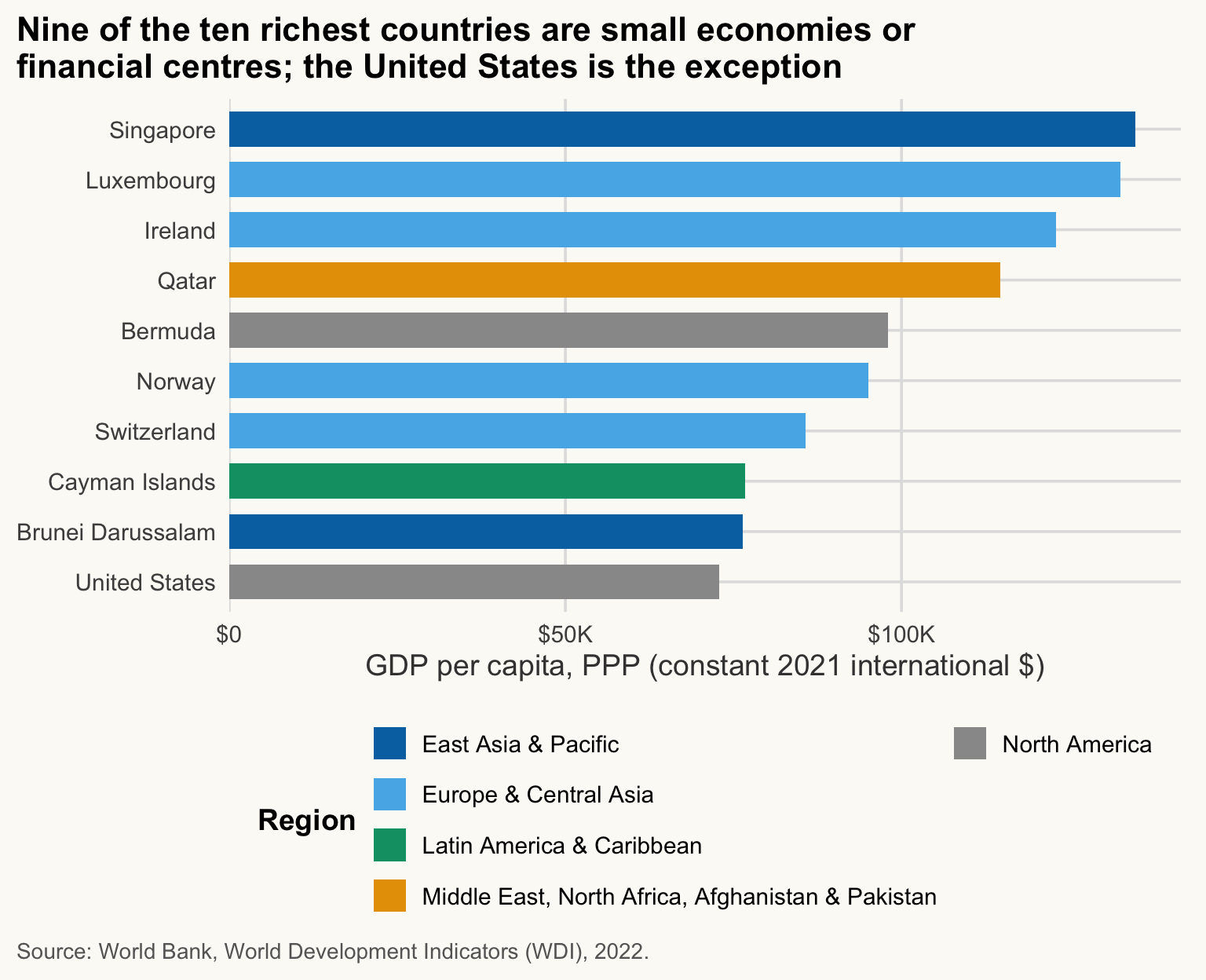
Show the ten richest countries in 2022 (GDP per capita, PPP) as sorted horizontal bars. Use slice_max(), not top_n() (superseded). Colour the bars by region with pal_regions.
NoteShow solution
wdi_2022_ok |>
  slice_max(gdp_pc_ppp, n = 10) |>
  mutate(country = fct_reorder(country, gdp_pc_ppp)) |>
  ggplot(aes(x = gdp_pc_ppp, y = country, fill = region)) +
  geom_col(width = 0.7) +
  scale_x_continuous(labels = label_dollar(scale_cut = cut_short_scale()), expand = expansion(mult = c(0, 0.05))) +
  scale_fill_manual(values = pal_regions) +
  guides(fill = guide_legend(nrow = 4)) +
  labs(
    title = str_wrap("Nine of the ten richest countries are small economies or financial centres; the United States is the exception", 60),
    x = "GDP per capita, PPP (constant 2021 international $)",
    y = NULL, fill = "Region",
    caption = str_wrap("Source: World Bank, World Development Indicators (WDI), 2022.", 95)
  )
Distributions
≈ 25 min After this section you can show how a variable is spread across countries, overall and by group.
To see how a variable is spread across countries, use one observation per country: wdi_2022_ok. (Pooling all years would count each country 24 times, and the observations would not be independent.)
Histogram and density
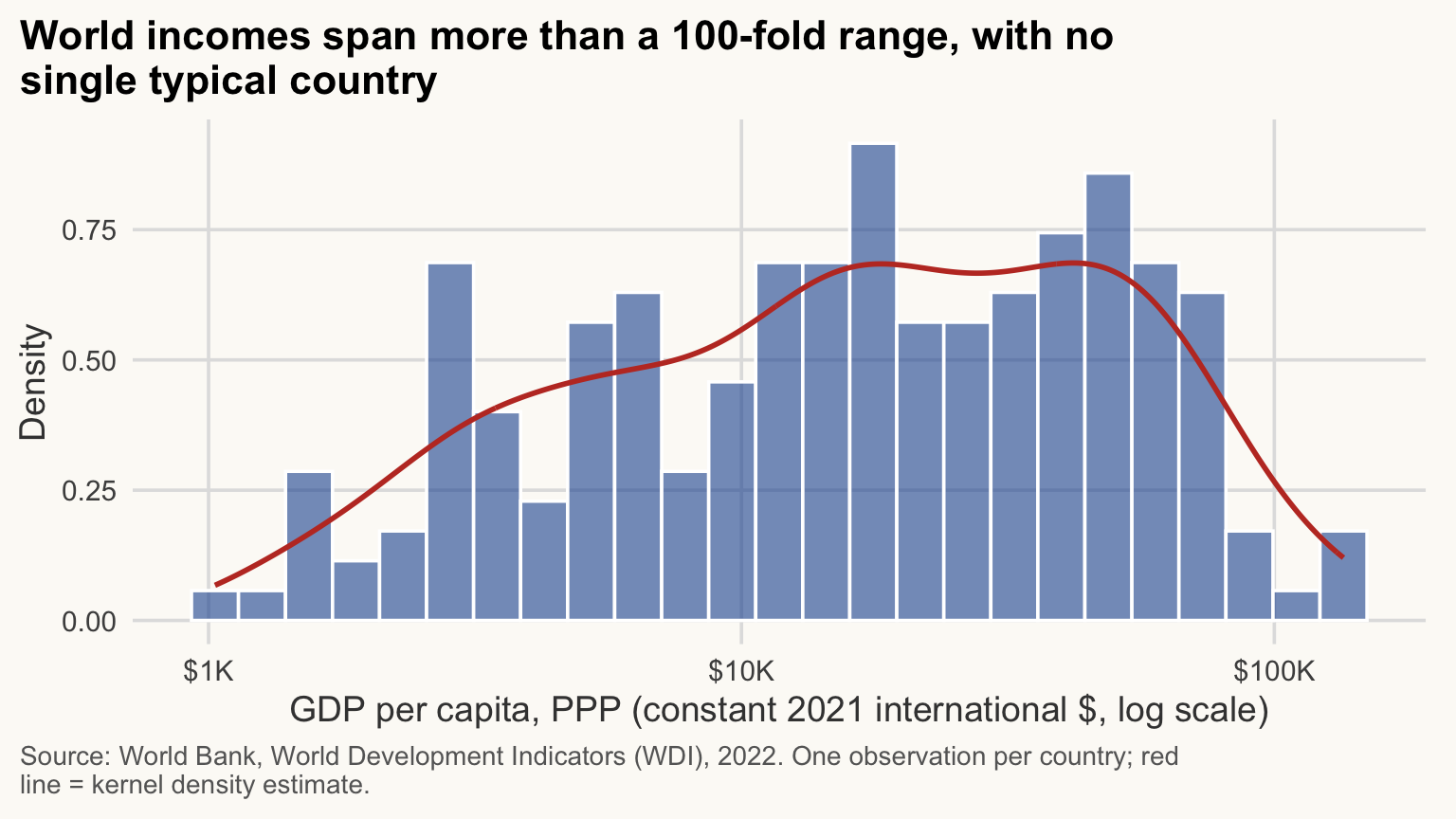
GDP per capita is very right-skewed, so we work on a log scale. We pick the bin width on that scale (here bins = 25) and compare a few values: too few bins hide structure, too many show noise. Putting the histogram on the density scale lets us overlay a smooth density curve.
ggplot(wdi_2022_ok, aes(x = gdp_pc_ppp)) +
  geom_histogram(aes(y = after_stat(density)), bins = 25,
                 fill = pal_cours[["principal"]], alpha = 0.6, colour = "white") +
  geom_density(colour = pal_cours[["accent"]], linewidth = 1) +
  scale_x_log10(labels = label_dollar(scale_cut = cut_short_scale())) +
  labs(
    title = str_wrap("World incomes span more than a 100-fold range, with no single typical country", 60),
    x = "GDP per capita, PPP (constant 2021 international $, log scale)",
    y = "Density",
    caption = str_wrap("Source: World Bank, World Development Indicators (WDI), 2022. One observation per country; red line = kernel density estimate.", 95)
  )
NoteHow to read this chart
- Each bar counts the countries in one slice of the (log) income axis: tall bars are common incomes.
- The red density line smooths the bars. Two humps would mean two groups of countries; here the mass is spread over a wide range.
- Because the axis is logarithmic, the same width means the same percentage gap, not the same dollar gap.
WarningCommon mistake
Linear scale on skewed data. On a linear axis, a few rich countries stretch the range and nearly all others pile up on the left. Try scale_x_log10() for incomes, populations and any quantity spanning orders of magnitude, and say on the axis title that it is a log scale.
Boxplot by group
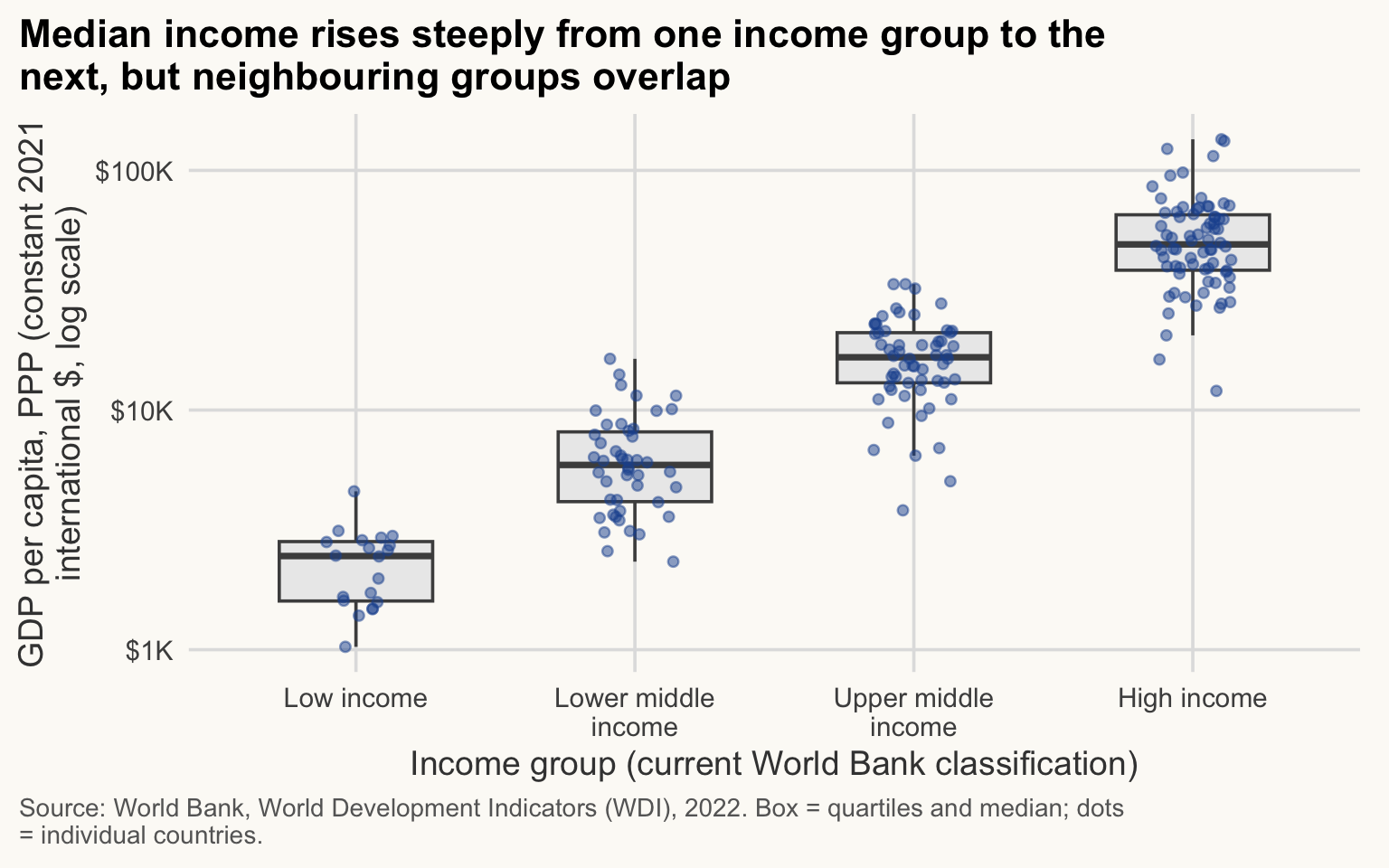
A boxplot shows the median (line), the middle half of observations (box) and unusual values (points). Add the individual countries with a light jitter, so the reader sees how many observations sit behind each box.
wdi_2022_ok |>
  mutate(income = factor(income, levels = niveaux, ordered = TRUE)) |>
  ggplot(aes(x = income, y = gdp_pc_ppp)) +
  geom_boxplot(outliers = FALSE, fill = "grey92", colour = "grey30", width = 0.55) +
  geom_jitter(width = 0.15, alpha = 0.5, colour = pal_cours[["principal"]], size = 1.6) +
  scale_x_discrete(labels = label_wrap(14)) +
  scale_y_log10(labels = label_dollar(scale_cut = cut_short_scale())) +
  labs(
    title = str_wrap("Median income rises steeply from one income group to the next, but neighbouring groups overlap", 60),
    x = "Income group (current World Bank classification)",
    y = str_wrap("GDP per capita, PPP (constant 2021 international $, log scale)", 40),
    caption = str_wrap("Source: World Bank, World Development Indicators (WDI), 2022. Box = quartiles and median; dots = individual countries.", 95)
  )
WarningCommon mistake
Too many colours. Colouring by 7 regions plus a gradient plus size makes a chart nobody can decode. Use colour for one idea; grey for the rest. If you need more than about 6 colours, facet or highlight instead.
Why outliers = FALSE? Otherwise the boxplot draws the outliers and the jitter draws them again.
The groups overlap because they are not defined on this axis: the World Bank classifies countries by gross national income per capita, not GDP per capita in PPP, and income holds today’s group, not the 2022 one. The richest low-income country ($4,579) is richer than the poorest upper-middle-income one ($3,816).
TipExercise 5.4
Compare the distribution of life expectancy in 2000 and 2022. Use facet_wrap(~ year) on a histogram of life expectancy (one observation per country). What happened to the left tail?
NoteShow solution
wdi |>
  filter(year %in% c(2000, 2022)) |>
  drop_na(life_exp) |>
  ggplot(aes(x = life_exp)) +
  geom_histogram(binwidth = 2.5, fill = pal_cours[["principal"]], colour = "white") +
  facet_wrap(~ year) +
  labs(
    title = str_wrap("The low-life-expectancy tail shrank between 2000 and 2022", 60),
    x = "Life expectancy at birth (years)",
    y = "Number of countries",
    caption = str_wrap("Source: World Bank, World Development Indicators (WDI), 2000 and 2022. One observation per country and year.", 95)
  )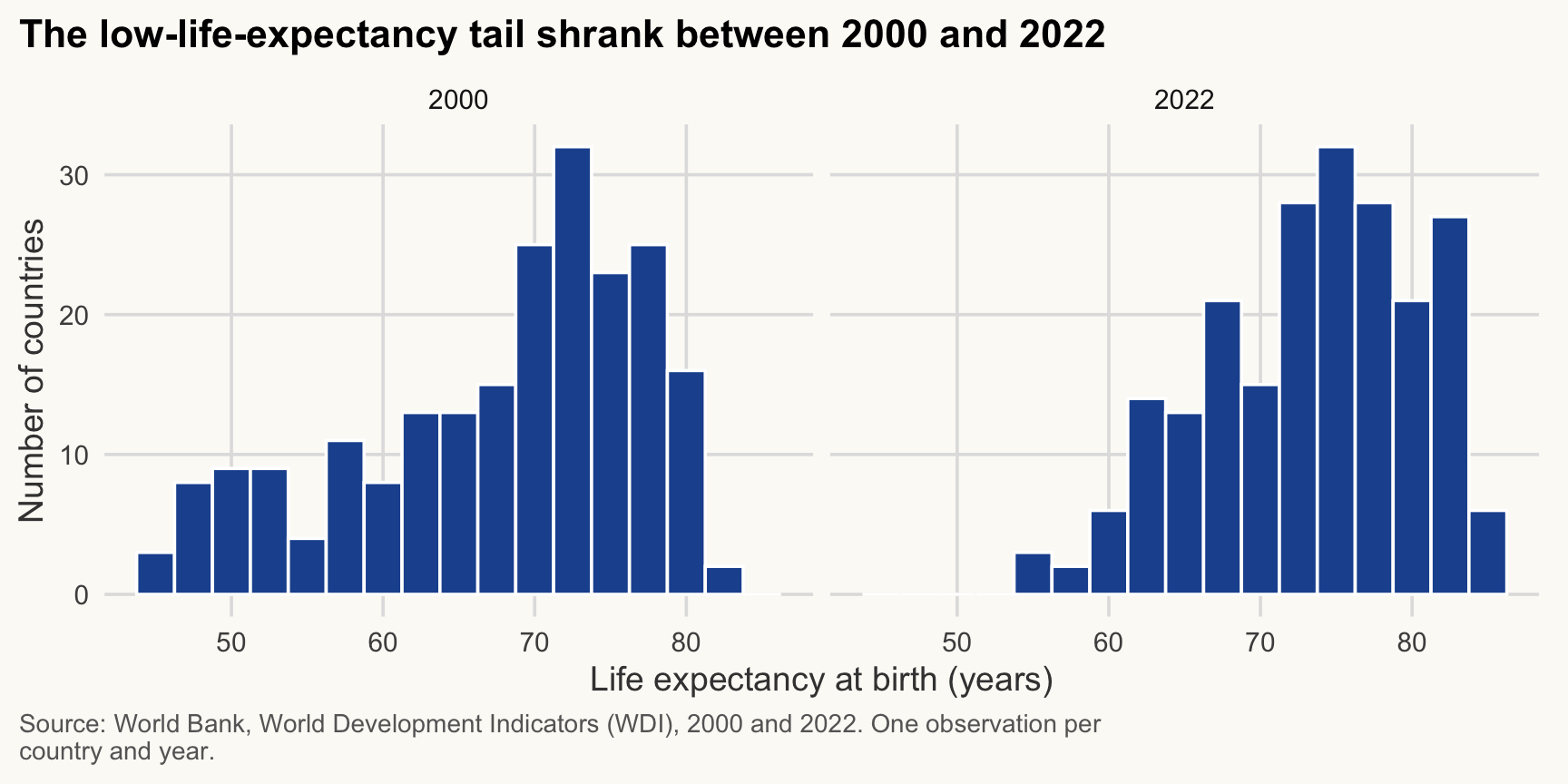
In 2000, 30 countries had a life expectancy below 55 years; in 2022 only 3 do (the Central African Republic series is excluded, see the start of this page). The whole distribution shifted to the right.
Maps
≈ 40 min After this section you can draw a choropleth of the world, join it safely to the WDI data and check what did not match.
Choropleth: a map where each area is coloured according to a value. sf (simple features): the R format that stores shapes as a geometry column in a data frame.
flowchart LR
  A[Shapes: Natural Earth] --> C[left_join on iso code]
  B[Data: WDI 2022] --> C
  C --> D[anti_join check]
  D --> E[bin values]
  E --> F[geom_sf + projection]
A choropleth colours areas by a value. A good one needs four things: all the geometries, a safe join, a readable scale, and an honest projection. A common mistake is to colour only a handful of countries, because the join was done on country names and kept only the matching rows.
1. Geometries: one row per country, in an sf table
sf (“simple features”) stores each country’s shape in a geometry column. The result behaves like a data frame: dplyr verbs work on it.
world <- ne_countries(scale = "medium", returnclass = "sf") |>
  filter(name != "Antarctica")          # no data there, and it eats a fifth of the map

dim(world)
[1] 241 169world |>
st_drop_geometry() |>
select(name, iso_a3, iso_a3_eh, adm0_a3) |>
slice(1:5) name iso_a3 iso_a3_eh adm0_a3
1 Zimbabwe ZWE ZWE ZWE
2 Zambia ZMB ZMB ZMB
3 Yemen YEM YEM YEM
4 Vietnam VNM VNM VNM
5 Venezuela VEN VEN VENNatural Earth has several ISO-like codes. Which one matches the WDI iso3c? Do not guess: test with anti_join(), which keeps the rows of the left table that find no match.
# WDI countries with no match in the map, for each candidate code
unmatched <- function(code) {
  wdi_2022 |>
    anti_join(st_drop_geometry(world), by = c("iso3c" = code)) |>
    pull(country)
}

# How many WDI economies stay unmatched with each code?
length(unmatched("iso_a3"))
[1] 5length(unmatched("iso_a3_eh"))[1] 3length(unmatched("adm0_a3"))[1] 5unmatched("iso_a3_eh")[1] "Channel Islands" "Gibraltar" "Kosovo" iso_a3_eh is the best key: only a few WDI economies are missing from the map. They are small or disputed territories (Channel Islands, Gibraltar, Kosovo, which has a non-standard code in Natural Earth). The reverse check shows map areas without WDI data:
world |>
  st_drop_geometry() |>
  anti_join(wdi_2022, by = c("iso_a3_eh" = "iso3c")) |>
  select(name, iso_a3_eh) |>
  head(8)
name iso_a3_eh
1 Vatican VAT
2 S. Geo. and the Is. SGS
3 Br. Indian Ocean Ter. IOT
4 Saint Helena SHN
5 Pitcairn Is. PCN
6 Anguilla AIA
7 Falkland Is. FLK
8 Montserrat MSR
NoteWhy it matters for development economics
Here the losses are small: three small or disputed territories on the WDI side, and mostly tiny territories without WDI data on the map side. That is because we join on codes. A join on country names would leave about 50 WDI economies without a shape, among them the Democratic Republic of the Congo, Yemen and Côte d’Ivoire, and the map would show them as “no data” without any warning. Checking the join is part of measuring development honestly.
Never join on country names: “Russian Federation” (WDI) is “Russia” (Natural Earth), “Egypt, Arab Rep.” is “Egypt”. Codes are far more stable than names, though they do change (ROM became ROU, ZAR became COD): run anti_join() anyway.
2. Join and plot
We start from the map (left_join(world, data)) so that every country keeps its shape, even without data. Those get NA and will be drawn in light grey.
world_gdp <- world |>
  select(iso_a3_eh, geometry) |>
  left_join(select(wdi_2022, iso3c, country, gdp_pc_ppp, elec_access),
            by = c("iso_a3_eh" = "iso3c"))

sum(is.na(world_gdp$gdp_pc_ppp))   # shapes drawn in grey (no data)
[1] 41GDP per capita is skewed, so a continuous colour scale would make almost everything look the same. We bin the values into classes with round breakpoints and readable labels.
cuts   <- c(0, 2500, 5000, 10000, 20000, 40000, Inf)
labs_g <- c("< $2,500", "$2,500-5,000", "$5,000-10,000", "$10,000-20,000",
            "$20,000-40,000", "> $40,000")

world_gdp |>
  mutate(gdp_class = cut(gdp_pc_ppp, breaks = cuts, labels = labs_g, right = FALSE)) |>
  ggplot() +
  geom_sf(aes(fill = fct_na_value_to_level(gdp_class, "No data")),   # NA becomes a level
          colour = "white", linewidth = 0.1) +
  scale_fill_manual(values = c(hcl.colors(6, "YlGnBu", rev = TRUE), "grey85"),  # one colour per level, in order
                    drop = FALSE) +
  coord_sf(crs = "+proj=robin") +
  guides(fill = guide_legend(nrow = 2, title.position = "top")) +
  labs(
    x = NULL, y = NULL,
    title = str_wrap("Income per head is highest in the North and lowest in Sub-Saharan Africa", 60),
    fill = "GDP per capita, PPP (constant 2021 international $)",
    caption = str_wrap("Source: World Bank, World Development Indicators (WDI), 2022. Light grey: no data.", 95)
  ) +
  theme(axis.text = element_blank(), panel.grid.major = element_line(colour = "grey94"))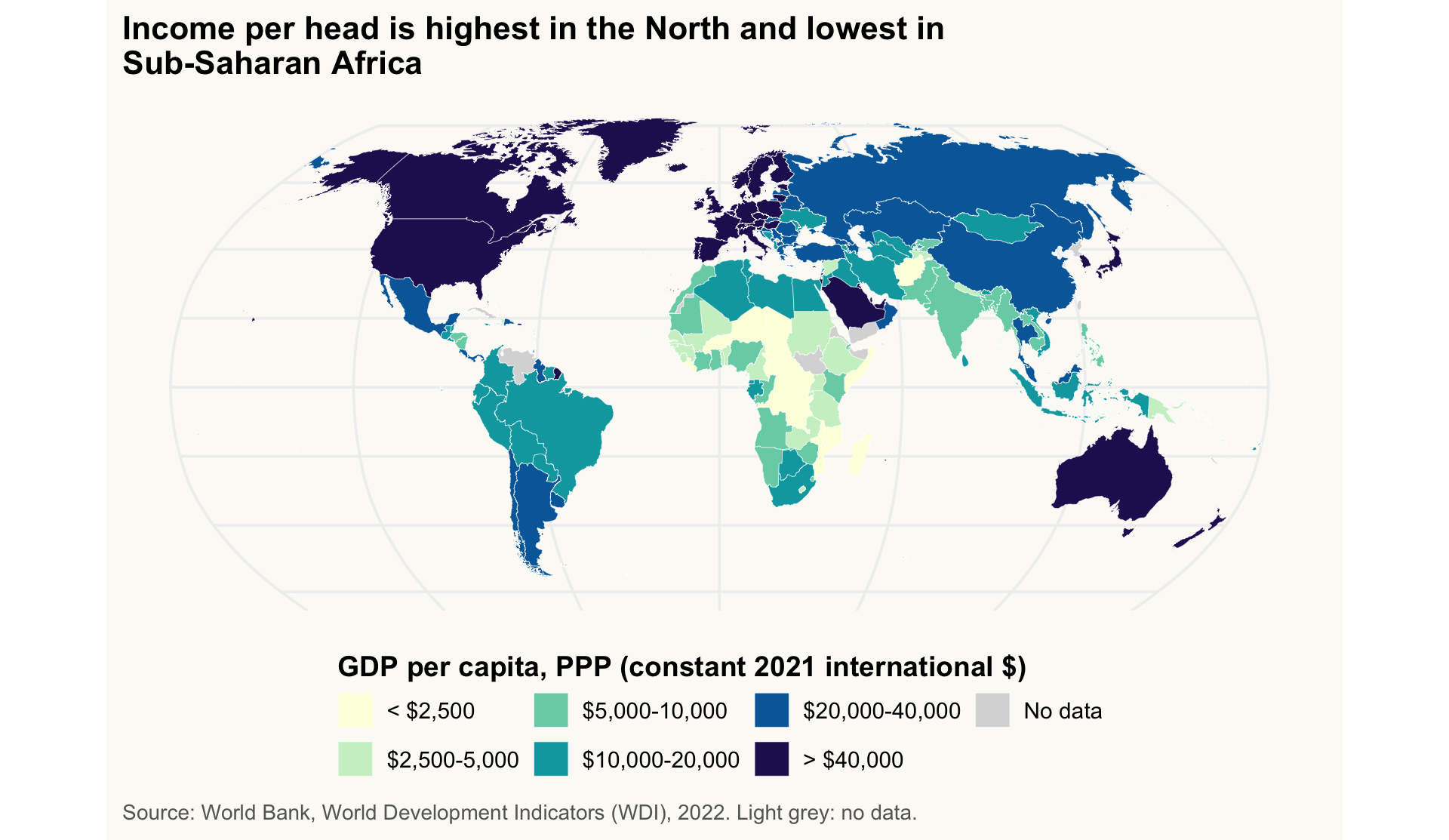
What makes this map honest:
-
All countries are drawn. Missing data get their own level, “No data”, in light grey:
fct_na_value_to_level()turnsNAinto a real factor level, the last one, so that it appears in the legend.scale_fill_manual()then gives one colour per level, in the order of the levels (drop = FALSEkeeps every level, even an empty one, so colours cannot shift). -
Binned scale with round breaks and labels written in dollars, not
1e+04. -
coord_sf(crs = "+proj=robin"): Robinson projection, a compromise that distorts areas less than the default longitude/latitude rectangle. A string like"+proj=robin"is a PROJ definition;"EPSG:4326"would give plain lat/long. - Area is not population: Russia and Canada look large, India small. A choropleth of an intensive variable (per capita) is fair; one of totals would mislead.
TipExercise 5.5
Map access to electricity (% of population) in 2022 for all countries, in bins (for example below 50%, 50-80%, 80-99%, 99-100%).
Optional: going further. Then annotate the three countries with the lowest access, with their names and values. Hint: use slice_min() to find them and st_point_on_surface() for a label position inside each country. (We use the lowest, not the highest: more than 100 countries are at 100%, so “top 3” would be an arbitrary tie.)
NoteShow solution
bottom3 <- world_gdp |>
  drop_na(elec_access) |>
  slice_min(elec_access, n = 3, with_ties = FALSE) |>
  mutate(label = paste0(str_remove(country, ",.*"), " ", round(elec_access), "%")) |>
  st_point_on_surface()                       # one point inside each polygon

bottom3$label                                  # check which countries are annotated
[1] "South Sudan 8%" "Burundi 10%" "Chad 12%" world_gdp |>
mutate(elec_class = cut(elec_access, breaks = c(0, 50, 80, 99, 100.01),
labels = c("< 50%", "50-80%", "80-99%", "99-100%"),
right = FALSE)) |>
ggplot() +
geom_sf(aes(fill = fct_na_value_to_level(elec_class, "No data")),
colour = "white", linewidth = 0.1) +
geom_label_repel(data = bottom3, aes(label = label, geometry = geometry),
stat = "sf_coordinates", size = 3.4, fill = alpha("white", 0.85),
min.segment.length = Inf, box.padding = 0.2, seed = 1) + # no leader lines
scale_fill_manual(values = c("#08306b", "#2171b5", "#9ecae1", "#eff3ff", "grey85"), # in level order
drop = FALSE) +
coord_sf(crs = "+proj=robin") +
guides(fill = guide_legend(nrow = 2, title.position = "top")) +
labs(
x = NULL, y = NULL,
title = str_wrap("20 of the 22 countries where less than half the population has electricity are in Sub-Saharan Africa", 60),
fill = "Population with access to electricity",
caption = str_wrap("Source: World Bank, World Development Indicators (WDI), 2022. Labels (placed near the countries): the three with the lowest access. Light grey: no data.", 95)
) +
theme(axis.text = element_blank(), panel.grid.major = element_line(colour = "grey94"))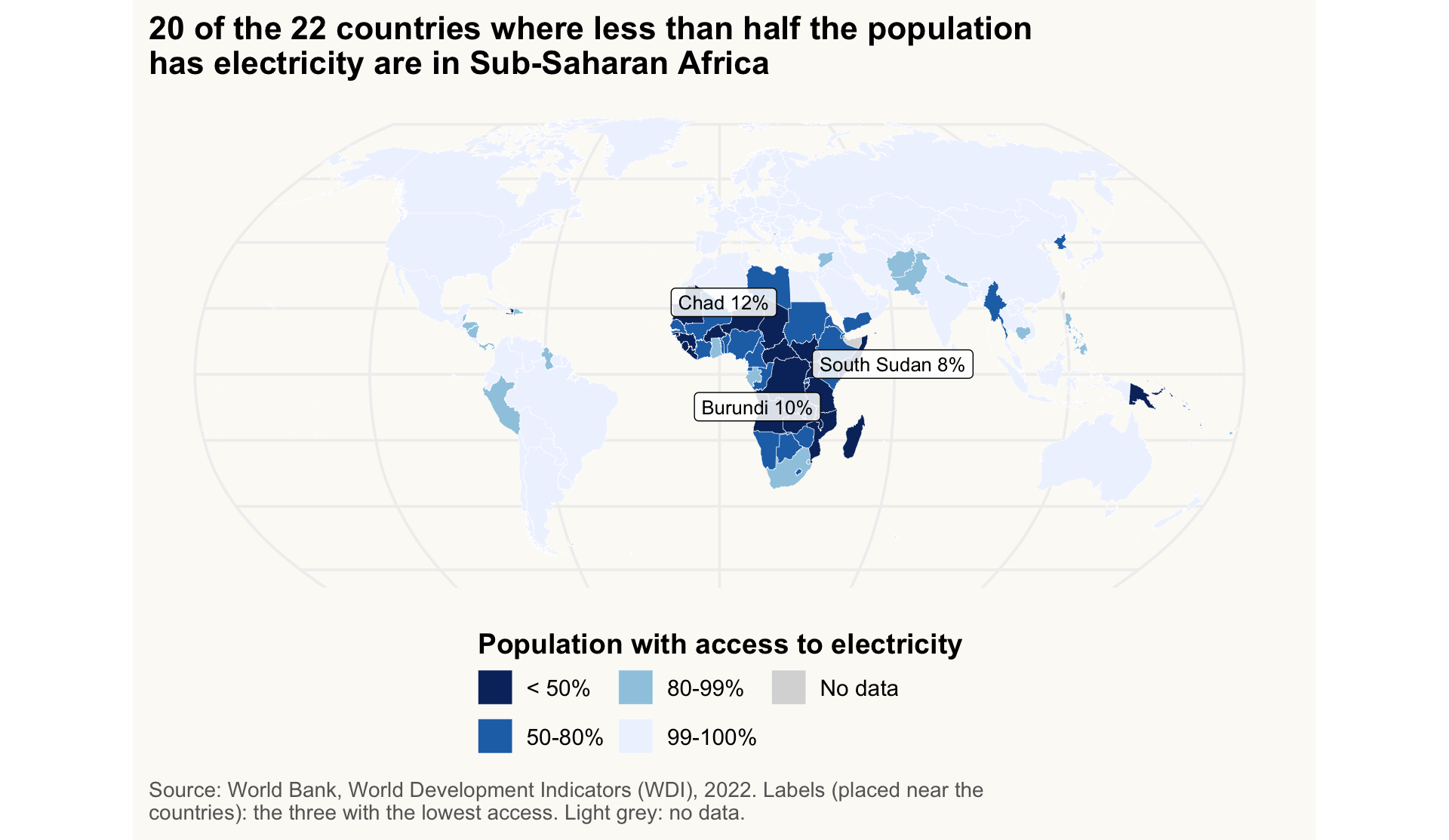
Saving figures
≈ 10 min After this section you can export a figure with a fixed size and resolution.
In a report, the figure on screen is not the figure in the file. Save with explicit size and resolution so the output is identical on every computer. Store the plot in an object, then call ggsave().
dir.create(here("output"), showWarnings = FALSE)   # output/ is created if missing

p_gapminder <- ggplot(wdi_2022_ok, aes(x = gdp_pc_ppp, y = life_exp, colour = region)) +
  geom_point() +
  scale_x_log10(labels = label_dollar(scale_cut = cut_short_scale()))

ggsave(here("output", "gapminder.png"), plot = p_gapminder,
       width = 8, height = 5, units = "in", dpi = 300)    # for Word / slides
ggsave(here("output", "gapminder.pdf"), plot = p_gapminder,
width = 8, height = 5) # vector, for LaTeX-
widthandheightare in inches (units = "cm"is possible). Choose them to match the final placement; do not resize in Word. - 300 dpi is the standard for print; 150 is enough for the web.
- Without
plot =,ggsave()saves the last plot displayed, which is fragile in a script. -
here()builds the path from the project root, so the code runs on any machine.
ImportantKey idea
A figure is a deliverable: message in the title, units on the axes, source in the caption, fixed size on export. If the title says nothing, the reader has to do your analysis.
TipExercise 5.6 (Optional: going further)
Make a boxplot of life expectancy by region (2022, one point per country), regions sorted by median, horizontal, and save it as a 300 dpi PNG in output/. The save chunk must not be evaluated when the page is rendered.
NoteShow solution
p_life_region <- wdi_2022 |>
  drop_na(life_exp) |>
  mutate(region = fct_reorder(region, life_exp, .fun = median)) |>
  ggplot(aes(x = life_exp, y = region)) +
  geom_boxplot(fill = "grey92", colour = "grey30", width = 0.55) +
  scale_y_discrete(labels = label_wrap(28)) +
  labs(
    title = str_wrap("Sub-Saharan Africa has the lowest median life expectancy, about 9 years below the next region", 60),
    x = "Life expectancy at birth (years)",
    y = NULL,
    caption = str_wrap("Source: World Bank, World Development Indicators (WDI), 2022. One observation per country.", 95)
  )

p_life_region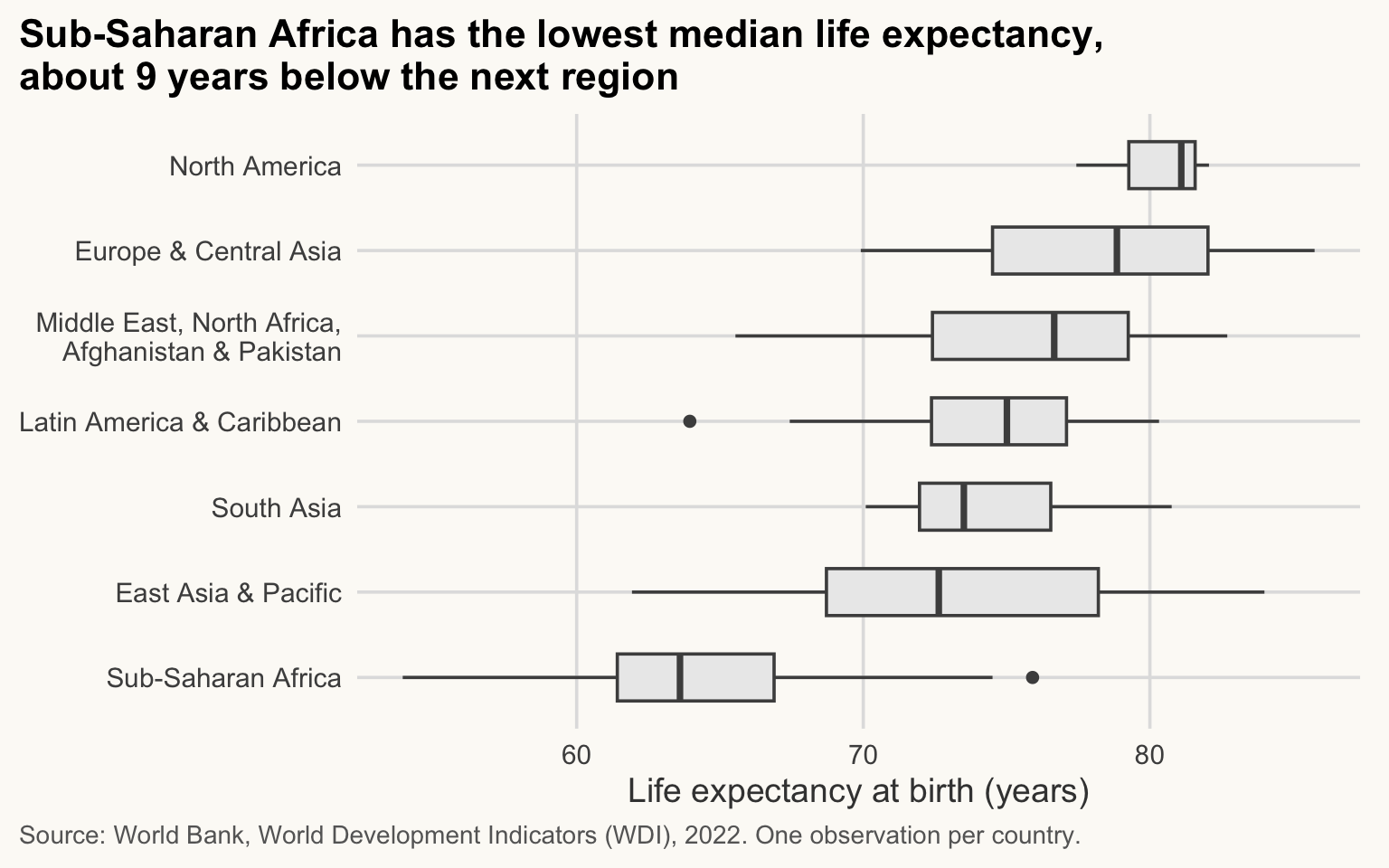
dir.create(here("output"), showWarnings = FALSE)
ggsave(here("output", "life_exp_region.png"), plot = p_life_region,
       width = 8, height = 5, dpi = 300)
Key takeaways
- A ggplot is a stack of independent layers: data, aesthetics, geoms, scales, labels, theme. Learn the grammar, not the recipes.
-
aes()maps variables; arguments outsideaes()set constants. - Log scales and
scales::label_dollar(scale_cut = cut_short_scale())/label_number()make skewed development data readable. Never leave1e+04on an axis. - Title = the message; axes with units; caption with the source. Direct labels beat legends.
- Highlight one series in colour and grey out the rest (signal vs context). Sort bars, start them at zero, use
geom_col()for values andgeom_bar()for counts. - For distributions, use one observation per country; do not pool years and call them independent.
- Maps: keep all shapes, join on codes (not names), check with
anti_join(), bin skewed values, use a projection, grey for missing data. - Save with
ggsave()and explicitwidth,height,dpi.