Sys.setenv(LANGUAGE = "en")   # R messages in English
library(tidyverse)   # readr, dplyr, ggplot2, ...
library(here)        # project-relative paths
library(janitor)     # clean_names()
library(readxl)      # read Excel files
library(writexl)     # write Excel files
library(lubridate)   # dates
library(scales)      # label_dollar()
library(WDI)         # World Bank API (used in a non-evaluated chunk)

source(here("R", "theme_cours.R"))Session 2: Importing and exporting data
CSV, Excel, awkward files, and data straight from the World Bank
Session objectives
- Locate files with
here::here()instead ofsetwd(). - Import CSV and Excel files, and inspect what you imported.
- Handle a badly formatted file: look at the raw text first, then check
nrow()andproblems(). - Convert text to numbers (
parse_number()), keep codes as text, tidy labels, and find the missing values a conversion created. - Optional: clean country labels and parse dates with
lubridate, then find the dates that failed. - Export results to
output/(CSV, Excel,.rds) without touching the raw data. - Get World Bank data with the
WDIpackage, and understand why we cache it.
Prepare your R session
Packages used today: tidyverse, here, janitor, readxl, writexl, lubridate, scales, WDI. If one is missing, run install.packages("name") in the console.
Script of this session: download seance-2.R, all the code of this page in one file.
Pacing. The core path takes about 190 minutes, exercises included. Parts marked Optional: going further (Section 6 on strings and dates, Section 9, and Exercises 2.4, 2.5 and 2.7) add about 45 minutes: do them if time allows, or at home.
1. Where are my files?
≈ 10 min After this section you can say where a file lives and point R to it without setwd().
Every analysis in this course follows the same pipeline: import the data, check it, clean it, save the result.
flowchart LR
    A[Raw file in data/raw] --> B[Import]
    B --> C[Check]
    C --> D[Clean]
    D --> E[Save in output]
Last session you worked in an RStudio project. The project folder is the working directory. Our layout:
r-course/
├── r-course.Rproj
├── data/          # data given to you (from data.zip)
│   └── raw/       # original files, READ-ONLY
├── R/
│   └── theme_cours.R   # shared chart theme (from data.zip)
└── output/        # everything YOU produce (tables, exports)
flowchart LR
P[r-course/] --> D[data/]
P --> R[R/]
P --> O[output/]
D --> RAW[data/raw/ read-only]
Rule: never write into data/. If you overwrite a raw file, the original is gone. Everything you create goes to output/.
Do not use setwd("C:/Users/me/..."). It breaks on every other computer. Use here::here(): it builds a path from the project root, whatever the machine.
# here("data", "raw", "SCIM.csv") returns the full path on your machine,
# e.g. "/home/you/r-course/data/raw/SCIM.csv" (not printed here)
file.exists(here("data", "raw", "SCIM.csv"))
[1] TRUEfile.exists() returning TRUE is the first check to make when an import fails.
NoteIn plain words
A path is an address. setwd("C:/Users/me/...") is like giving your home address to someone who lives elsewhere. here() gives directions from the project’s front door, so the same directions work on every computer.
2. CSV files with readr
≈ 30 min After this section you can read a CSV file and tell at a glance whether R understood it.
A CSV (comma-separated values) file is plain text: one row per line, values separated by a delimiter. read_csv() guesses the type of each column from the first 1000 rows.
We use SCIM.csv, OECD data on international trade (exports, imports, trade balance) by country and period.
scim <- read_csv(here("data", "raw", "SCIM.csv"))When you run this in the console, readr prints the number of rows and columns and the type it guessed for each: read it, it is the cheapest check you have (this page hides such messages). Now look at the data.
head(scim)# A tibble: 6 × 19
SUBJECT Sujet LOCATION Pays MEASURE Mesure FREQUENCY Fréquence TIME Temps
<chr> <chr> <chr> <chr> <chr> <chr> <chr> <chr> <chr> <chr>
1 XTEXVA01 Export… ISR Isra… CXMLSA Monna… Q Trimestr… 2022… T2-2…
2 XTEXVA01 Export… ISR Isra… CXMLSA Monna… Q Trimestr… 2022… T3-2…
3 XTEXVA01 Export… ISR Isra… CXMLSA Monna… Q Trimestr… 2022… T4-2…
4 XTEXVA01 Export… ISR Isra… CXMLSA Monna… Q Trimestr… 2023… T1-2…
5 XTEXVA01 Export… ISR Isra… CXMLSA Monna… Q Trimestr… 2023… T2-2…
6 XTEXVA01 Export… ISR Isra… CXMLSA Monna… Q Trimestr… 2023… T3-2…
# ℹ 9 more variables: `Unit Code` <chr>, Unit <chr>, `PowerCode Code` <dbl>,
# PowerCode <chr>, `Reference Period Code` <lgl>, `Reference Period` <lgl>,
# Value <dbl>, `Flag Codes` <lgl>, Flags <lgl>glimpse(scim)Rows: 20,580
Columns: 19
$ SUBJECT <chr> "XTEXVA01", "XTEXVA01", "XTEXVA01", "XTEXVA01"…
$ Sujet <chr> "Exportations des biens (en valeur)", "Exporta…
$ LOCATION <chr> "ISR", "ISR", "ISR", "ISR", "ISR", "ISR", "ZAF…
$ Pays <chr> "Israël", "Israël", "Israël", "Israël", "Israë…
$ MEASURE <chr> "CXMLSA", "CXMLSA", "CXMLSA", "CXMLSA", "CXMLS…
$ Mesure <chr> "Monnaie nationale convertie en dollars, corri…
$ FREQUENCY <chr> "Q", "Q", "Q", "Q", "Q", "Q", "Q", "Q", "Q", "…
$ Fréquence <chr> "Trimestrielle", "Trimestrielle", "Trimestriel…
$ TIME <chr> "2022-Q2", "2022-Q3", "2022-Q4", "2023-Q1", "2…
$ Temps <chr> "T2-2022", "T3-2022", "T4-2022", "T1-2023", "T…
$ `Unit Code` <chr> "USD", "USD", "USD", "USD", "USD", "USD", "USD…
$ Unit <chr> "Dollar des États-Unis", "Dollar des États-Uni…
$ `PowerCode Code` <dbl> 9, 9, 9, 9, 9, 9, 9, 9, 9, 9, 9, 9, 9, 9, 9, 9…
$ PowerCode <chr> "Milliards", "Milliards", "Milliards", "Millia…
$ `Reference Period Code` <lgl> NA, NA, NA, NA, NA, NA, NA, NA, NA, NA, NA, NA…
$ `Reference Period` <lgl> NA, NA, NA, NA, NA, NA, NA, NA, NA, NA, NA, NA…
$ Value <dbl> 17.196020, 17.218710, 16.495160, 14.000260, 15…
$ `Flag Codes` <lgl> NA, NA, NA, NA, NA, NA, NA, NA, NA, NA, NA, NA…
$ Flags <lgl> NA, NA, NA, NA, NA, NA, NA, NA, NA, NA, NA, NA…
ImportantKey idea
An import that runs without an error is not an import that worked. Always look at the result (glimpse(), nrow()) before using it.
glimpse() shows every column on one line with its type: use it more than head(). summary() gives numeric summaries:
summary(scim$Value) Min. 1st Qu. Median Mean 3rd Qu. Max.
-28821.12 -0.25 8.15 3878.63 55.73 1167777.00 This summary is meaningless, and R gives no warning: Value mixes US dollars, national currencies and percentage changes, some monthly and some quarterly. The maximum, 1,167,777, is Indonesia’s quarterly trade in billions of rupiah. We check this below with count().
What do we notice?
- Column names mix cases and contain spaces (
"Unit Code","Reference Period"). Awkward to type, because you need backticks. - Columns come in French/English pairs (
SUBJECT/Sujet,LOCATION/Pays,MEASURE/Mesure,TIME/Temps): the same information twice. -
TIMEis a text column that mixes months ("2022-04") and quarters ("2022-Q2").
janitor::clean_names() turns names into consistent snake_case:
scim <- clean_names(scim)
names(scim)
[1] "subject" "sujet" "location"
[4] "pays" "measure" "mesure"
[7] "frequency" "frequence" "time"
[10] "temps" "unit_code" "unit"
[13] "power_code_code" "power_code" "reference_period_code"
[16] "reference_period" "value" "flag_codes"
[19] "flags"
NotePreview: dplyr verbs
select(), filter(), count(), distinct(), mutate(), slice_max() and summarise() are taught in Session 3 (ggplot in Session 5). For now, copy the pattern.
Let us drop the French duplicates and the columns we do not need, but keep unit_code and frequency, then count what is left:
scim <- scim |>
  select(subject, location, measure, frequency, time, unit_code, value)

scim |> count(subject)
# A tibble: 3 × 2
subject n
<chr> <int>
1 XTEXVA01 7738
2 XTIMVA01 7726
3 XTNTVA01 5116scim |> count(measure, unit_code, frequency)# A tibble: 12 × 4
measure unit_code frequency n
<chr> <chr> <chr> <int>
1 CXML USD M 2986
2 CXML USD Q 931
3 CXMLSA USD M 2986
4 CXMLSA USD Q 931
5 GPSA PC M 1991
6 GPSA PC Q 621
7 GYSA PC M 1991
8 GYSA PC Q 621
9 NCML NATCUR M 2866
10 NCML NATCUR Q 895
11 NCMLSA NATCUR M 2866
12 NCMLSA NATCUR Q 895The three subjects are exports (XTEXVA01), imports (XTIMVA01) and net trade (XTNTVA01). The second count shows why we kept unit_code and frequency: CXML and CXMLSA are in US dollars, NCML and NCMLSA in national currency, GPSA and GYSA are percentage changes (from the previous period and from a year earlier), and each comes monthly (M) and quarterly (Q). Before computing anything on value, keep one measure and one frequency.
Teaser: dates. time is text, so R cannot sort or plot it as a date. lubridate::yq() converts "2022-Q2" to the first day of that quarter (the Dates and times chapter of R for Data Science goes further, and so does Section 6):
scim |>
  filter(str_detect(time, "Q")) |>
  distinct(time) |>
  mutate(date = yq(time))
# A tibble: 7 × 2
time date
<chr> <date>
1 2022-Q2 2022-04-01
2 2022-Q3 2022-07-01
3 2022-Q4 2022-10-01
4 2023-Q1 2023-01-01
5 2023-Q2 2023-04-01
6 2023-Q3 2023-07-01
7 2023-Q4 2023-10-01
WarningCommon mistake
Opening a CSV in Excel and saving it back can turn codes into dates (the gene SEPT2 becomes “2-Sep”, the code 1-3 becomes a date) or change the decimal mark: in a French-language Excel, 3,5 means 3.5, but read_csv() expects a point. Check with glimpse(): a numeric column read as <chr> is the usual symptom. Fix it at the source or with read_csv2() (semicolon separator, decimal comma). Accented characters turned into é signal a wrong encoding: add locale = locale(encoding = "latin1") (or "UTF-8").
3. Excel files with readxl
≈ 20 min After this section you can list the sheets of a workbook and read one sheet, or part of it.
read_excel() reads .xls and .xlsx files. An Excel file can contain several sheets, so first list them:
path_xlsx <- here("data", "raw", "SCIM.xlsx")
excel_sheets(path_xlsx)
[1] "Sheet1" "Feuil2"Two sheets. By default read_excel() reads the first one. Choose a sheet by name or position with sheet =. Files made with French-language Excel often have French sheet names (Feuil1, Feuil2) and column names with accents or dashes (Août-2022); R needs backticks around such names.
scim_xlsx <- read_excel(path_xlsx, sheet = "Sheet1")
dim(scim_xlsx)
[1] 50 18scim_xlsx[1:5, 1:6]# A tibble: 5 × 6
Pays `Août-2022` `Sept-2022` `Oct-2022` `Nov-2022` `Déc-2022`
<chr> <dbl> <dbl> <dbl> <dbl> <dbl>
1 Australie 35.2 36.0 33.9 34.3 35.0
2 Autriche 17.3 17.2 16.9 18.0 18.0
3 Belgique 55.1 54.2 51.0 55.0 53.2
4 Canada 50.9 49.6 48.5 47.6 47.8
5 Chili 8.07 8.34 8.47 8.13 8.43This file is not the same as the CSV: it is in wide format (one column per month, one row per country), and the month names are in French. And the second sheet?
dim(read_excel(path_xlsx, sheet = "Feuil2"))[1] 0 0It is empty (0 rows, 0 columns); Feuil2 is the French default name for “Sheet 2”. Lesson: do not assume what a sheet contains.
To read only part of a sheet, use range = (Excel notation):
read_excel(path_xlsx, sheet = "Sheet1", range = "A1:D6")# A tibble: 5 × 4
Pays `Août-2022` `Sept-2022` `Oct-2022`
<chr> <dbl> <dbl> <dbl>
1 Australie 35.2 36.0 33.9
2 Autriche 17.3 17.2 16.9
3 Belgique 55.1 54.2 51.0
4 Canada 50.9 49.6 48.5
5 Chili 8.07 8.34 8.474. A hard import: the WID file
≈ 35 min After this section you can import a malformed file and prove, with numbers, that the import is right.
Real files are rarely clean. WID_Data.csv comes from the World Inequality Database: Gini coefficients of pre-tax national income for China, India and the USA. Before running any code, look at the raw text:
readLines(here("data", "raw", "WID_Data.csv"), n = 9)[1] "Downloaded from wid.world on 08-08-2024 at 09:28:58"
[2] "China;\"gptinc_pall_992_j_CN"
[3] "Pre-tax national income "
[4] "Total population | Gini coefficient | adults | equal split"
[5] "\";pall;2000;0.49796440218"
[6] "China;\"gptinc_pall_992_j_CN"
[7] "Pre-tax national income "
[8] "Total population | Gini coefficient | adults | equal split"
[9] "\";pall;2001;0.507249422709" Three problems:
- The first line is a comment (“Downloaded from wid.world…”), not a header.
- Separator is
;, not,. - The variable label is spread over several lines inside quotes, and there is no header row.
A naive read_csv() does not fail loudly. It returns something:
wid_naive <- read_csv(here("data", "raw", "WID_Data.csv"))   # naive attempt
dim(wid_naive)
[1] 190 1head(wid_naive, 3)# A tibble: 3 × 1
`Downloaded from wid.world on 08-08-2024 at 09:28:58`
<chr>
1 "China;\"gptinc_pall_992_j_CN"
2 "Pre-tax national income"
3 "Total population | Gini coefficient | adults | equal split"One column, 190 “rows” that are fragments of text, and the comment line became the column name. We know the file has 3 countries × 21 years = 63 observations, so 190 is wrong. problems() lists the cells readr could not parse; here it flags only one, so it is not enough: your own nrow() check is what catches the error.
problems(wid_naive) |> select(-file) # hide the long path# A tibble: 1 × 4
row col expected actual
<int> <int> <chr> <chr>
1 191 1 closing quote end of file
NoteIn plain words
read_csv() is a tourist with a phrasebook for one language only. Faced with a file whose “grammar” is different (; separator, a comment on line 1), it does not stop: it invents a reading. You are the interpreter: look at the raw text, then tell readr the rules.
Now read it properly: skip the comment line, say the delimiter is ;, and provide the column names ourselves.
wid <- read_delim(
  here("data", "raw", "WID_Data.csv"),
  delim = ";",
  skip = 1,                                   # the comment line
  col_names = c("country_wid", "indicator", "percentile", "year", "gini"),
  show_col_types = FALSE
)
nrow(wid)
[1] 63glimpse(wid)Rows: 63
Columns: 5
$ country_wid <chr> "China", "China", "China", "China", "China", "China", "Chi…
$ indicator <chr> "gptinc_pall_992_j_CN\nPre-tax national income \nTotal pop…
$ percentile <chr> "pall", "pall", "pall", "pall", "pall", "pall", "pall", "p…
$ year <dbl> 2000, 2001, 2002, 2003, 2004, 2005, 2006, 2007, 2008, 2009…
$ gini <dbl> 0.4979644, 0.5072494, 0.5345691, 0.5428115, 0.5460035, 0.5…63 rows, as expected. Side by side, the naive result and the correct one:
# A tibble: 4 × 1
  comment_line_as_name
  <chr>
1 "China;\"gptinc_pall_992_j_CN"
2 "Pre-tax national income"
3 "Total population | Gini coefficient …
4 ";pall;2000;0.49796440218\nChina;gpti…
# A tibble: 4 × 3
country_wid year gini
<chr> <dbl> <dbl>
1 China 2000 0.498
2 China 2001 0.507
3 China 2002 0.535
4 China 2003 0.543The multi-line label ends up in indicator: quoted text may contain line breaks, and readr handles that. Compare with the cleaned version data/wid_gini.csv prepared for this course:
wid_gini <- read_csv(here("data", "wid_gini.csv"), show_col_types = FALSE)
glimpse(wid_gini)
Rows: 63
Columns: 4
$ iso3c <chr> "CHN", "CHN", "CHN", "CHN", "CHN", "CHN", "CHN", "CHN", "C…
$ country_wid <chr> "China", "China", "China", "China", "China", "China", "Chi…
$ year <dbl> 2000, 2001, 2002, 2003, 2004, 2005, 2006, 2007, 2008, 2009…
$ gini <dbl> 0.4979644, 0.5072494, 0.5345691, 0.5428115, 0.5460035, 0.5…# Same numbers? (the cleaned file has an iso3c code in addition)
all.equal(wid$gini, wid_gini$gini)[1] TRUEA chart is also a check: if the import is right, the series should look like inequality data, not like noise. This is the WID Gini index (0 = perfect equality, 1 = one person receives all the income) once imported correctly.
Show the chart code (taught in Session 5)
ggplot(wid_gini, aes(x = year, y = gini, colour = iso3c)) +
  geom_line(linewidth = 1) +
  scale_colour_manual(values = c(CHN = pal_cours[["accent"]],
                                 IND = "#E69F00",
                                 USA = pal_cours[["principal"]])) +
  labs(
    title = str_wrap("Income inequality rose in China, India and the USA, 2000-2020", 60),
    x = NULL, y = "Gini index (0-1)", colour = NULL,
    caption = str_wrap("Source: World Inequality Database (WID), pre-tax national income.", 95)
  )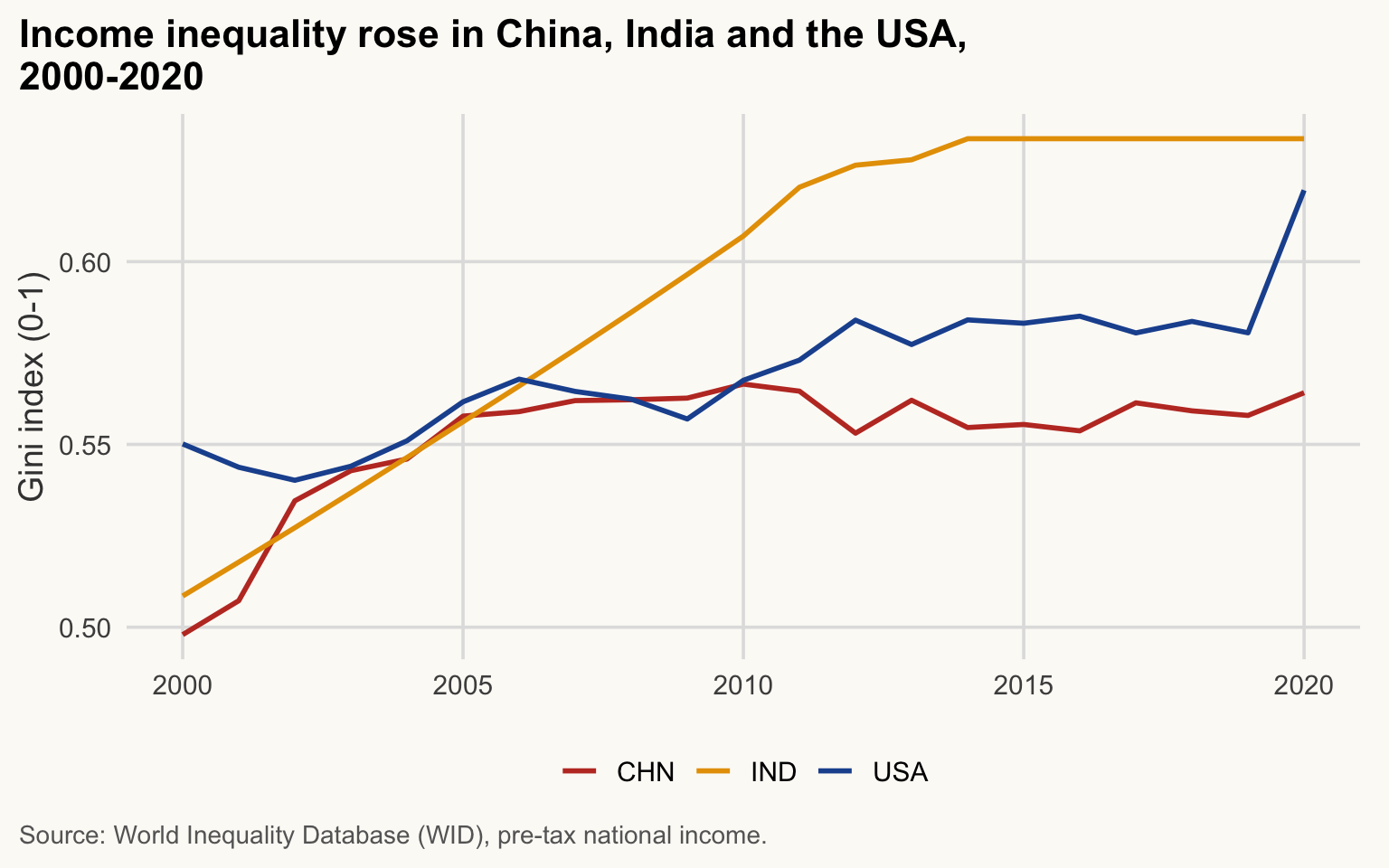
Read the chart as a check, not only as a result. India’s line is almost straight from 2000 to 2011 (about +0.01 every year), then perfectly flat from 2014 to 2020 (0.634 every year): these are WID interpolations, not yearly measurements, because India has few surveys. The US jump in 2020 (0.58 to 0.62) also deserves a look. Check the WID metadata before reading year-to-year changes.
ImportantThe checklist for any new file
- Open the raw text (
readLines(path, n = 10)) before reading it. - After the import:
nrow(),ncol(),glimpse(): do they match what you expect? -
problems(x)lists the cellsreadrcould not parse. - Check missing values and types (
summary()).
The cleaned file carries an iso3c code (country code). Notice that WID writes "USA" where the World Bank writes "United States": country names differ between sources. We will see in session 3 why you must join on codes, never on names.
5. Converting and cleaning values
≈ 20 min After this section you can turn text into numbers, keep codes as text, tidy labels, and find the values a conversion lost.
glimpse() tells you that a column has the wrong type. This section is about fixing it, and checking the fix. We use repair_me.csv: real World Bank values for six countries in 2015 and 2019, with problems planted on purpose. You will repair it completely in Session 3; here we practise one fix at a time.
repair <- read_csv(here("data", "raw", "repair_me.csv"), show_col_types = FALSE)
glimpse(repair)
Rows: 13
Columns: 5
$ country <chr> "Afghanistan", "Afghanistan", "Angola", "Angola", "Banglade…
$ iso_num <chr> "004", "004", "024", "024", "050", "050", "204", "204", "28…
$ year <dbl> 2015, 2019, 2015, 2019, 2015, 2019, 2015, 2019, 2015, 2019,…
$ gdp_pc_ppp <dbl> 2967.7, 2927.2, 11389.8, 9713.0, 5352.7, 6838.3, 2952.0, 32…
$ life_exp <chr> "62.3", "62.9", "61", "63.1", "70.5", "72.6", "n/a", "59.9"…Read the types. gdp_pc_ppp is <dbl>: readr understood that "2,967.7" is a number with a thousands separator. iso_num is <chr> and keeps "004". But life_exp is <chr>: at least one value in it is not a number. We come back to it at the end.
Numbers stored as text
Not every tool is as helpful as readr. Base R’s read.csv(), which you will meet in many answers online, reads the same file differently:
repair_base <- read.csv(here("data", "raw", "repair_me.csv"))
str(repair_base)
'data.frame': 13 obs. of 5 variables:
$ country : chr "Afghanistan" "Afghanistan" "Angola" "Angola" ...
$ iso_num : int 4 4 24 24 50 50 204 204 288 288 ...
$ year : int 2015 2019 2015 2019 2015 2019 2015 2019 2015 2019 ...
$ gdp_pc_ppp: chr "2,967.7" "2,927.2" "11,389.8" "9,713.0" ...
$ life_exp : chr "62.3" "62.9" "61" "63.1" ...gdp_pc_ppp is now text (chr). The reflex as.numeric() fails on every value, because of the comma:
as.numeric(repair_base$gdp_pc_ppp)Warning: NAs introduced by coercion [1] NA NA NA NA NA NA NA NA NA NA NA NA NAThirteen NA and one warning: NAs introduced by coercion. readr::parse_number() drops the thousands separator, and any text around the number:
parse_number(repair_base$gdp_pc_ppp) [1] 2967.7 2927.2 11389.8 9713.0 5352.7 6838.3 2952.0 3281.1 5607.4
[10] 6508.2 4679.6 5171.7 6508.2
WarningCommon mistake
parse_number() keeps the first number it finds and drops everything else: "12 km" and "12 miles" both become 12. Look at the text before you convert it. For French-style numbers ("2.967,7" or "2 967,7"), tell it which mark is which with locale =:
parse_number("12 km")[1] 12parse_number("2.967,7", locale = locale(decimal_mark = ",", grouping_mark = "."))[1] 2967.7Codes that must stay text
iso_num is the ISO numeric country code: Afghanistan is "004". A code is a label, not a quantity: you never add two codes, but you join tables on them. read.csv() turned it into a number, and the zeros are gone:
repair_base$iso_num [1] 4 4 24 24 50 50 204 204 288 288 404 404 2884 will never match "004" in another file. With readr, declare the type instead of trusting the guess:
repair_codes <- read_csv(here("data", "raw", "repair_me.csv"),
                         col_types = cols(iso_num = col_character()))
repair_codes$iso_num
[1] "004" "004" "024" "024" "050" "050" "204" "204" "288" "288" "404" "404"
[13] "288"Here the guess was already right (the version of readr used for this page keeps values with leading zeros as text), but a guess depends on the version and on the first 1000 rows. col_types = writes the rule down: the same script gives the same result on every computer.
Spaces and case in labels
read_csv() silently removes spaces at the ends of each value (its argument trim_ws = TRUE); read.csv() keeps them. unique() prints each value in quotes, so you can see them:
unique(repair$country) # read_csv(): spaces removed, case problem left[1] "Afghanistan" "Angola" "Bangladesh" "Benin" "Ghana"
[6] "kenya" "KENYA" unique(repair_base$country) # read.csv(): both problems[1] "Afghanistan" "Angola" "Bangladesh" "Benin" "Ghana"
[6] " kenya" "KENYA " For R, " kenya" and "KENYA " are two different countries, and neither is "Kenya". str_squish() removes spaces at both ends (and doubled spaces inside); str_to_title() puts a capital at the start of each word:
str_squish(c(" kenya", "KENYA ", "Burkina Faso"))[1] "kenya" "KENYA" "Burkina Faso"unique(str_to_title(str_squish(repair_base$country)))[1] "Afghanistan" "Angola" "Bangladesh" "Benin" "Ghana"
[6] "Kenya" Six names for six countries. (We only print the result: the table itself is repaired in Session 3.)
WarningCommon mistake
Running str_to_title() on names that were already right. It does not know country names:
str_to_title(c("Côte d'Ivoire", "United States of America"))[1] "Côte D'ivoire" "United States Of America"Check with unique() after every cleaning step, and fix the exceptions one by one (Section 6 shows how). Better still, match countries on codes, not on names.
Missing values created by a conversion
Back to life_exp. Count the missing values before and after converting:
sum(is.na(repair$life_exp)) # before[1] 0life_num <- as.numeric(repair$life_exp)Warning: NAs introduced by coercionsum(is.na(life_num)) # after[1] 1One NA appeared that was not in the file. To find it, keep the rows where the text was present but the number is missing:
repair |>
  mutate(life_num = as.numeric(life_exp)) |>
  filter(!is.na(life_exp), is.na(life_num)) |>
  select(country, year, life_exp, life_num)
# A tibble: 1 × 4
country year life_exp life_num
<chr> <dbl> <chr> <dbl>
1 Benin 2015 n/a NABenin 2015 is written "n/a". Now decide. If it were a typo ("6l.2"), you would look up the right value at the source. Here "n/a" is the provider’s way to write “missing”, so declare it at import with na =:
repair_na <- read_csv(here("data", "raw", "repair_me.csv"),
                      na = c("", "NA", "n/a"), show_col_types = FALSE)
class(repair_na$life_exp)
[1] "numeric"sum(is.na(repair_na$life_exp))[1] 1life_exp is now numeric, with one NA that we chose. na = replaces the default c("", "NA"), so keep those two in the list.
ImportantKey idea
A conversion can turn a value into NA with only a warning, or with none at all. Count NA before and after every conversion: each new NA must have an explanation.
The file still has a problem we have not touched; Session 3’s “Repair this analysis” exercise puts all the fixes together. Practise now with Exercise 2.6.
6. Strings and dates: a small worked example (Optional: going further)
≈ 20 min After this section you can harmonise country labels, turn date text into real dates, and find the dates that failed.
This section is not needed for the next sessions: do it if you finish early, or at home. Annual WDI data have no dates, but survey data do. Here is a small table of household interviews, typed by different enumerators:
interviews <- tibble(
  country   = c("Senegal", "senegal ", "Côte d'Ivoire", "Cote d'Ivoire", "IVORY COAST", " Ghana"),
  interview = c("15/03/2019", "02/11/2019", "30/06/2020", "31/02/2020", "14/07/2020", "03/12/2019")
)
interviews
# A tibble: 6 × 2
country interview
<chr> <chr>
1 "Senegal" 15/03/2019
2 "senegal " 02/11/2019
3 "Côte d'Ivoire" 30/06/2020
4 "Cote d'Ivoire" 31/02/2020
5 "IVORY COAST" 14/07/2020
6 " Ghana" 03/12/2019Labels. First the two steps of Section 5, spaces then case. Then one case_when() (taught in Session 3: read it as “if … then …”) gathers the variant names, including the one str_to_title() damaged:
interviews <- interviews |>
  mutate(
    country = str_to_title(str_squish(country)),
    country = case_when(
      country %in% c("Côte D'ivoire", "Cote D'ivoire", "Ivory Coast") ~ "Côte d'Ivoire",
      .default = country   # every other label stays as it is
    )
  )
count(interviews, country)
# A tibble: 3 × 2
country n
<chr> <int>
1 Côte d'Ivoire 3
2 Ghana 1
3 Senegal 2Three countries, as expected.
Dates. In Section 2, yq() turned "2022-Q2" into a date. Every lubridate parser is named after the order of the parts in the text: y year, m month, d day, q quarter.
ymd("2019-03-15")[1] "2019-03-15"dmy("15/03/2019")[1] "2019-03-15"my("03/2019")[1] "2019-03-01"yq("2019-Q1")[1] "2019-01-01"All four return a Date. Our interviews are written day/month/year, so we use dmy(), then extract the year with year():
interviews <- interviews |>
  mutate(date = dmy(interview), year = year(date))
Warning: There was 1 warning in `mutate()`.
ℹ In argument: `date = dmy(interview)`.
Caused by warning:
! 1 failed to parse.interviews# A tibble: 6 × 4
country interview date year
<chr> <chr> <date> <dbl>
1 Senegal 15/03/2019 2019-03-15 2019
2 Senegal 02/11/2019 2019-11-02 2019
3 Côte d'Ivoire 30/06/2020 2020-06-30 2020
4 Côte d'Ivoire 31/02/2020 NA NA
5 Côte d'Ivoire 14/07/2020 2020-07-14 2020
6 Ghana 03/12/2019 2019-12-03 2019The warning 1 failed to parse means that one text could not be read as a date. As in Section 5, find it with is.na():
interviews |> filter(is.na(date))# A tibble: 1 × 4
country interview date year
<chr> <chr> <date> <dbl>
1 Côte d'Ivoire 31/02/2020 NA NAThe 31st of February does not exist: an entry error. Do not guess the right day; ask the source (questionnaire, survey team), or keep the NA and say so.
WarningCommon mistake
"02/11/2019" is 2 November with dmy() but 11 February with mdy(), and both run without any warning. lubridate cannot know which convention the source used: read its documentation (US sources often put the month first), and check that range(interviews$date, na.rm = TRUE) falls inside the fieldwork period.
Practise with Exercise 2.7 (optional).
7. Writing files
≈ 25 min After this section you can save a result in the format that suits its reader.
Create the output/ folder (nothing happens if it already exists), then write there.
dir.create(here("output"), showWarnings = FALSE)Text files. write_csv() writes a comma-separated file, write_delim() any delimiter:
write_csv(wid_gini, here("output", "wid_gini_copy.csv"))
write_delim(wid_gini, here("output", "wid_gini_tab.txt"), delim = "\t")
Excel. writexl::write_xlsx() writes one sheet from a data frame, or several sheets from a named list; the names become the sheet names:
write_xlsx(wid_gini, here("output", "wid_gini.xlsx"))

write_xlsx(
  list(wid_clean = wid_gini, scim_sample = head(scim, 100)),
  here("output", "two_sheets.xlsx")
)
excel_sheets(here("output", "two_sheets.xlsx"))
[1] "wid_clean" "scim_sample"R’s own format: .rds. A CSV loses information (column types, factor levels). saveRDS() stores one R object exactly as it is; readRDS() restores it.
saveRDS(wid_gini, here("output", "wid_gini.rds"))
wid_back <- readRDS(here("output", "wid_gini.rds"))
all.equal(wid_gini, wid_back)   # TRUE: same values, types and names
[1] TRUE
ImportantKey idea
Your raw data never changes; your outputs can always be regenerated by re-running the script. If you can delete output/ and rebuild it, your work is reproducible.
When to use what?
| Format | Use it when |
|---|---|
.csv |
sharing with others or other software; the file must be readable anywhere |
.xlsx |
the recipient works in Excel (several tables in one file) |
.rds |
you want to reload the object in R exactly as it was (intermediate results) |
8. Data from packages: the World Bank
≈ 25 min After this section you can fetch World Bank data with WDI() and explain why we read a cached copy.
Many institutions provide an R package to fetch their data directly. The WDI package queries the World Bank’s World Development Indicators. Each indicator has a code, e.g. NY.GDP.MKTP.CD = GDP in current US dollars. Find a code with WDIsearch():
WDIsearch("gdp per capita") # needs InternetFetching GDP for the USA, China and India looks like this:
gdp_api <- WDI(
  country   = c("US", "CN", "IN"),     # ISO-2 codes
  indicator = c(gdp = "NY.GDP.MKTP.CD"),  # new_name = indicator code
  start = 2000, end = 2020
)
This chunk is not evaluated when this page is built: it needs an Internet connection and the World Bank server may be slow or change its data. Instead, the course uses a cached copy saved once by R/00_prepare_data.R.
NoteWhy cache data?
- Reproducibility: the World Bank revises its series. Today’s call may give different numbers than last year’s.
- Robustness: no Internet, no download, no failure. Your classroom Wi-Fi is not a dependency.
- Speed: calling an API at every run is slow.
Good practice: fetch once, save the file in your project, read the file afterwards, and note the download date.
wdi3 <- read_csv(here("data", "wdi_3countries.csv"), show_col_types = FALSE)
glimpse(wdi3)
Rows: 63
Columns: 4
$ country <chr> "China", "China", "China", "China", "China", "China", "China",…
$ iso3c <chr> "CHN", "CHN", "CHN", "CHN", "CHN", "CHN", "CHN", "CHN", "CHN",…
$ year <dbl> 2000, 2001, 2002, 2003, 2004, 2005, 2006, 2007, 2008, 2009, 20…
$ gdp <dbl> 1.223755e+12, 1.355037e+12, 1.489822e+12, 1.683903e+12, 1.9841…We also have a larger panel: all countries, 2000–2023, six indicators. It will be our main dataset from session 3.
wdi_panel <- read_csv(here("data", "wdi_panel.csv"), show_col_types = FALSE)
glimpse(wdi_panel)
Rows: 5,208
Columns: 11
$ country <chr> "Afghanistan", "Afghanistan", "Afghanistan", "Afghanistan"…
$ iso3c <chr> "AFG", "AFG", "AFG", "AFG", "AFG", "AFG", "AFG", "AFG", "A…
$ year <dbl> 2000, 2001, 2002, 2003, 2004, 2005, 2006, 2007, 2008, 2009…
$ region <chr> "Middle East, North Africa, Afghanistan & Pakistan", "Midd…
$ income <chr> "Low income", "Low income", "Low income", "Low income", "L…
$ gdp <dbl> 3521418060, 2813571754, 3825701439, 4520946819, 5224896719…
$ gdp_pc_ppp <dbl> 1617.826, 1454.111, 1774.309, 1815.928, 1776.918, 1908.115…
$ population <dbl> 20130327, 20284307, 21378117, 22733049, 23560654, 24404567…
$ life_exp <dbl> 55.005, 55.511, 56.225, 57.171, 57.810, 58.247, 58.553, 58…
$ gini <dbl> NA, NA, NA, NA, NA, NA, NA, NA, NA, NA, NA, NA, NA, NA, NA…
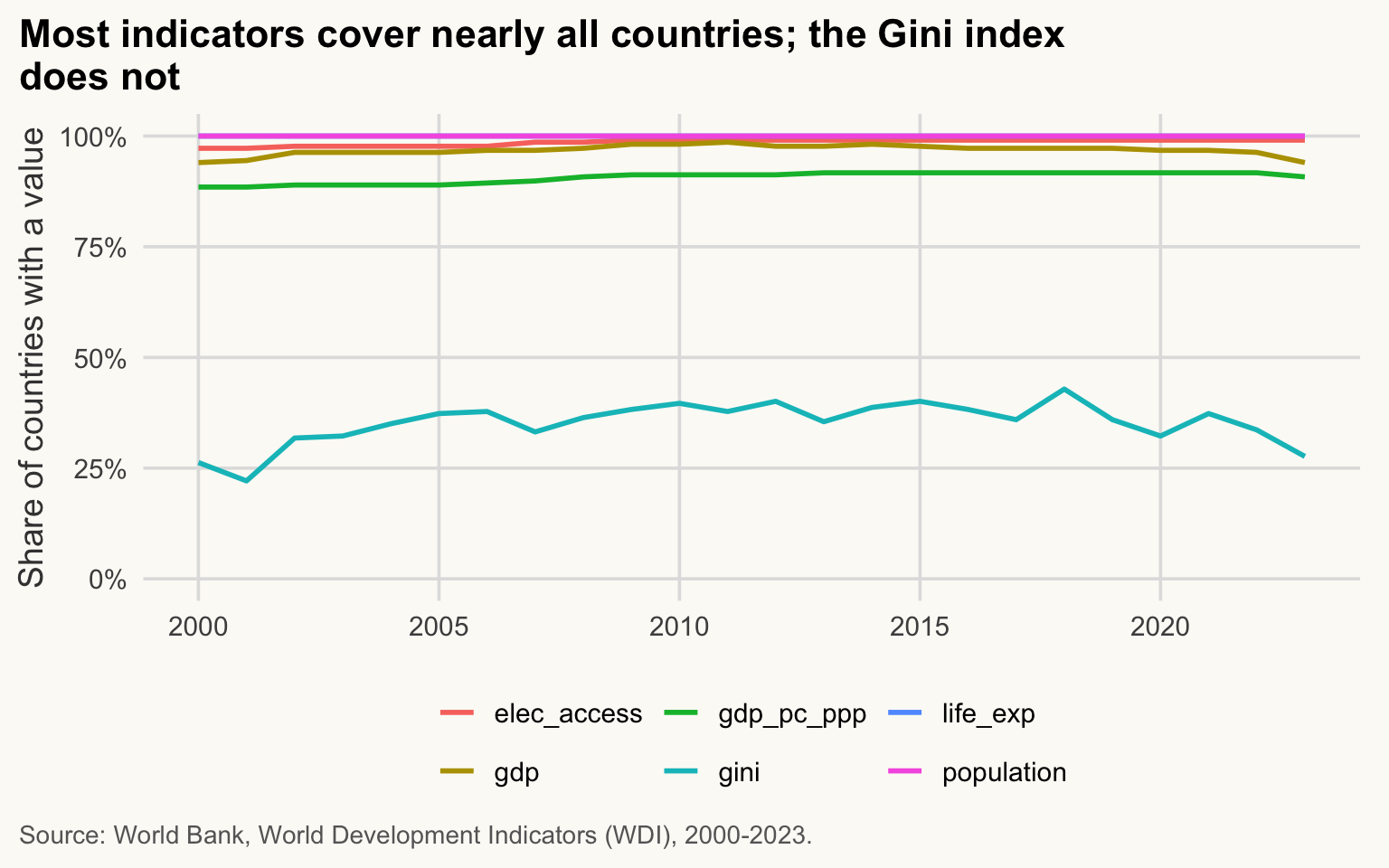
$ elec_access <dbl> 4.4, 9.3, 14.1, 19.0, 23.8, 28.7, 33.5, 38.4, 42.4, 48.3, …Before using a panel, ask: how much of it is actually observed? The chart below shows, for each indicator and year, the share of countries with a non-missing value. (Lines near 100% overlap: population and life_exp are fully observed.)
Show the chart code (taught in Session 5)
wdi_panel |>
  summarise(across(c(gdp, gdp_pc_ppp, population, life_exp, gini, elec_access),
                   \(x) mean(!is.na(x))),
            .by = year) |>
  pivot_longer(-year, names_to = "indicator", values_to = "share_observed") |>
  ggplot(aes(x = year, y = share_observed, colour = indicator)) +
  geom_line(linewidth = 1) +
  scale_y_continuous(labels = label_percent(), limits = c(0, 1)) +
  labs(
    title = str_wrap("Most indicators cover nearly all countries; the Gini index does not", 60),
    x = NULL, y = "Share of countries with a value", colour = NULL,
    caption = str_wrap("Source: World Bank, World Development Indicators (WDI), 2000-2023.", 95)
  )
WarningCommon mistake
Averaging or comparing an indicator without checking its coverage. If the Gini index is observed for under half of the countries in a year, any “world average” describes a selected group (countries that run household surveys), not the world.
NoteWhy it matters for development economics
Missing data in WDI is not random: low-income and fragile countries are the ones with the fewest observations. Checking coverage first tells you whom your results are about.
9. A first look at the data (Optional: going further)
≈ 5 min After this section you have seen what a clean import lets you do next.
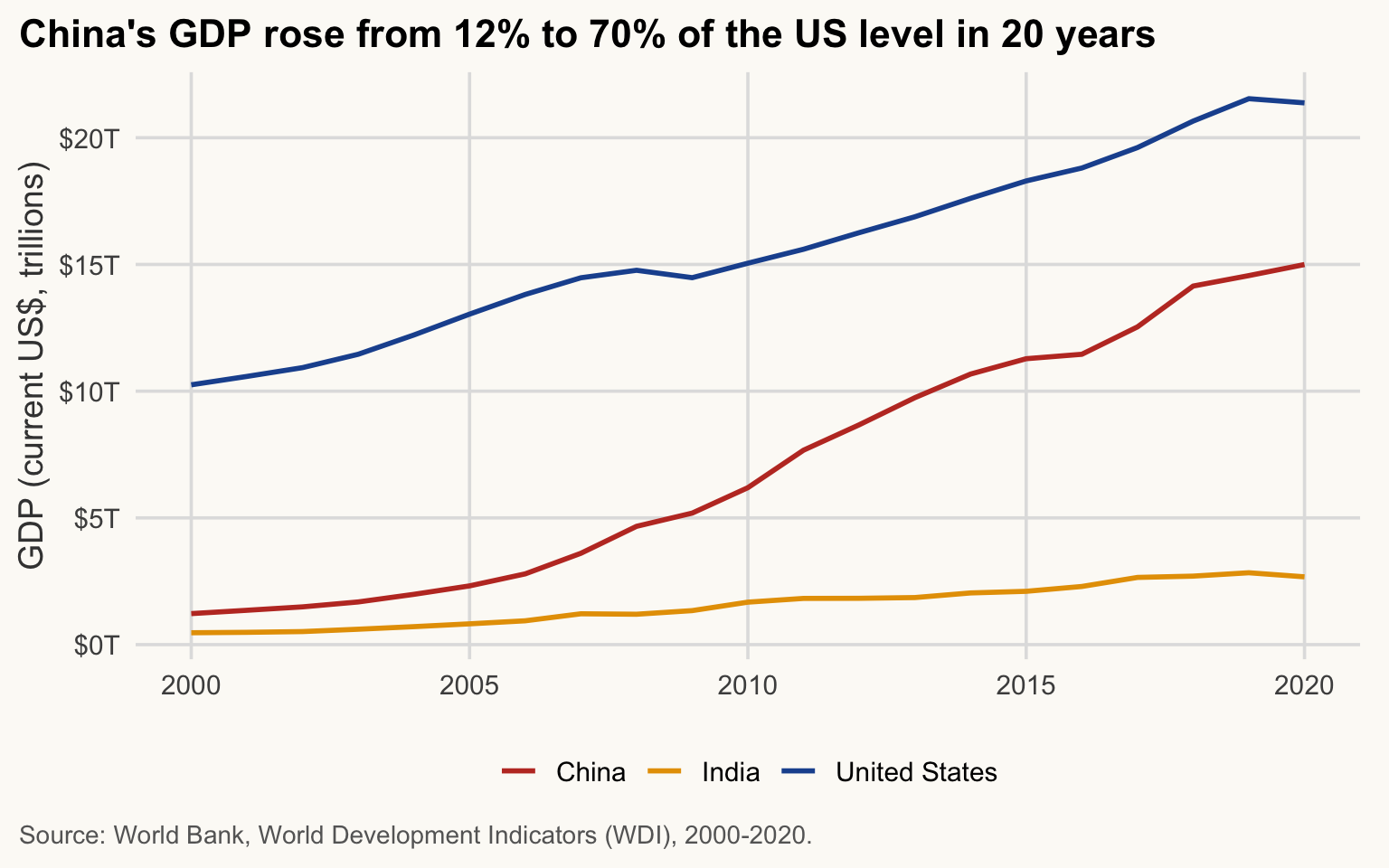
Just to see where we are going (session 5 explains each line; for now, copy the pattern): GDP of the three countries.
ggplot(wdi3, aes(x = year, y = gdp, colour = country)) +
  geom_line(linewidth = 1) +
  scale_y_continuous(labels = label_dollar(scale = 1e-12, suffix = "T")) +
  scale_colour_manual(values = c(China = pal_cours[["accent"]],
                                 India = "#E69F00",
                                 `United States` = pal_cours[["principal"]])) +
  labs(
    title = "China's GDP rose from 12% to 70% of the US level in 20 years",
    x = NULL, y = "GDP (current US$, trillions)", colour = NULL,
    caption = "Source: World Bank, World Development Indicators (WDI), 2000-2020."
  )
10. Exercises (≈ 25 min, plus ≈ 20 min optional)
TipExercise 2.1
Import data/raw/SCIM.csv. Clean the column names, keep only location, time, subject and value, and display the first 6 rows. How many distinct countries (location) are there?
NoteShow solution
ex1 <- read_csv(here("data", "raw", "SCIM.csv"), show_col_types = FALSE) |>
  clean_names() |>
  select(location, time, subject, value)

head(ex1)
# A tibble: 6 × 4
location time subject value
<chr> <chr> <chr> <dbl>
1 ISR 2022-Q2 XTEXVA01 17.2
2 ISR 2022-Q3 XTEXVA01 17.2
3 ISR 2022-Q4 XTEXVA01 16.5
4 ISR 2023-Q1 XTEXVA01 14.0
5 ISR 2023-Q2 XTEXVA01 15.5
6 ISR 2023-Q3 XTEXVA01 15.7n_distinct(ex1$location)[1] 49
TipExercise 2.2
From data/raw/SCIM.xlsx, read sheet Sheet1, but only the cells A1:C11 (country and the first two months). Which country has the highest value in the first month column?
NoteShow solution
ex2 <- read_excel(here("data", "raw", "SCIM.xlsx"), sheet = "Sheet1", range = "A1:C11")
ex2
# A tibble: 10 × 3
Pays `Août-2022` `Sept-2022`
<chr> <dbl> <dbl>
1 Australie 35.2 36.0
2 Autriche 17.3 17.2
3 Belgique 55.1 54.2
4 Canada 50.9 49.6
5 Chili 8.07 8.34
6 Colombie 4.29 4.68
7 Costa Rica 1.60 1.53
8 Tchéquie 20.3 19.9
9 Danemark 10.8 10.7
10 Estonie 1.85 1.78ex2 |> slice_max(`Août-2022`, n = 1) # backticks: accent and dash in the name# A tibble: 1 × 3
Pays `Août-2022` `Sept-2022`
<chr> <dbl> <dbl>
1 Belgique 55.1 54.2
TipExercise 2.3
Write ex2 to output/ as a CSV file and as an Excel file with two sheets (ex2 and ex1_head, the latter being the first 20 rows of ex1). Check that the files exist.
NoteShow solution
write_csv(ex2, here("output", "ex2.csv"))
write_xlsx(list(ex2 = ex2, ex1_head = head(ex1, 20)),
           here("output", "ex2_sheets.xlsx"))

file.exists(here("output", c("ex2.csv", "ex2_sheets.xlsx")))
[1] TRUE TRUE
TipExercise 2.4 (Optional: going further)
Write the WDI() call that would fetch total population (SP.POP.TOTL) for Japan, Germany and Brazil from 2000 to 2020. (You cannot run it in class without Internet: write it only.)
NoteShow solution
pop_api <- WDI(
  country   = c("JP", "DE", "BR"),
  indicator = c(population = "SP.POP.TOTL"),
  start = 2000, end = 2020
)
# then save it once, so that you never have to call the API again:
dir.create(here("output"), showWarnings = FALSE)
write_csv(pop_api, here("output", "pop_3countries.csv"))
WDI() takes ISO-2 country codes (or "all"), a named vector of indicators (new_name = code) and a period. The result has one row per country-year.
TipExercise 2.5 (Optional: going further)
Using the cached panel wdi_panel, compute the average population (in millions) of Japan, Germany and Brazil over 2000–2020.
NoteShow solution
wdi_panel |>
  filter(country %in% c("Japan", "Germany", "Brazil"), year <= 2020) |>
  summarise(mean_pop_millions = mean(population, na.rm = TRUE) / 1e6,
            .by = country)
# A tibble: 3 × 2
country mean_pop_millions
<chr> <dbl>
1 Brazil 193.
2 Germany 82.1
3 Japan 127.
TipExercise 2.6: from text to numbers
Someone typed these amounts by hand:
x <- c(" 12", "1,200", "n/a", "7 ")- Run
as.numeric(x). How manyNAdo you get? Which one is a real missing value, and which one is a conversion failure? - Convert
xwithparse_number(). Which value is now right? - Tell
parse_number()that"n/a"means missing (argumentna =). Check withsum(is.na())that exactly oneNAremains, and that the warning has gone.
NoteShow solution
as.numeric(x) # spaces are fine; the comma and "n/a" are notWarning: NAs introduced by coercion[1] 12 NA NA 7sum(is.na(as.numeric(x)))Warning: NAs introduced by coercion[1] 2parse_number(x) # 1200 is right; "n/a" still gives a warningWarning: 1 parsing failure.
row col expected actual
3 -- a number n/a[1] 12 1200 NA 7
attr(,"problems")
# A tibble: 1 × 4
row col expected actual
<int> <int> <chr> <chr>
1 3 NA a number n/a parse_number(x, na = "n/a") # "n/a" declared missing: no warning[1] 12 1200 NA 7sum(is.na(parse_number(x, na = "n/a")))[1] 1as.numeric() gives two NA: "n/a" is a real missing value, "1,200" is a conversion failure. parse_number() reads "1,200" as 1200. Once "n/a" is declared with na =, the only NA left is the one you expected.
TipExercise 2.7 (Optional: going further)
Field visits, one row per visit, with the month typed as month/year:
visits <- tibble(
  country = c("Gambia, The", "the  gambia", "THE GAMBIA ", "Senegal", "senegal"),
  month   = c("03/2018", "11/2018", "13/2019", "06/2019", "09/2019")
)- Clean
countryso that there are exactly two names,"The Gambia"and"Senegal". - Turn
monthinto a date with the rightlubridatefunction. Which row fails, and why? - Add the year and count the visits by country and year.
NoteShow solution
visits <- visits |>
  mutate(
    country = str_to_title(str_squish(country)),
    country = case_when(country == "Gambia, The" ~ "The Gambia",   # World Bank spelling
                        .default = country),
    date = my(month),
    year = year(date)
  )
Warning: There was 1 warning in `mutate()`.
ℹ In argument: `date = my(month)`.
Caused by warning:
! 1 failed to parse.visits |> filter(is.na(date)) # month 13 does not exist# A tibble: 1 × 4
country month date year
<chr> <chr> <date> <dbl>
1 The Gambia 13/2019 NA NAvisits |> count(country, year)# A tibble: 3 × 3
country year n
<chr> <dbl> <int>
1 Senegal 2019 2
2 The Gambia 2018 2
3 The Gambia NA 1my() reads month then year. "13/2019" fails to parse: there is no 13th month. Its year is NA too, so the count shows one visit to The Gambia with an unknown year: report it, do not drop it silently.
Key takeaways
- Never use
setwd()or absolute paths:here::here()works on every machine. -
data/raw/is read-only. Everything you produce goes tooutput/. - Look at the raw text of a file before reading it, and check
nrow(),glimpse()andproblems()after. -
read_csv()for commas,read_delim()for other separators (skip =,col_names =);read_excel()withsheet =andrange =. -
clean_names()makes column names usable; duplicated columns and text dates are common in real data. - Numbers stored as text:
parse_number(), notas.numeric(). Codes stay text:col_types = cols(code = col_character()). Labels:str_squish(), then check withunique(). - Count
NAbefore and after every conversion; declare the provider’s missing codes at import withna = c("", "NA", "n/a"). - Dates: the
lubridatefunction follows the order in the text (dmy(),ymd(),my(),yq()); afailed to parsewarning meansNAto find withis.na(). - Write with
write_csv(),write_xlsx()(a named list gives several sheets) andsaveRDS()to keep R objects exactly. - Cache API data (
WDI) in a file: reproducible, offline, fast.