Sys.setenv(LANGUAGE = "en")   # R messages in English
library(tidyverse)   # dplyr, tidyr, forcats, ggplot2, readr...
library(here)
source(here("R", "theme_cours.R"))

wdi <- read_csv(here("data", "wdi_panel.csv"), show_col_types = FALSE)
# CAF life expectancy is unreliable in this WDI release (14.7 in 2009, 18.8 in 2022): exclude every year
wdi <- wdi |> mutate(life_exp = if_else(iso3c == "CAF", NA_real_, life_exp))Session 3: Data manipulation (dplyr, tidyr, joins)
dplyr, tidyr and joins: from a raw table to the table you need
Session objectives
- Chain operations with the pipe
|>and use the maindplyrverbs:filter,select,arrange,mutate,rename,summarise. - Create variables with
case_when()andif_else(); order categories with factors. - Handle missing values explicitly and always report the number of observations (N).
- Reshape a table between wide and long format with
tidyr. - Combine tables with joins, and detect a join that silently loses observations.
- Find the broken step of a pipeline by running it one step at a time.
- Write a simple function of your own.
- Repair a messy file in a script, and rerun the whole analysis from a fresh R session.
Prepare your R session
Packages used today: tidyverse, here. If one is missing: install.packages(c("tidyverse", "here")).
Script of this session: download seance-3.R, all the code of this page in one file.
The question that runs through the course: “Growth, health and inequality: what do the data say about developing countries?” Today we use the World Bank panel (all countries, 2000-2023) and learn to cut it into the pieces we need.
glimpse(wdi)Rows: 5,208
Columns: 11
$ country <chr> "Afghanistan", "Afghanistan", "Afghanistan", "Afghanistan"…
$ iso3c <chr> "AFG", "AFG", "AFG", "AFG", "AFG", "AFG", "AFG", "AFG", "A…
$ year <dbl> 2000, 2001, 2002, 2003, 2004, 2005, 2006, 2007, 2008, 2009…
$ region <chr> "Middle East, North Africa, Afghanistan & Pakistan", "Midd…
$ income <chr> "Low income", "Low income", "Low income", "Low income", "L…
$ gdp <dbl> 3521418060, 2813571754, 3825701439, 4520946819, 5224896719…
$ gdp_pc_ppp <dbl> 1617.826, 1454.111, 1774.309, 1815.928, 1776.918, 1908.115…
$ population <dbl> 20130327, 20284307, 21378117, 22733049, 23560654, 24404567…
$ life_exp <dbl> 55.005, 55.511, 56.225, 57.171, 57.810, 58.247, 58.553, 58…
$ gini <dbl> NA, NA, NA, NA, NA, NA, NA, NA, NA, NA, NA, NA, NA, NA, NA…
$ elec_access <dbl> 4.4, 9.3, 14.1, 19.0, 23.8, 28.7, 33.5, 38.4, 42.4, 48.3, …Each row is a country-year: 217 countries, 24 years, 5,208 rows.
The setup already applies one correction: the life expectancy of the Central African Republic (CAF) is set to missing (NA) for every year, because this release of the series is unreliable (Session 4 shows it). So the summaries of life_exp below use na.rm = TRUE, which skips missing values; we explain it in the section on missing values.
Pacing. The core path takes about 190 minutes, exercises included. Exercises 3.3 to 3.7 are marked Optional: going further and add about 45 minutes: do them if time allows, or at home.
The pipe and the main verbs
≈ 35 min After this section you can write a chain of dplyr verbs that filters, selects, sorts and creates variables.
The pipe |>
The pipe takes what is on its left and passes it as the first argument of the function on its right. Read it as “and then”.
flowchart LR
  A[wdi] --> B["filter(year == 2020)"]
  B --> C["select(country, life_exp)"]
  C --> D["arrange(desc(life_exp))"]
  D --> E[Result table]
Pipe (|>): an operator that sends the result on its left into the first argument of the function on its right. x |> f(y) is the same as f(x, y).
# Without the pipe: read from the inside out
head(arrange(filter(wdi, year == 2020), desc(life_exp)), 3)
# A tibble: 3 × 11
country iso3c year region income gdp gdp_pc_ppp population life_exp gini
<chr> <chr> <dbl> <chr> <chr> <dbl> <dbl> <dbl> <dbl> <dbl>
1 Monaco MCO 2020 Europ… High … 6.73e 9 NA 38050 86.1 NA
2 Hong K… HKG 2020 East … High … 3.45e11 61329. 7481000 85.5 NA
3 Japan JPN 2020 East … High … 5.19e12 44213. 126261000 84.6 32.3
# ℹ 1 more variable: elec_access <dbl># With the pipe: read from top to bottom
wdi |>
filter(year == 2020) |>
arrange(desc(life_exp)) |>
head(3)# A tibble: 3 × 11
country iso3c year region income gdp gdp_pc_ppp population life_exp gini
<chr> <chr> <dbl> <chr> <chr> <dbl> <dbl> <dbl> <dbl> <dbl>
1 Monaco MCO 2020 Europ… High … 6.73e 9 NA 38050 86.1 NA
2 Hong K… HKG 2020 East … High … 3.45e11 61329. 7481000 85.5 NA
3 Japan JPN 2020 East … High … 5.19e12 44213. 126261000 84.6 32.3
# ℹ 1 more variable: elec_access <dbl>
ImportantKey idea
Every dplyr verb takes a table and returns a table. That is why they chain: one verb per line, read top to bottom as “and then”.
Note
Older code online uses the %>% pipe from the magrittr package. It does almost the same thing. Both work; in this course we use the native |>.
filter(): keep rows
filter() keeps the rows where the condition is TRUE. Several conditions separated by a comma mean “and”; use | for “or” and %in% for “one of”.
wdi |>
  filter(year == 2020, region == "South Asia") |>
  select(country, life_exp, gdp_pc_ppp)
# A tibble: 6 × 3
country life_exp gdp_pc_ppp
<chr> <dbl> <dbl>
1 Bangladesh 71.4 7015.
2 Bhutan 72.3 12980.
3 India 70.2 7187.
4 Maldives 78.7 14243.
5 Nepal 69.1 4413.
6 Sri Lanka 76.9 13887.wdi |>
filter(year == 2020, iso3c %in% c("FRA", "DEU", "ESP")) |>
select(country, life_exp)# A tibble: 3 × 2
country life_exp
<chr> <dbl>
1 France 82.2
2 Germany 81.0
3 Spain 82.2Comparison operators: == (equal; never a single =), !=, <, <=, >, >=.
select(): keep columns
WarningCommon mistake
Confusing the two: filter() works on rows (conditions on values), select() works on columns (names). If R says “object not found” inside filter(), check that you did not drop the column with an earlier select().
wdi |> select(country, year, life_exp) |> head(3)# A tibble: 3 × 3
country year life_exp
<chr> <dbl> <dbl>
1 Afghanistan 2000 55.0
2 Afghanistan 2001 55.5
3 Afghanistan 2002 56.2# Helpers: select columns by pattern or by type
wdi |> select(country, starts_with("gdp")) |> head(3)# A tibble: 3 × 3
country gdp gdp_pc_ppp
<chr> <dbl> <dbl>
1 Afghanistan 3521418060. 1618.
2 Afghanistan 2813571754. 1454.
3 Afghanistan 3825701439. 1774.wdi |> select(contains("_")) |> head(3)# A tibble: 3 × 3
gdp_pc_ppp life_exp elec_access
<dbl> <dbl> <dbl>
1 1618. 55.0 4.4
2 1454. 55.5 9.3
3 1774. 56.2 14.1wdi |> select(where(is.numeric)) |> names()[1] "year" "gdp" "gdp_pc_ppp" "population" "life_exp"
[6] "gini" "elec_access"select(-gini) drops a column. select() can also reorder: select(iso3c, country, everything()).
arrange(): sort rows
wdi |>
  filter(year == 2020) |>
  arrange(desc(gdp_pc_ppp)) |>   # desc() = largest first
  select(country, gdp_pc_ppp) |>
  head(5)
# A tibble: 5 × 2
country gdp_pc_ppp
<chr> <dbl>
1 Luxembourg 129866.
2 Singapore 116684.
3 Qatar 103062.
4 Ireland 101793.
5 Norway 89012.
mutate() and rename(): create and rename columns
wdi |>
  filter(year == 2020) |>
  mutate(gdp_bn = gdp / 1e9,                      # GDP in billions of US$
         pop_m  = population / 1e6) |>            # population in millions
  select(country, gdp_bn, pop_m) |>
  arrange(desc(gdp_bn)) |>
  head(3)
# A tibble: 3 × 3
country gdp_bn pop_m
<chr> <dbl> <dbl>
1 United States 21375. 332.
2 China 14996. 1411.
3 Japan 5189. 126.rename(new_name = old_name) changes a column name:
wdi |> rename(life_expectancy = life_exp) |> names() [1] "country" "iso3c" "year" "region"
[5] "income" "gdp" "gdp_pc_ppp" "population"
[9] "life_expectancy" "gini" "elec_access"
if_else() and case_when(): conditional variables
if_else(condition, value_if_true, value_if_false) handles two cases; case_when() handles as many as you want. Conditions are tested in order; the first TRUE wins; .default catches the rest.
wdi_2020 <- wdi |>
  filter(year == 2020) |>
  mutate(
    high_life = if_else(life_exp >= 75, "75+ years", "under 75"),
    elec_level = case_when(
      elec_access >= 99 ~ "universal (99%+)",
      elec_access >= 80 ~ "high (80-99%)",
      elec_access >= 50 ~ "medium (50-80%)",
      elec_access <  50 ~ "low (<50%)",
      .default = "no data"
    )
  )

wdi_2020 |> count(elec_level)
# A tibble: 5 × 2
elec_level n
<chr> <int>
1 high (80-99%) 31
2 low (<50%) 26
3 medium (50-80%) 23
4 no data 2
5 universal (99%+) 135Show the chart code (taught in Session 5)
wdi_2020 |>
  count(elec_level) |>
  ggplot(aes(x = n, y = fct_reorder(elec_level, n))) +
  geom_col(fill = pal_cours[["principal"]]) +
  labs(title = "Most countries have near-universal electricity access",
       x = "Number of countries, 2020", y = NULL,
       caption = "Source: World Bank, World Development Indicators (WDI), 2020.")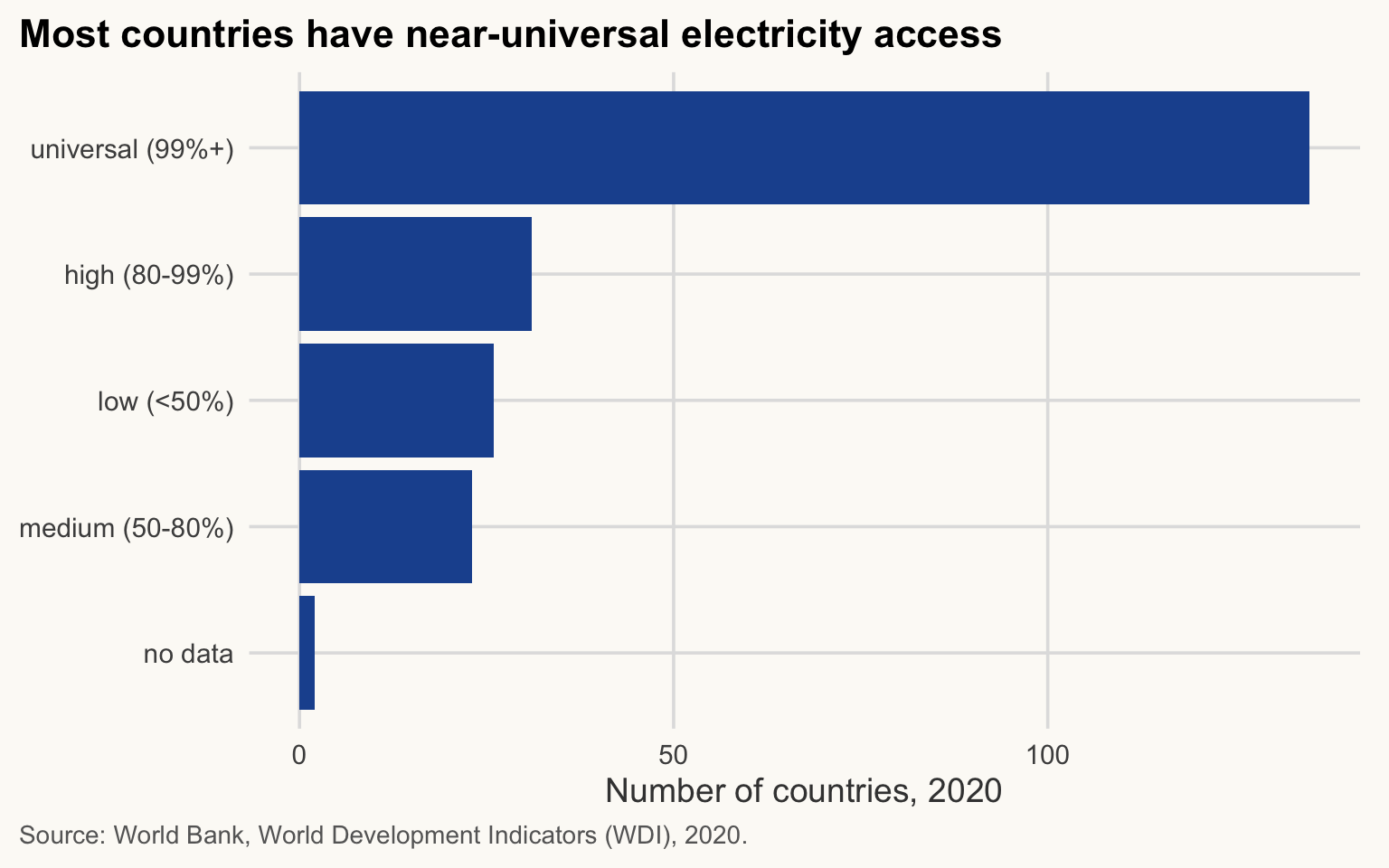
NoteIn plain words
case_when() is a sorting machine: each country goes through the questions from top to bottom and stops at the first “yes”. That is why the order of the conditions matters.
count() is a shortcut for “group and count the rows”. We come back to it below.
Debugging a pipeline, one step at a time
≈ 15 min After this section you can find the broken step of a pipeline by running it piece by piece, and read what an error message tells you.
A pipeline fails as a whole, but it breaks at one step. This one should list the Sub-Saharan African countries in 2020 with their life expectancy and GDP per capita. It contains three mistakes:
wdi |>
  filter(year = 2020, region == "Sub-Saharan africa") |>
  select(country, life_exp, gdp_pc) |>
  arrange(desc(life_exp))
Error in `filter()`:
! We detected a named input.
ℹ This usually means that you've used `=` instead of `==`.
ℹ Did you mean `year == 2020`?Read the error message
Read the message from the top. The first line names the verb that failed (filter()). The line starting with ! says what went wrong. The lines starting with ℹ often suggest the fix: here R even guesses that we meant year == 2020.
R stops at the first error. Fix it and run again:
wdi |>
  filter(year == 2020, region == "Sub-Saharan africa") |>
  select(country, life_exp, gdp_pc) |>
  arrange(desc(life_exp))
Error in `select()`:
! Can't select columns that don't exist.
✖ Column `gdp_pc` doesn't exist.Now select() fails: the column gdp_pc does not exist. names(wdi) lists the exact names; the column is called gdp_pc_ppp.
wdi |>
  filter(year == 2020, region == "Sub-Saharan africa") |>
  select(country, life_exp, gdp_pc_ppp) |>
  arrange(desc(life_exp))
# A tibble: 0 × 3
# ℹ 3 variables: country <chr>, life_exp <dbl>, gdp_pc_ppp <dbl>No error this time, and yet the table has 0 rows. This is the most dangerous kind of bug, because R does not complain.
Run the pipeline one step at a time
To find a silent bug, run the pipeline up to one |> at a time and look at what comes out. In RStudio, select the lines up to (not including) a |> and press Ctrl + Enter (Cmd + Enter on a Mac). Ending a piece with nrow() or glimpse() shows how many rows survive:
wdi |> nrow() # start: all country-years[1] 5208wdi |> filter(year == 2020) |> nrow() # one year: one row per country[1] 217wdi |> filter(year == 2020, region == "Sub-Saharan africa") |> nrow() # 0: the problem is here[1] 0The count drops to zero at the region condition. Look at the values that actually exist:
wdi |> distinct(region)# A tibble: 7 × 1
region
<chr>
1 Middle East, North Africa, Afghanistan & Pakistan
2 Europe & Central Asia
3 East Asia & Pacific
4 Sub-Saharan Africa
5 Latin America & Caribbean
6 South Asia
7 North America The data write "Sub-Saharan Africa", with a capital A, and == compares text exactly. The repaired pipeline, checked with glimpse():
wdi |>
  filter(year == 2020, region == "Sub-Saharan Africa") |>
  select(country, life_exp, gdp_pc_ppp) |>
  arrange(desc(life_exp)) |>
  glimpse()
Rows: 48
Columns: 3
$ country <chr> "Seychelles", "Mauritius", "Cabo Verde", "Sao Tome and Prin…
$ life_exp <dbl> 77.23659, 74.17707, 73.81800, 67.97900, 67.64300, 67.49600,…
$ gdp_pc_ppp <dbl> 30056.199, 22272.540, 7207.869, 5742.947, 16289.391, 4018.0…48 countries, as expected.
ImportantKey idea
An error is a friend: it tells you which step failed and often how to fix it. An empty or too small result is silent. After every filter() or join, check nrow(), and copy category labels from distinct() instead of typing them from memory.
TipExercise 3.1: repair a pipeline
This pipeline should list the low-income countries in 2019, with GDP per capita (PPP) in thousands of dollars and life expectancy, richest first. It contains two bugs. Run it, find them step by step, fix them, and say how many countries the table contains.
wdi |>
  filter(year == 2019, income == "Low Income") |>
  mutate(gdp_pc_k = gdp_pc_ppp / 1000) |>
  select(country, gdp_pc_k, life_expectancy) |>
  arrange(desc(gdp_pc_k))
NoteShow solution
# Bug 1 (error in select): the column is life_exp, not life_expectancy
names(wdi)
[1] "country" "iso3c" "year" "region" "income"
[6] "gdp" "gdp_pc_ppp" "population" "life_exp" "gini"
[11] "elec_access"# Bug 2 (silent): no row survives the filter
wdi |> filter(year == 2019, income == "Low Income") |> nrow()[1] 0wdi |> distinct(income) # the label is "Low income", lower-case i# A tibble: 4 × 1
income
<chr>
1 Low income
2 Upper middle income
3 High income
4 Lower middle incomelow_2019 <- wdi |>
filter(year == 2019, income == "Low income") |>
mutate(gdp_pc_k = gdp_pc_ppp / 1000) |>
select(country, gdp_pc_k, life_exp) |>
arrange(desc(gdp_pc_k))
nrow(low_2019) # N[1] 25low_2019# A tibble: 25 × 3
country gdp_pc_k life_exp
<chr> <dbl> <dbl>
1 Syrian Arab Republic 4.93 71.0
2 Sudan 3.63 65.8
3 Afghanistan 2.93 62.9
4 Mali 2.92 59.2
5 Sierra Leone 2.85 59.6
6 Rwanda 2.75 66.7
7 Gambia, The 2.75 64.4
8 Uganda 2.69 66.4
9 Chad 2.60 53.0
10 Guinea-Bissau 2.44 62.2
# ℹ 15 more rowsThe table contains 25 low-income countries. If you fix only the column name, the pipeline runs without any error and returns an empty table: the second bug can only be found by checking nrow() step by step.
Summarising by group, and missing values
≈ 30 min After this section you can compute a statistic by group, and say how many observations it rests on.
group_by() + summarise()
summarise() collapses many rows into one. Combined with group_by() it gives one row per group. n() counts the rows of each group.
flowchart LR
  A["wdi, 2020 (one row per country)"] --> B["group_by(region)"]
  B --> C["summarise(mean_life = mean(life_exp))"]
  C --> D["one row per region"]
wdi |>
  filter(year == 2020) |>
  group_by(region) |>
  summarise(
    n_countries = n(),
    median_life = median(life_exp, na.rm = TRUE),
    median_gdp_pc = median(gdp_pc_ppp)
  )
# A tibble: 7 × 4
region n_countries median_life median_gdp_pc
<chr> <int> <dbl> <dbl>
1 East Asia & Pacific 37 72.4 NA
2 Europe & Central Asia 58 78.4 NA
3 Latin America & Caribbean 42 73.4 NA
4 Middle East, North Africa, Afghanistan … 23 75.0 NA
5 North America 3 81.5 67407.
6 South Asia 6 71.8 10083.
7 Sub-Saharan Africa 48 62.7 NA Here is the same logic with the mean, saved so that we can plot it:
life_by_region <- wdi |>
  filter(year == 2020) |>
  group_by(region) |>
  summarise(mean_life = mean(life_exp, na.rm = TRUE), n_countries = sum(!is.na(life_exp)))

life_by_region
# A tibble: 7 × 3
region mean_life n_countries
<chr> <dbl> <int>
1 East Asia & Pacific 73.4 37
2 Europe & Central Asia 77.8 58
3 Latin America & Caribbean 73.8 42
4 Middle East, North Africa, Afghanistan & Pakistan 74.1 23
5 North America 80.0 3
6 South Asia 73.1 6
7 Sub-Saharan Africa 63.2 47Show the chart code (taught in Session 5)
life_by_region |>
  ggplot(aes(x = mean_life, y = fct_reorder(region, mean_life))) +
  geom_col(fill = pal_cours[["principal"]]) +
  geom_text(aes(label = paste0("n = ", n_countries)), hjust = 1.1, colour = "white") +
  labs(title = str_wrap("Sub-Saharan Africa trails North America by 17 years", 60),
       x = "Mean life expectancy at birth, 2020 (years)", y = NULL,
       caption = str_wrap("Source: World Bank, World Development Indicators (WDI), 2020. Unweighted mean across countries.", 95))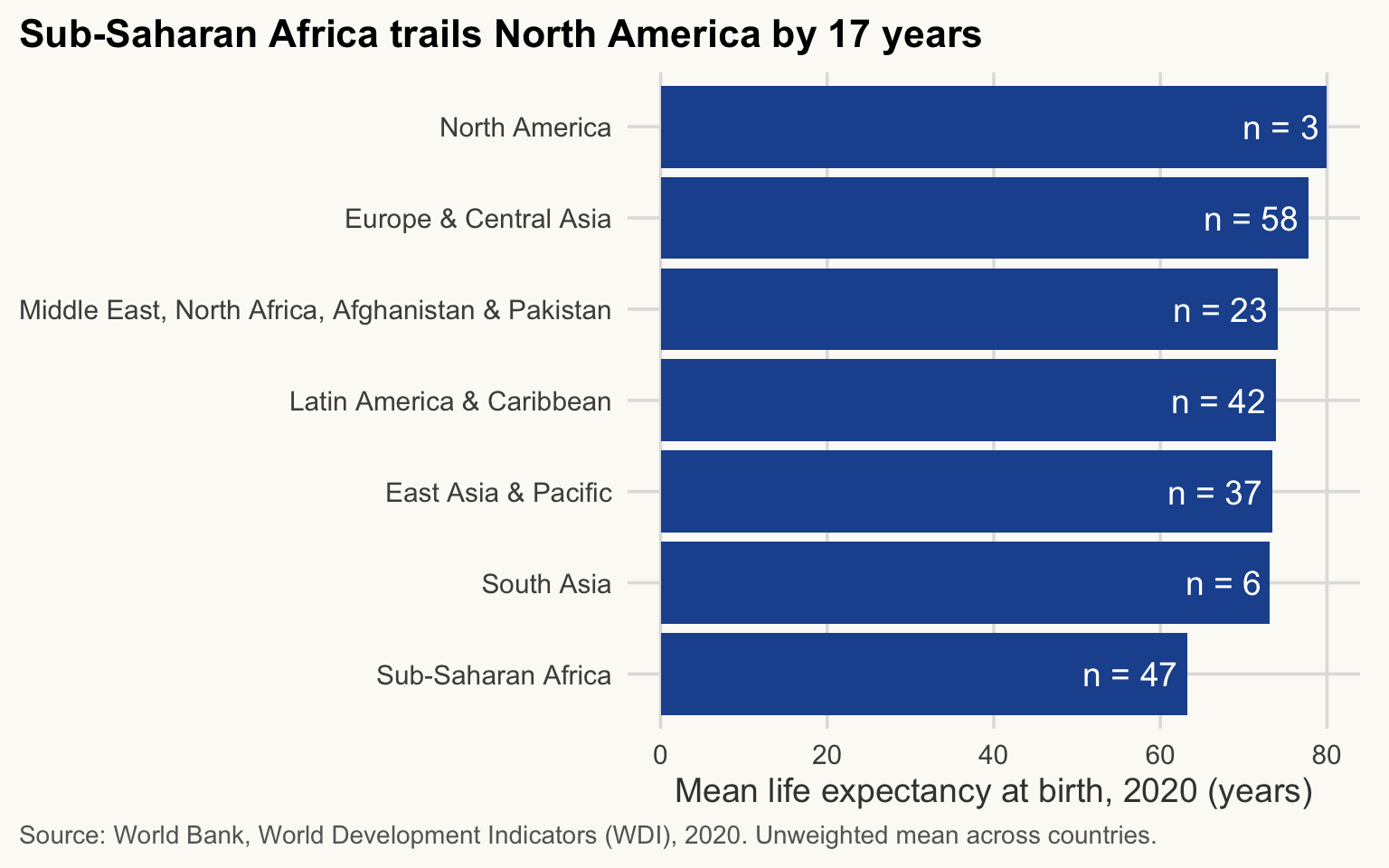
Now look at median_gdp_pc in the previous table: NA for five of the seven regions. One missing value is enough for median() to return NA. We need to talk about missing values.
Missing values
NA means “value unknown”. It is contagious: any calculation involving an NA returns NA.
mean(c(70, 75, NA))[1] NAmean(c(70, 75, NA), na.rm = TRUE) # ignore the NAs[1] 72.5How many NA per column in our panel?
wdi |> summarise(across(everything(), \(x) sum(is.na(x))))# A tibble: 1 × 11
country iso3c year region income gdp gdp_pc_ppp population life_exp gini
<int> <int> <int> <int> <int> <int> <int> <int> <int> <int>
1 0 0 0 0 0 166 487 0 24 3372
# ℹ 1 more variable: elec_access <int>gini is missing for 65% of the country-years: inequality is measured by household surveys, which are not run every year. Three tools:
-
is.na(x)returnsTRUEwherexis missing. Use it insidefilter(). -
drop_na(var)removes the rows wherevaris missing (without argument: any variable). -
na.rm = TRUEinsidemean(),median(),sum()… ignores theNAin the calculation.
WarningRemoving NAs changes your N, and possibly your conclusion
Dropping missing values is not neutral: the countries that have no Gini are not a random sample (they are often poorer or less well covered by statistics). Always report how many observations each number rests on.
wdi |>
  filter(year == 2020) |>
  summarise(
    n_countries   = n(),
    n_with_gdp_pc = sum(!is.na(gdp_pc_ppp)),
    n_with_gini   = sum(!is.na(gini)),
    median_gdp_pc = median(gdp_pc_ppp, na.rm = TRUE),
    median_gini   = median(gini, na.rm = TRUE)
  )
# A tibble: 1 × 5
n_countries n_with_gdp_pc n_with_gini median_gdp_pc median_gini
<int> <int> <int> <dbl> <dbl>
1 217 199 70 15631. 34.4The median Gini is computed on n_with_gini countries only, not on all of them. Now the grouped table again, this time with N:
gdp_n_region <- wdi |>
  filter(year == 2020) |>
  group_by(region) |>
  summarise(
    n_countries   = n(),
    n_gdp_pc      = sum(!is.na(gdp_pc_ppp)),
    median_gdp_pc = median(gdp_pc_ppp, na.rm = TRUE),
    .groups = "drop"
  ) |>
  arrange(desc(median_gdp_pc))

gdp_n_region
# A tibble: 7 × 4
region n_countries n_gdp_pc median_gdp_pc
<chr> <int> <int> <dbl>
1 North America 3 3 67407.
2 Europe & Central Asia 58 53 36852.
3 Latin America & Caribbean 42 38 19163.
4 Middle East, North Africa, Afghanistan & P… 23 22 13511.
5 East Asia & Pacific 37 31 11306.
6 South Asia 6 6 10083.
7 Sub-Saharan Africa 48 46 3424.Dropping the NA is not free. The chart shows how many countries each region loses:
Show the chart code (taught in Session 5)
gdp_n_region |>
  mutate(lost = n_countries - n_gdp_pc) |>
  select(region, `Kept` = n_gdp_pc, `Lost (NA)` = lost) |>
  pivot_longer(-region, names_to = "status", values_to = "countries") |>
  mutate(status = factor(status, levels = c("Lost (NA)", "Kept"))) |>
  ggplot(aes(x = countries, y = fct_reorder(region, countries, sum), fill = status)) +
  geom_col() +
  scale_fill_manual(values = c(Kept = pal_cours[["principal"]], `Lost (NA)` = pal_cours[["accent"]]),
                    labels = c(Kept = "Kept", `Lost (NA)` = "Lost (NA)")) +
  labs(title = "Dropping NAs removes countries unevenly across regions",
       x = "Number of countries, 2020", y = NULL, fill = NULL,
       caption = "Source: World Bank, World Development Indicators (WDI), 2020. GDP per capita (PPP).") +
  theme(legend.position = "top")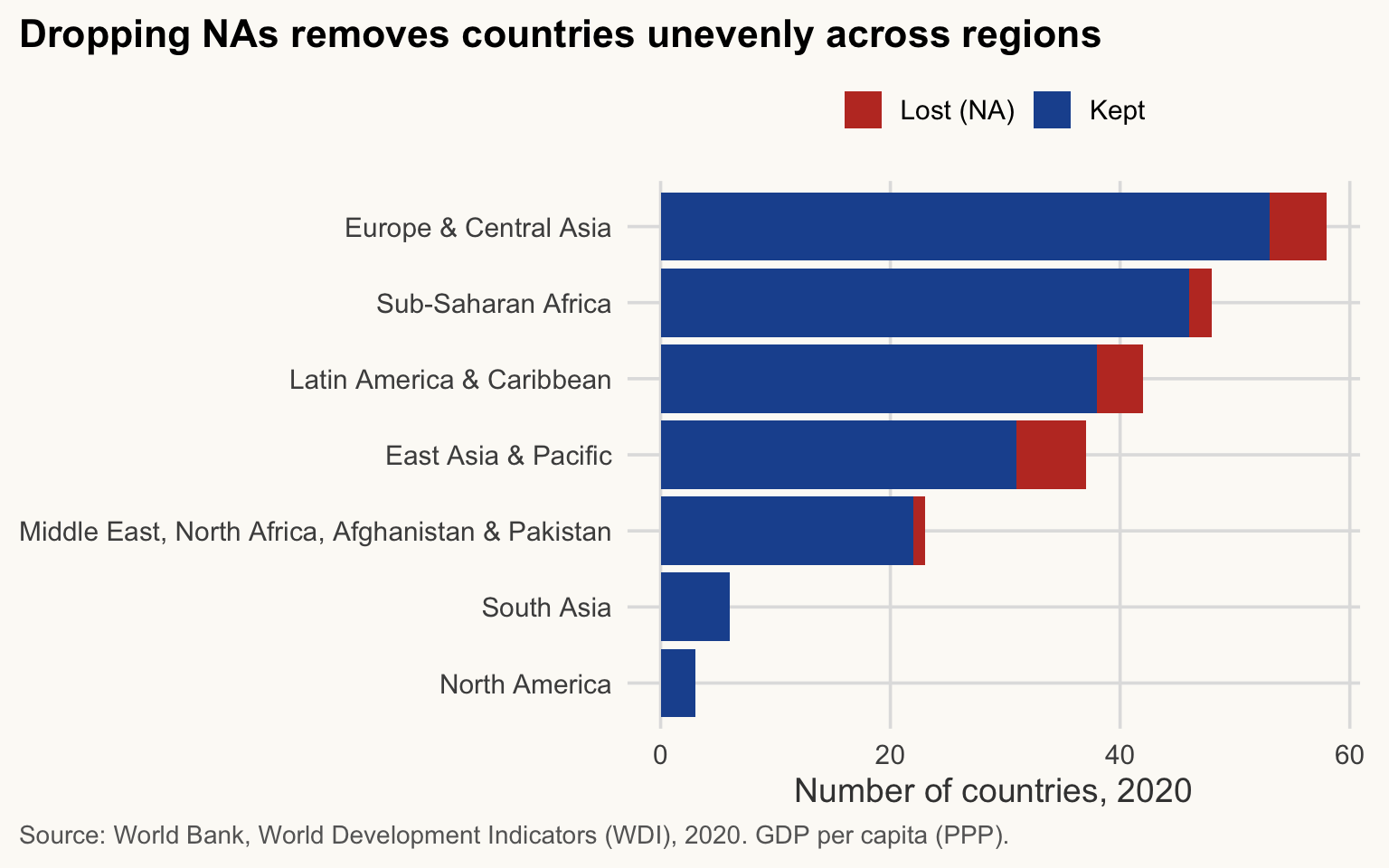
ImportantKey idea
na.rm = TRUE makes the calculation run, but the statistic now describes a smaller, possibly different group of countries. Print N next to every number.
Two details. .groups = "drop" removes the grouping from the result (otherwise it stays grouped, which can surprise you later). And since dplyr 1.1, .by is a shorter alternative to group_by(), with no grouping left behind:
wdi |>
  filter(year == 2020) |>
  summarise(mean_life = mean(life_exp, na.rm = TRUE), n = n(), .by = income)
# A tibble: 4 × 3
income mean_life n
<chr> <dbl> <int>
1 Low income 62.9 25
2 Upper middle income 72.3 59
3 High income 78.9 86
4 Lower middle income 66.5 47count() is the quickest way to tabulate a categorical variable (sort = TRUE puts the largest first):
wdi |> filter(year == 2020) |> count(income, sort = TRUE)# A tibble: 4 × 2
income n
<chr> <int>
1 High income 86
2 Upper middle income 59
3 Lower middle income 47
4 Low income 25Factors: giving categories an order
≈ 10 min After this section you can control the order in which categories appear in tables and charts.
R sorts text alphabetically, which is rarely what we want. Income groups have a natural order. Note that income is the World Bank’s current classification, applied to every year: a country that has changed group since 2000 appears in its present-day group even in 2000.
Factor: a variable with a fixed, ordered list of allowed categories (its levels). The order of the levels is the order used in tables and charts.
unique(wdi$income) # check the exact labels before using them[1] "Low income" "Upper middle income" "High income"
[4] "Lower middle income"income_levels <- c("Low income", "Lower middle income",
"Upper middle income", "High income")
wdi <- wdi |>
mutate(income = factor(income, levels = income_levels))
wdi |> filter(year == 2020) |> count(income)# A tibble: 4 × 2
income n
<fct> <int>
1 Low income 25
2 Lower middle income 47
3 Upper middle income 59
4 High income 86Now the table follows the economic order and not the alphabet. Other tools from forcats (loaded with tidyverse):
-
fct_relevel(x, "High income")moves one level to the front without retyping all of them. -
fct_reorder(x, y)orders the levels ofxby the values ofy. This is what makes bar charts readable (Session 5).
Preview: ggplot is taught in Session 5. For now, just copy the pattern.
wdi |>
  filter(year == 2020) |>
  summarise(median_life = median(life_exp, na.rm = TRUE), .by = region) |>
  ggplot(aes(x = median_life, y = fct_reorder(region, median_life))) +
  geom_col(fill = pal_cours[["principal"]]) +
  labs(title = str_wrap("Life expectancy is lowest in Sub-Saharan Africa", 60),
       x = "Median life expectancy at birth, 2020 (years)",
       y = NULL,
       caption = str_wrap("Source: World Bank, WDI. Median across countries of each region.", 95))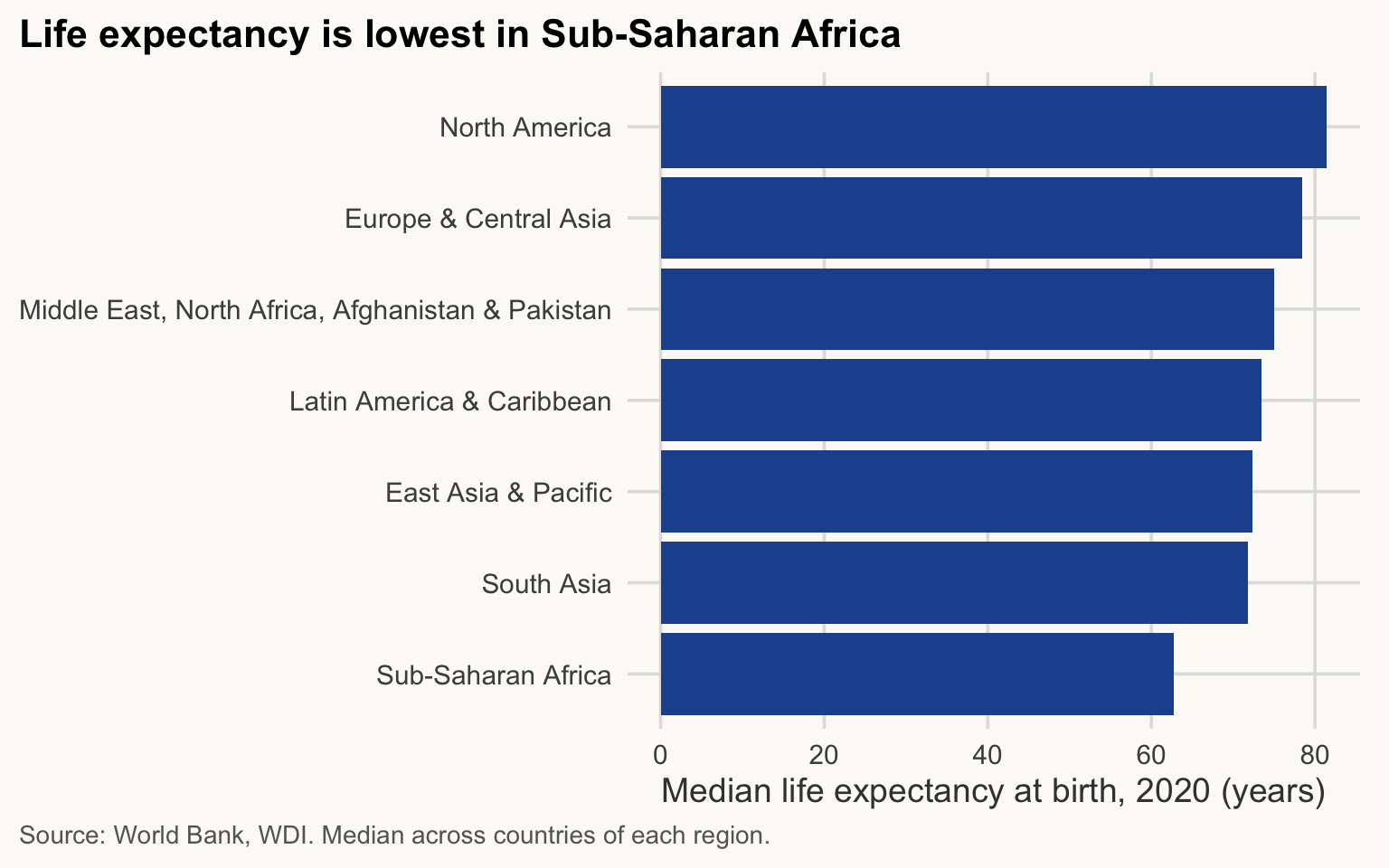
Without fct_reorder(), the bars would be in alphabetical order and the message would be harder to read.
WarningCommon mistake
Typing a level with a slightly different spelling ("Low Income" instead of "Low income"): R silently turns it into NA. That is why we ran unique(wdi$income) first. After factor(), check with count() that no NA appeared.
Reshaping with tidyr: wide and long
≈ 25 min After this section you can switch a table between wide and long format with pivot_wider() and pivot_longer().
Tidy data in three rules
Tidy data: a table is tidy when (1) each variable is a column, (2) each observation is a row, (3) each value is a cell.
Our panel is tidy: one row per country-year, one column per variable (year is a column, not 24 columns). ggplot2 and dplyr expect this long format.
But data downloaded from the World Bank website or an Excel sheet usually come wide: one column per year (2000, 2001, …). It is handy to read, but a year is a value, not a variable. Before analysing such data, you reshape them.
flowchart LR
  L["Long: one row per country-year"] -- "pivot_wider()" --> W["Wide: one column per year"]
  W -- "pivot_longer()" --> L
Long (3 columns)
| country | year | value |
|---|---|---|
| A | 2000 | 70 |
| A | 2010 | 73 |
| B | 2000 | 55 |
| B | 2010 | 60 |
Wide (one column per year)
| country | y2000 | y2010 |
|---|---|---|
| A | 70 | 73 |
| B | 55 | 60 |
ImportantKey idea
Ask: “is this column name actually a value?” Column names 2000, 2010, … are values of the variable year: pivot them into rows with pivot_longer().
pivot_wider(): long to wide
Life expectancy for five countries, one column per year:
life_long <- wdi |>
  filter(country %in% c("Algeria", "Brazil", "Ghana", "India", "Norway"),
         year %in% c(2000, 2010, 2020)) |>
  select(country, year, life_exp)

life_long
# A tibble: 15 × 3
country year life_exp
<chr> <dbl> <dbl>
1 Algeria 2000 70.6
2 Algeria 2010 74.1
3 Algeria 2020 73.3
4 Brazil 2000 69.6
5 Brazil 2010 73.8
6 Brazil 2020 74.5
7 Ghana 2000 58.1
8 Ghana 2010 61.3
9 Ghana 2020 64.3
10 India 2000 62.7
11 India 2010 67.2
12 India 2020 70.2
13 Norway 2000 78.6
14 Norway 2010 81.0
15 Norway 2020 83.2life_wide <- life_long |>
pivot_wider(names_from = year, values_from = life_exp, names_prefix = "y")
life_wide# A tibble: 5 × 4
country y2000 y2010 y2020
<chr> <dbl> <dbl> <dbl>
1 Algeria 70.6 74.1 73.3
2 Brazil 69.6 73.8 74.5
3 Ghana 58.1 61.3 64.3
4 India 62.7 67.2 70.2
5 Norway 78.6 81.0 83.2names_from gives the column that becomes the new column names, values_from the column that fills the cells.
pivot_longer(): wide to long
The way back, which is the one you will use most with Excel-style downloads:
life_back <- life_wide |>
  pivot_longer(cols = starts_with("y"),
               names_to = "year", names_prefix = "y",
               values_to = "life_exp") |>
  mutate(year = as.integer(year))   # year came back as text

life_back
# A tibble: 15 × 3
country year life_exp
<chr> <int> <dbl>
1 Algeria 2000 70.6
2 Algeria 2010 74.1
3 Algeria 2020 73.3
4 Brazil 2000 69.6
5 Brazil 2010 73.8
6 Brazil 2020 74.5
7 Ghana 2000 58.1
8 Ghana 2010 61.3
9 Ghana 2020 64.3
10 India 2000 62.7
11 India 2010 67.2
12 India 2020 70.2
13 Norway 2000 78.6
14 Norway 2010 81.0
15 Norway 2020 83.2# Check: we recover exactly the table we started from
all.equal(as.data.frame(life_back), as.data.frame(life_long))[1] TRUE
WarningCommon mistake
After pivot_longer() with names_prefix, the new year column is text, not a number. Charts and filters on it then misbehave. Convert it with as.integer(), as above.
Joins: combining two tables
≈ 35 min After this section you can combine two tables safely and detect rows that failed to match.
Real projects use several sources: GDP from the World Bank, inequality from WID, trade from the OECD.
Join: adds to table x the columns of table y, matching rows on a key. Key: the column (or columns) that identify the same unit in both tables, here the country code and the year.
A tiny example
data1 <- tibble(country = c("US", "CN", "IN"), value1 = 1:3)
data2 <- tibble(country = c("US", "CN", "BR"), value2 = 4:6)

data1
# A tibble: 3 × 2
country value1
<chr> <int>
1 US 1
2 CN 2
3 IN 3data2# A tibble: 3 × 2
country value2
<chr> <int>
1 US 4
2 CN 5
3 BR 6“US” and “CN” are in both tables, “IN” only on the left, “BR” only on the right. The four main joins differ in which rows they keep:
left_join(data1, data2, by = "country") # all rows of data1# A tibble: 3 × 3
country value1 value2
<chr> <int> <int>
1 US 1 4
2 CN 2 5
3 IN 3 NAinner_join(data1, data2, by = "country") # only rows found in both# A tibble: 2 × 3
country value1 value2
<chr> <int> <int>
1 US 1 4
2 CN 2 5full_join(data1, data2, by = "country") # all rows of both# A tibble: 4 × 3
country value1 value2
<chr> <int> <int>
1 US 1 4
2 CN 2 5
3 IN 3 NA
4 BR NA 6anti_join(data1, data2, by = "country") # rows of data1 with NO match in data2# A tibble: 1 × 2
country value1
<chr> <int>
1 IN 3flowchart LR
subgraph X["x: US, CN, IN"]
x1[US]
x2[CN]
x3[IN]
end
subgraph Y["y: US, CN, BR"]
y1[US]
y2[CN]
y3[BR]
end
X --> L["left_join keeps US, CN, IN"]
X --> I["inner_join keeps US, CN"]
X --> A["anti_join keeps IN"]
Y --> I
| Join | Keeps | Rows here | Unmatched values |
|---|---|---|---|
left_join(x, y) |
all rows of x
|
3 (US, CN, IN) |
NA for y’s columns |
inner_join(x, y) |
rows present in both | 2 (US, CN) | none |
full_join(x, y) |
all rows of both | 4 (US, CN, IN, BR) |
NA on either side |
anti_join(x, y) |
rows of x absent from y
|
1 (IN) | no y columns at all |
(right_join(x, y) is left_join(y, x) with the columns in another order; you can ignore it.)
left_join() is the default choice: you start from your main table and add information, without ever losing a row of the main table. anti_join() is not a way to merge but a diagnostic: it lists the keys that failed to match.
The real-world trap: joining on country names
We want to add inequality data from the World Inequality Database (WID) to GDP from the World Bank, for three countries.
gdp3 <- read_csv(here("data", "wdi_3countries.csv"), show_col_types = FALSE)
wid  <- read_csv(here("data", "wid_gini.csv"), show_col_types = FALSE)

# first row of each country
gdp3 |> arrange(country, year) |> distinct(country, .keep_all = TRUE)
# A tibble: 3 × 4
country iso3c year gdp
<chr> <chr> <dbl> <dbl>
1 China CHN 2000 1.22e12
2 India IND 2000 4.68e11
3 United States USA 2000 1.03e13wid |> arrange(country_wid, year) |> distinct(country_wid, .keep_all = TRUE)# A tibble: 3 × 4
iso3c country_wid year gini
<chr> <chr> <dbl> <dbl>
1 CHN China 2000 0.498
2 IND India 2000 0.509
3 USA USA 2000 0.550The natural idea: both tables have a country column, so join on it. (WID calls it country_wid, so we tell by that the two names are equivalent.)
naive <- gdp3 |>
  left_join(wid, by = c("country" = "country_wid", "year"))

nrow(gdp3)
[1] 63nrow(naive)[1] 63naive |>
summarise(n_rows = n(), n_gini = sum(!is.na(gini)), .by = country)# A tibble: 3 × 3
country n_rows n_gini
<chr> <int> <int>
1 China 21 21
2 India 21 21
3 United States 21 0No error, no warning, the right number of rows. And yet the United States has no Gini at all:
Show the chart code (taught in Session 5)
naive |>
  summarise(n_gini = sum(!is.na(gini)), n_missing = sum(is.na(gini)), .by = country) |>
  pivot_longer(c(n_gini, n_missing), names_to = "status", values_to = "years") |>
  mutate(status = recode(status, n_gini = "Gini found", n_missing = "Gini missing (NA)")) |>
  ggplot(aes(x = years, y = country, fill = status)) +
  geom_col() +
  scale_fill_manual(values = c(`Gini found` = pal_cours[["principal"]],
                               `Gini missing (NA)` = pal_cours[["accent"]]),
                    labels = c(`Gini found` = "Gini found", `Gini missing (NA)` = "Gini missing (NA)")) +
  labs(title = "The join on names silently lost the United States",
       x = "Number of years (2000-2020)", y = NULL, fill = NULL,
       caption = "Source: World Bank WDI and World Inequality Database (WID).") +
  theme(legend.position = "top")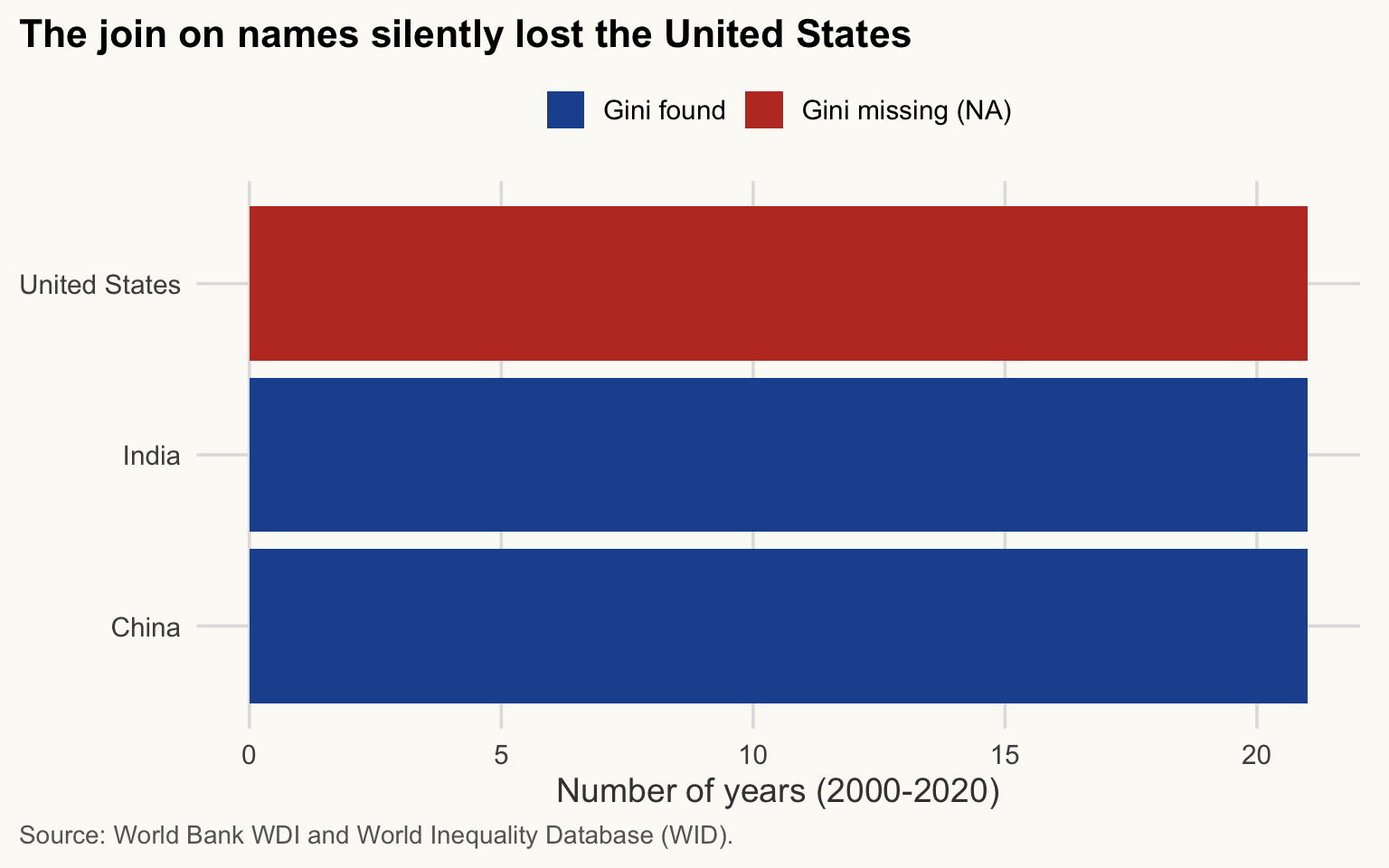
Why? WDI writes “United States”, WID writes “USA”: the two strings differ, so no row matches, and left_join() fills with NA.
WarningCommon mistake
Joining two sources by country name: the US silently loses its Gini and nobody notices, because R raises nothing. A join never complains about unmatched keys. You must check.
Two checks that would have caught it:
# 1. anti_join: which keys of the left table have no match on the right?
gdp3 |>
  anti_join(wid, by = c("country" = "country_wid", "year")) |>
  distinct(country)
# A tibble: 1 × 1
country
<chr>
1 United States# 2. count the NAs created by the join
sum(is.na(naive$gini))[1] 21The fix: join on a standardised code, not on a name. The ISO 3-letter code (iso3c) is the same in both sources. Names change (“Turkey” / “Turkiye”, “Korea, Rep.” / “South Korea”); codes are far more stable. They still change now and then (Romania went from ROM to ROU, DR Congo from ZAR to COD), so run anti_join() anyway.
gdp_gini <- gdp3 |>
  left_join(select(wid, iso3c, year, gini), by = c("iso3c", "year"))

nrow(gdp3)
[1] 63nrow(gdp_gini)[1] 63sum(is.na(gdp_gini$gini))[1] 0gdp_gini |>
summarise(n_rows = n(), n_gini = sum(!is.na(gini)), .by = country)# A tibble: 3 × 3
country n_rows n_gini
<chr> <int> <int>
1 China 21 21
2 India 21 21
3 United States 21 21# And the anti_join check is now empty
gdp3 |> anti_join(wid, by = c("iso3c", "year")) |> nrow()[1] 0We selected only iso3c, year and gini from wid: otherwise country and country_wid would both be carried along, which is confusing.
Now all three countries have a Gini, and we can finally compare inequality with income:
Show the chart code (taught in Session 5)
gdp_gini |>
  ggplot(aes(x = year, y = gini, colour = country)) +
  geom_line(linewidth = 1) +
  scale_colour_manual(values = c(China = pal_cours[["accent"]],
                                 India = "#E69F00",
                                 `United States` = pal_cours[["principal"]])) +
  labs(title = str_wrap("Inequality rose in all three countries; in China, mostly before 2010", 60),
       x = "Year", y = "Gini coefficient (WID, 0-1)",
       colour = NULL,
       caption = str_wrap("Source: World Bank WDI (GDP) joined with World Inequality Database (WID, Gini) on iso3c and year.", 95))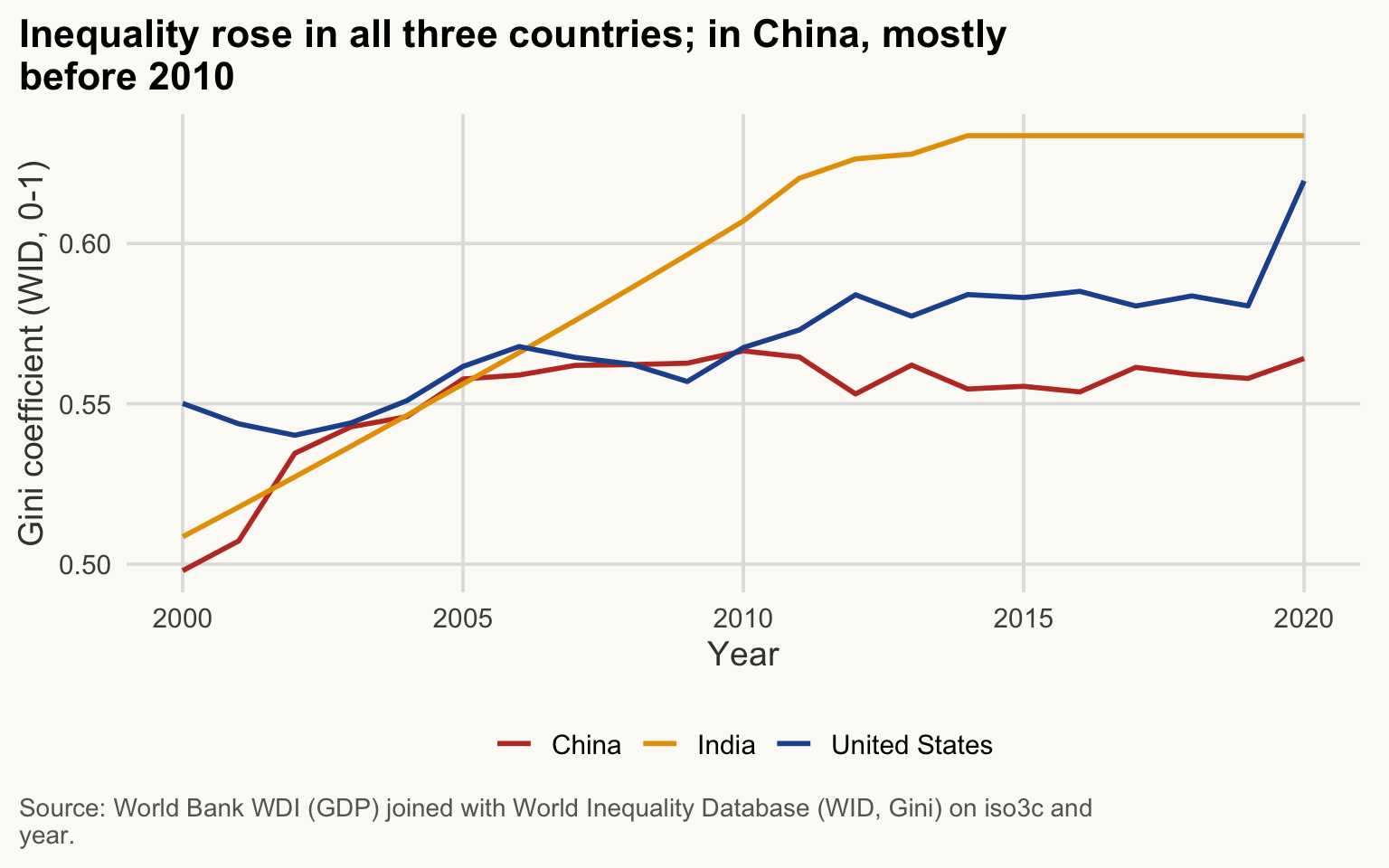
NoteTwo Ginis that are not comparable
The gini column of wdi and the Gini of wid do not measure the same thing:
- WDI (0-100): household surveys, often of consumption rather than income in low- and middle-income countries, India included.
- WID (0-1): pre-tax national income among adults, combining surveys, tax records and national accounts.
They even rank India differently. In WID, India is the most unequal of the three countries in 2020 (0.63, against 0.62 for the United States and 0.56 for China). In WDI, India’s latest Gini (23.0 in 2023) is far below that of the United States (41.8 in 2023). Never put the two in the same column or compare one with the other.
NoteWhy it matters for development economics
Cross-country work always combines sources (growth from the World Bank, inequality from WID, trade from the OECD). A silent loss like the US here biases every comparison that follows, usually without any visible symptom.
Good habits for every join
ImportantKey idea
A join never complains about unmatched keys. The safety net is a routine: join on codes, count rows, run anti_join().
-
Join on codes (
iso3c, not names), and on all the keys that identify a row: country and year here. -
Count rows before and after with
nrow(). After aleft_join(), the number of rows should equal that of the left table. -
Run
anti_join()in both directions to see what did not match. -
Count the
NAin the new columns.
What if the key is not unique in the right table? For instance, joining on iso3c alone when wid has 21 years per country: each row of gdp3 matches 21 rows of wid, and the result explodes to many more rows. Since dplyr 1.1, *_join() warns about unexpected many-to-many matches, and you can state your expectation with the relationship argument:
# Each (iso3c, year) must appear at most once in wid, otherwise: error
gdp3 |>
  left_join(wid, by = c("iso3c", "year"), relationship = "many-to-one")
Do not ignore that warning: it almost always means the key is incomplete (here, year was forgotten).
Writing a simple function
≈ 15 min After this section you can write a small function of your own and use it inside mutate().
You have used many functions written by others: mean(), filter(), read_csv(). When you repeat the same calculation, you can write your own. This one computes GDP per capita:
gdp_per_capita <- function(gdp, population) {
  gdp / population
}Function: a named recipe. Its arguments are the inputs (here gdp and population). The body, between { }, is the calculation. The value of the last line is what the function returns.
Running this chunk creates the function (it appears in the Environment pane) but computes nothing yet. Call it first on numbers where you know the answer:
gdp_per_capita(gdp = 2e12, population = 50e6) # 2,000 billion / 50 million = 40,000[1] 40000Test a new function on a case you can check by hand before you trust it on real data.
The arguments are local: inside the function, gdp and population are whatever you passed in, and they vanish when the function finishes. Only the returned value comes out.
Because / works on whole columns, the function also works inside mutate(). The three-country table gdp3 (from the joins section) has GDP but no population, so we add it from wdi with the join habits of the previous section:
gdp_pc_3 <- gdp3 |>
  filter(year == 2020) |>
  left_join(select(wdi, iso3c, year, population), by = c("iso3c", "year")) |>
  mutate(gdp_pc = gdp_per_capita(gdp, population))

nrow(gdp_pc_3)   # 3 rows, as in the left table
[1] 3gdp_pc_3# A tibble: 3 × 6
country iso3c year gdp population gdp_pc
<chr> <chr> <dbl> <dbl> <dbl> <dbl>
1 China CHN 2020 1.50e13 1411100000 10627.
2 India IND 2020 2.67e12 1402617695 1907.
3 United States USA 2020 2.14e13 331578104 64465.In 2020, GDP per capita was about $64,465 in the United States, $10,627 in China and $1,907 in India. These are current US dollars at market exchange rates: they are not comparable with the gdp_pc_ppp column of wdi, which corrects for price levels (PPP).
WarningCommon mistake
could not find function "gdp_per_capita": the chunk that defines the function was not run in this R session, for instance after a restart. Run it first; in a script, put your functions at the top, right after library().
Later sessions define small helpers the same way: unmatched() in Session 5 lists the countries that fail to match the world map, and Session 6 builds its own theme function for charts.
TipExercise 3.2: a growth-rate function
Write a function growth_pct(before, after) that returns the percentage change from before to after. Test it: growth_pct(100, 110) must give 10. Then use it to compute the growth of GDP per capita (PPP) between 2000 and 2020 for China, India and the United States. Hint: get one column per year with pivot_wider().
NoteShow solution
growth_pct <- function(before, after) {
  100 * (after - before) / before
}

growth_pct(100, 110)   # check by hand: 10
[1] 10growth_3 <- wdi |>
filter(iso3c %in% c("CHN", "IND", "USA"), year %in% c(2000, 2020)) |>
select(country, year, gdp_pc_ppp) |>
pivot_wider(names_from = year, values_from = gdp_pc_ppp, names_prefix = "y") |>
mutate(growth = growth_pct(y2000, y2020))
growth_3# A tibble: 3 × 4
country y2000 y2020 growth
<chr> <dbl> <dbl> <dbl>
1 China 4066. 19215. 373.
2 India 3010. 7187. 139.
3 United States 55046. 67407. 22.5Between 2000 and 2020, GDP per capita (PPP) grew by about 373% in China, 139% in India and 22% in the United States (N = 3 countries).
Exercises (≈ 25 min, plus ≈ 45 min optional)
The following exercises use the panel wdi, except the last one. Exercise 3.8, the capstone, is the core of this part. Exercises 3.3 to 3.7 are extra practice, one per topic of the day: do the ones on the topics you feel least sure about, in class if time allows or at home.
TipExercise 3.3: filter, select, arrange (Optional: going further)
Take the Sub-Saharan African countries in 2020. Keep country, income, life_exp and elec_access, and sort them by life expectancy, lowest first. Show the 10 lowest. How many countries are in the group?
NoteShow solution
ssa_2020 <- wdi |>
  filter(region == "Sub-Saharan Africa", year == 2020) |>
  select(country, income, life_exp, elec_access) |>
  arrange(life_exp)

nrow(ssa_2020)   # N
[1] 48head(ssa_2020, 10)# A tibble: 10 × 4
country income life_exp elec_access
<chr> <fct> <dbl> <dbl>
1 Nigeria Lower middle income 53.1 55.4
2 Chad Low income 53.1 10.9
3 Lesotho Lower middle income 55.1 47.5
4 Somalia, Fed. Rep. Low income 57.1 49.9
5 South Sudan Low income 57.6 7.3
6 Mali Low income 58.9 50.6
7 Guinea Lower middle income 59.4 44.7
8 Sierra Leone Low income 59.7 26.3
9 Eswatini Lower middle income 59.9 80
10 Niger Low income 59.9 18.7
TipExercise 3.4: mutate (Optional: going further)
Add the column gdp_bn (GDP in billions of US$) to the 2020 data and list the 5 countries with the largest GDP, with their GDP in billions. Which of them are not high income?
NoteShow solution
wdi |>
  filter(year == 2020) |>
  mutate(gdp_bn = gdp / 1e9) |>
  arrange(desc(gdp_bn)) |>
  select(country, income, gdp_bn) |>
  head(5)
# A tibble: 5 × 3
country income gdp_bn
<chr> <fct> <dbl>
1 United States High income 21375.
2 China Upper middle income 14996.
3 Japan High income 5189.
4 Germany High income 3941.
5 United Kingdom High income 2724.The list contains China, which is not classified as high income by the World Bank.
TipExercise 3.5: group_by and summarise (Optional: going further)
For each region and each year in 2000, 2010 and 2020, compute the median GDP per capita (PPP) and the number of countries it is based on (excluding missing values). Present the result sorted by year, then by median.
NoteShow solution
wdi |>
  filter(year %in% c(2000, 2010, 2020)) |>
  summarise(
    n_countries   = sum(!is.na(gdp_pc_ppp)),
    median_gdp_pc = median(gdp_pc_ppp, na.rm = TRUE),
    .by = c(region, year)
  ) |>
  arrange(year, desc(median_gdp_pc))
# A tibble: 21 × 4
region year n_countries median_gdp_pc
<chr> <dbl> <int> <dbl>
1 North America 2000 3 55046.
2 Europe & Central Asia 2000 51 21302.
3 Latin America & Caribbean 2000 34 14016.
4 Middle East, North Africa, Afghanistan & Pak… 2000 21 11643.
5 East Asia & Pacific 2000 31 5809.
6 South Asia 2000 6 4149.
7 Sub-Saharan Africa 2000 46 2597.
8 North America 2010 3 59797.
9 Europe & Central Asia 2010 53 30068.
10 Latin America & Caribbean 2010 38 18366.
# ℹ 11 more rowsThe N is not constant across regions and years: compare the medians with that in mind.
TipExercise 3.6: pivot (Optional: going further)
Build a table with one row per region and one column per year (2000, 2010, 2020) containing the median life expectancy. Then bring it back to long format.
NoteShow solution
life_region <- wdi |>
  filter(year %in% c(2000, 2010, 2020)) |>
  summarise(median_life = median(life_exp, na.rm = TRUE), .by = c(region, year)) |>
  pivot_wider(names_from = year, values_from = median_life, names_prefix = "y")

life_region
# A tibble: 7 × 4
region y2000 y2010 y2020
<chr> <dbl> <dbl> <dbl>
1 Middle East, North Africa, Afghanistan & Pakistan 70.9 74.1 75.0
2 Europe & Central Asia 74.9 77.9 78.4
3 East Asia & Pacific 69.6 71.3 72.4
4 Sub-Saharan Africa 52.3 58.3 62.7
5 Latin America & Caribbean 72.2 73.7 73.4
6 South Asia 62.7 68.4 71.8
7 North America 78.3 79.4 81.5life_region |>
pivot_longer(starts_with("y"), names_to = "year", names_prefix = "y",
values_to = "median_life") |>
mutate(year = as.integer(year)) # year comes back as text# A tibble: 21 × 3
region year median_life
<chr> <int> <dbl>
1 Middle East, North Africa, Afghanistan & Pakistan 2000 70.9
2 Middle East, North Africa, Afghanistan & Pakistan 2010 74.1
3 Middle East, North Africa, Afghanistan & Pakistan 2020 75.0
4 Europe & Central Asia 2000 74.9
5 Europe & Central Asia 2010 77.9
6 Europe & Central Asia 2020 78.4
7 East Asia & Pacific 2000 69.6
8 East Asia & Pacific 2010 71.3
9 East Asia & Pacific 2020 72.4
10 Sub-Saharan Africa 2000 52.3
# ℹ 11 more rows
TipExercise 3.7: join and check (Optional: going further)
Using wdi, build the table elec with iso3c, year, elec_access for 2020. Then join it to a table small that contains iso3c = c("FRA", "GHA", "XXX") (the last code does not exist). Use left_join(), check the number of rows, then use anti_join() to find the code that did not match.
NoteShow solution
elec <- wdi |>
  filter(year == 2020) |>
  select(iso3c, year, elec_access)

small <- tibble(iso3c = c("FRA", "GHA", "XXX"))

joined <- small |> left_join(elec, by = "iso3c")

nrow(small)
[1] 3nrow(joined) # same: left_join keeps all rows of `small`[1] 3joined # XXX has NA# A tibble: 3 × 3
iso3c year elec_access
<chr> <dbl> <dbl>
1 FRA 2020 100
2 GHA 2020 85.4
3 XXX NA NA small |> anti_join(elec, by = "iso3c") # the code that failed to match# A tibble: 1 × 1
iso3c
<chr>
1 XXX
TipExercise 3.8: repair this analysis (capstone)
A colleague sends you data/raw/repair_me.csv: real World Bank values for six countries (Afghanistan, Angola, Bangladesh, Benin, Ghana, Kenya) in 2015 and 2019. Session 2 opened this file and introduced the tools that convert text into numbers; here you finish the job.
Task: compute the mean life expectancy in each year over the six countries, and state the N behind each mean.
The file contains four planted problems, plus one trap. Work in a new script (File > New File > R Script), in three stages:
-
Inspect before computing anything:
glimpse(),count(country, year),distinct(country). - Repair each problem with a line of code. Never edit the CSV by hand: the raw file stays as it came, and the script records every change.
-
Rerun the whole script from a fresh R session:
Session > Restart R(Ctrl/Cmd + Shift + F10), then run the script from top to bottom, as in Session 1. If it runs without you and prints the same numbers, your analysis is reproducible.
NoteShow hint
A checklist to work through, in order:
NoteShow solution
Inspect. Read everything as text first, then look:
# 1. Read: every column as text, so that R guesses nothing behind your back
repair_raw <- read_csv(here("data", "raw", "repair_me.csv"),
                       col_types = cols(.default = col_character()))

# 2. Inspect
read_lines(here("data", "raw", "repair_me.csv"), n_max = 3)   # the file as stored
[1] "country,iso_num,year,gdp_pc_ppp,life_exp"
[2] "Afghanistan,004,2015,\"2,967.7\",62.3"
[3] "Afghanistan,004,2019,\"2,927.2\",62.9" glimpse(repair_raw)Rows: 13
Columns: 5
$ country <chr> "Afghanistan", "Afghanistan", "Angola", "Angola", "Banglade…
$ iso_num <chr> "004", "004", "024", "024", "050", "050", "204", "204", "28…
$ year <chr> "2015", "2019", "2015", "2019", "2015", "2019", "2015", "20…
$ gdp_pc_ppp <chr> "2,967.7", "2,927.2", "11,389.8", "9,713.0", "5,352.7", "6,…
$ life_exp <chr> "62.3", "62.9", "61", "63.1", "70.5", "72.6", "n/a", "59.9"…repair_raw |> distinct(country)# A tibble: 7 × 1
country
<chr>
1 Afghanistan
2 Angola
3 Bangladesh
4 Benin
5 Ghana
6 kenya
7 KENYA repair_raw |> count(country, year) |> filter(n > 1)# A tibble: 1 × 3
country year n
<chr> <chr> <int>
1 Ghana 2019 2sort(unique(repair_raw$life_exp)) [1] "59.9" "61" "62.3" "62.9" "63.1" "63.2" "64.5" "70.5" "72.6" "n/a" Diagnose. The four problems and the trap:
-
GDP is stored as text with a thousands separator (
"2,967.7"):as.numeric()would returnNA;parse_number()reads it. -
Kenya has inconsistent labels,
" kenya"and"KENYA "(spaces and capitals):distinct()shows seven “countries” instead of six. - Ghana 2019 appears twice: it would count twice in the mean.
-
Benin’s 2015 life expectancy is written
"n/a": the whole column is text, somean()cannot use it. - The trap:
iso_numis a code. Read as a number,"004"becomes4, which is what Excel or base R’sread.csv()do. Keep it as text.
Recent versions of read_csv() guess some columns correctly on their own (they read "2,967.7" as a number). Do not count on it: the guess depends on the package version and on the file. Reading as text and converting yourself always gives the same result.
Repair, one line per problem, then check:
# 3. Repair
repaired <- repair_raw |>
  mutate(
    country    = str_to_title(str_trim(country)),     # " kenya", "KENYA " -> "Kenya"
    year       = as.integer(year),
    gdp_pc_ppp = parse_number(gdp_pc_ppp),            # "2,967.7" -> 2967.7
    life_exp   = as.numeric(na_if(life_exp, "n/a"))   # "n/a" -> NA, then a number
  ) |>                                                # iso_num stays text: "004"
  distinct()                                          # drops the second Ghana 2019 row

# 4. Check the repair
glimpse(repaired)
Rows: 12
Columns: 5
$ country <chr> "Afghanistan", "Afghanistan", "Angola", "Angola", "Banglade…
$ iso_num <chr> "004", "004", "024", "024", "050", "050", "204", "204", "28…
$ year <int> 2015, 2019, 2015, 2019, 2015, 2019, 2015, 2019, 2015, 2019,…
$ gdp_pc_ppp <dbl> 2967.7, 2927.2, 11389.8, 9713.0, 5352.7, 6838.3, 2952.0, 32…
$ life_exp <dbl> 62.3, 62.9, 61.0, 63.1, 70.5, 72.6, NA, 59.9, 63.2, 64.5, 6…nrow(repaired) # 12 country-years[1] 12repaired |> count(country, year) |> filter(n > 1) # empty: no duplicate left# A tibble: 0 × 3
# ℹ 3 variables: country <chr>, year <int>, n <int>Answer, with N:
# 5. Mean life expectancy by year, with N
life_by_year <- repaired |>
  summarise(
    n_countries = n(),
    n_life      = sum(!is.na(life_exp)),
    mean_life   = mean(life_exp, na.rm = TRUE),
    .by = year
  )

life_by_year
# A tibble: 2 × 4
year n_countries n_life mean_life
<int> <int> <int> <dbl>
1 2015 6 5 63.9
2 2019 6 6 64.3Mean life expectancy over the six countries: 63.86 years in 2015 (N = 5: Benin is missing) and 64.32 years in 2019 (N = 6).
The two means do not rest on the same countries. To compare years, keep the countries observed in both:
# Same five countries in both years: drop Benin, missing in 2015
life_same <- repaired |>
  filter(country != "Benin") |>
  summarise(n_countries = n(), mean_life = mean(life_exp), .by = year)

life_same
# A tibble: 2 × 3
year n_countries mean_life
<int> <int> <dbl>
1 2015 5 63.9
2 2019 5 65.2On the same 5 countries, the mean rises from 63.86 to 65.20 years. With Benin included in 2019 only, the rise looks smaller, because Benin has the lowest life expectancy of the group.
Rerun. Last step: Session > Restart R, then run the whole script. Same numbers? Then the repair is done and documented.
Key takeaways
- The pipe
|>reads as “and then”: one verb per line, top to bottom. -
filter()selects rows,select()columns,arrange()sorts,mutate()creates variables,summarise()(withgroup_by()or.by) collapses to one row per group. - Missing values are contagious:
na.rm = TRUEordrop_na()fix the calculation but change N. Always report N. - Factors give categories a meaningful order (
factor(levels = ),fct_relevel(),fct_reorder()). - Tidy data: one variable per column, one observation per row, one value per cell.
pivot_longer()andpivot_wider()switch between formats. - A join never complains about keys that do not match. Join on codes (
iso3c), count rows before and after, and runanti_join(). - To debug a pipeline, run it up to one
|>at a time and checknrow(). Errors tell you where; empty results do not. - A function has arguments (inputs), a body (the calculation) and returns its last value. Test it on a case you can check by hand.
- Repair a messy file in a script, never by hand: inspect, repair, check, then rerun everything from a fresh R session.