library(tidyverse)
library(here)
library(scales)
source(here("R", "theme_cours.R"))
Sys.setenv(LANGUAGE = "en") # error messages in EnglishSession 1: Getting started with R and RStudio
Interface, projects, objects, functions, packages, vectors and data frames
Session objectives
- Install R and RStudio and find your way around the four panes.
- Work inside an RStudio Project and build file paths with
here::here(). - Create objects, call functions, and read a help page.
- Know what R keeps in memory, and check that a script runs on its own after a restart.
- Tell installing a package from loading it, read the three most common error messages, tell an error from a warning, and ask a question someone can answer.
- Manipulate vectors (including missing values) and data frames in base R.
- Compute GDP per capita for three countries: the first step of our common thread.
Prepare your R session
Have you done the “Before the first session” steps on the home page? If not, do them first: the chunk below needs the packages and the file R/theme_cours.R that they install.
Script of this session: download seance-1.R, all the code of this page in one file.
Pacing. The core path takes about 200 minutes, exercises included. Exercise 1.7 is Optional: going further; Exercises 1.3, 1.4, 1.8 and 1.9 are for homework.
What are R and RStudio?
≈ 15 min By the end of this section you can say what R and RStudio are, and why we use them.
R is a programming language for statistics and data analysis. RStudio (now from Posit) is the editor we use to write and run R code. R is the engine, RStudio is the dashboard.
NoteIn plain words
R is the engine of a car, RStudio is the dashboard and steering wheel. You can drive without a dashboard, but you will not want to.
Why R for an economist?
- Free and open source: your code runs the same on any machine, now and in five years.
- Packages: thousands of extensions on CRAN (the official archive) for data wrangling, econometrics, maps, text analysis.
- Reproducible: code, results and text live in one document (Quarto, session 6).
- Widely used in academia, central banks and international organisations, with a large community.
Installing
Install in this order: first R from CRAN, then RStudio Desktop from Posit. The chapter Starting with R and RStudio of Hands-On Programming with R walks through both installations with screenshots.
The four panes
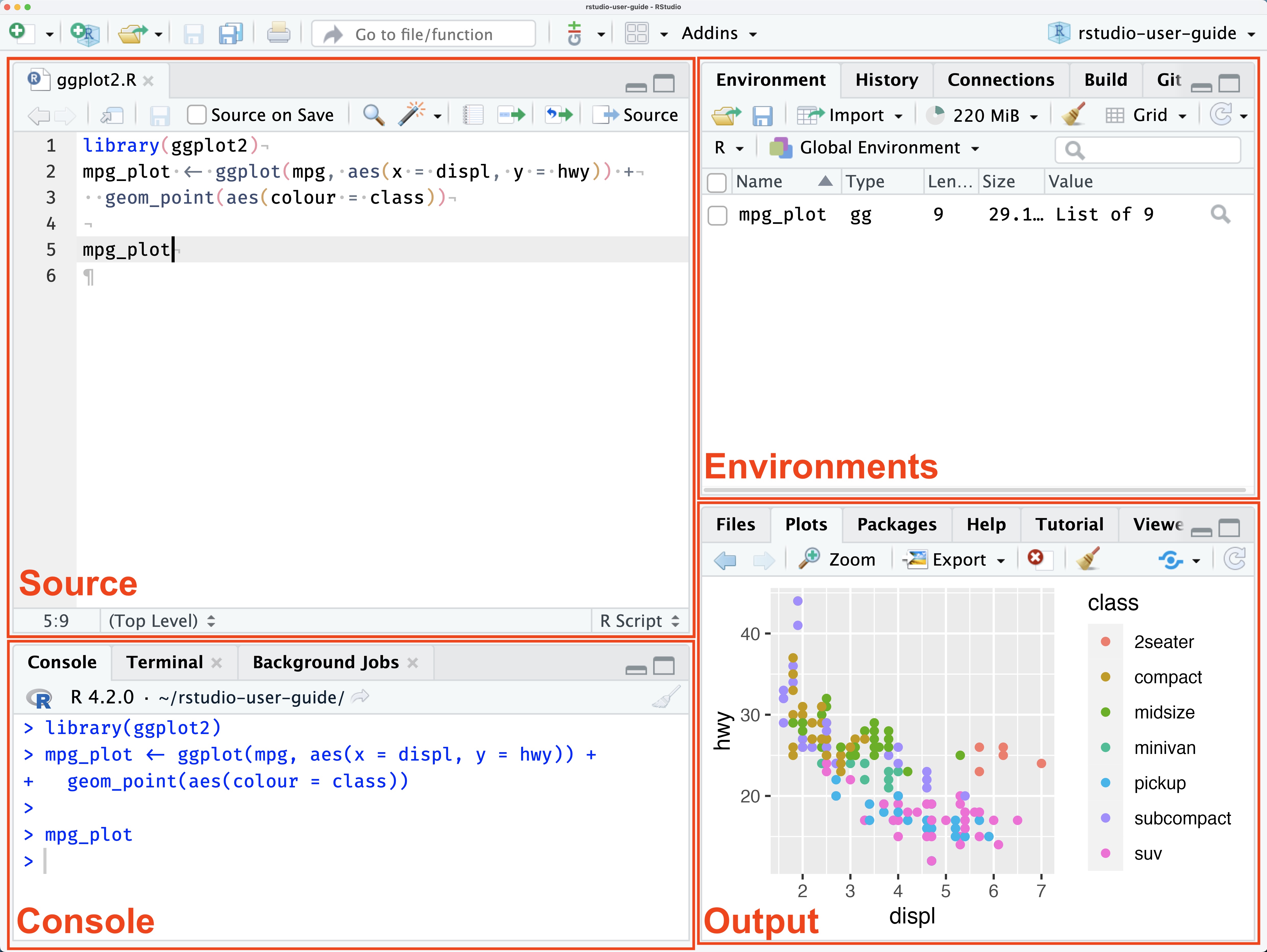
| Pane | What it is for |
|---|---|
| Source (top left) | Your scripts (.R files). This is where you write code you want to keep. |
| Console (bottom left) | Where R runs the code and prints results. Good for quick tests. |
| Environment (top right) | The objects currently in memory. |
| Files / Plots / Packages / Help (bottom right) | File browser, charts, installed packages, help pages. |
RStudio Projects and file paths
≈ 15 min After this section you can set up a project folder in which every path works on any computer.
Do this from day one, it will save you hours later.
An RStudio Project is a folder with a .Rproj file. When you open it, RStudio sets the working directory to that folder, so every path can be written relative to the project.
-
File > New Project > New Directory > New Project. Name itr-courseand choose where to put it. - Unzip
data.zip(home page) into the project folder. It createsdata/(all data files go there),data/raw/andR/theme_cours.R. - Create a script:
File > New File > R Script, save it assession1.Rin the project folder.
Your project folder now looks like this:
r-course/
├── r-course.Rproj
├── session1.R
├── data/          # the course data (from data.zip)
│   └── raw/       # original files, read-only
├── R/
│   └── theme_cours.R   # shared chart theme (from data.zip)
└── output/        # everything you produce (created in session 2)
Why here::here() and never setwd()
Many tutorials start scripts with setwd("/Users/john/Desktop/course"). Never do this. That path exists only on your own computer: the script breaks on any other machine (your colleague’s, your supervisor’s, yours in six months). Never write setwd() with a path from your own computer in a script you share.
Instead, the here package builds paths from the project root, wherever the project sits:
# Builds "<project root>/data/wdi_panel.csv" on any computer
here::here("data", "wdi_panel.csv")

# Used inside a reading function (session 2)
wdi <- read_csv(here::here("data", "wdi_panel.csv"))
ImportantKey idea
One project per course or paper, data in data/, paths built with here::here(). Your code then runs on any computer without editing a single path.
WarningCommon mistake
Opening an .R file by double-clicking it, outside the project. The working directory is then wrong and here() cannot find data/. Always open the .Rproj file first (the project name shows in the top-right corner of RStudio).
Scripts, console and comments
≈ 10 min After this section you can write, run and comment code in a script.
You can type in the console, but what you type is lost. Code you want to keep goes in a script.
flowchart LR
    A["Script: write and save code"] -->|"Cmd/Ctrl + Enter"| B["Console: R runs it"]
    B --> C["Environment: objects in memory"]
    B --> D["Plots / Files: outputs"]
- Write code in the script, then run the current line (or the selected lines) with
Ctrl + Enter(Windows/Linux) orCmd + Enter(Mac). R sends it to the console. - Run the whole script with
Ctrl/Cmd + Shift + Enter. - Everything after
#on a line is a comment: R ignores it. Comment the why, not the obvious.
# A comment: R ignores this line
2 + 2   # a comment can also follow code
[1] 4
ImportantKey idea
The script is your product; the console is a scratch pad. If it is not in the script, it does not exist tomorrow.
Good habit: a script should run from top to bottom in a fresh R session and give the same results. If it does not, something is hidden in your environment (What R remembers shows how to check).
Objects, types and operators
≈ 30 min After this section you can store anything under a name, find it again, tell types apart and use operators.
R is an object-based language
Everything you work with in R lives in an object: a name that points to a value stored in the computer’s memory. Two moves do all the work:
-
name <- valuestores the value under the name (the assignment arrow<-, shortcutAlt + -on Windows,Option + -on Mac). It prints nothing. - Typing the name alone recalls the value and prints it.
You can store anything under a name: a number, a text, a vector, a whole table, the result of a calculation, and later a regression model (Session 4) or a chart (Session 5). Even a function is an object.
gdp_usa <- 20.9                                  # a number: US GDP, US$ trillions, 2020
three_countries <- c("USA", "China", "India")    # a vector of texts (see Vectors)
gdp_table <- tibble(country = three_countries,
                    gdp_bn  = c(20894, 14688, 2671))  # a whole table (see Data frames)
gdp_sum <- sum(gdp_table$gdp_bn)                 # the result of a calculation
my_mean <- mean                                  # even a function

gdp_usa            # typing the name recalls the value
[1] 20.9gdp_table# A tibble: 3 × 2
country gdp_bn
<chr> <dbl>
1 USA 20894
2 China 14688
3 India 2671my_mean(gdp_table$gdp_bn) # my_mean now works exactly like mean[1] 12751flowchart LR
A["gdp_usa"] -->|"points to"| A2["20.9"]
B["three_countries"] -->|"points to"| B2["USA, China, India"]
C["gdp_table"] -->|"points to"| C2["a table: 3 rows, 2 columns"]
D["my_mean"] -->|"points to"| D2["the function mean()"]
Every object you create appears in the Environment pane (top right), with a preview of its value; click a table there to open it. ls() prints the same list in the console:
ls() [1] "course_lang" "gdp_sum" "gdp_table" "gdp_usa"
[5] "my_mean" "nb" "nb_dollar" "nb_pct"
[9] "pal_cours" "pal_regions" "theme_cours" "three_countries"The list also holds objects you did not type: pal_cours, theme_cours, nb and a few others were created by source(here("R", "theme_cours.R")) in the setup chunk. theme_cours and nb are functions, stored under a name like any other object.
NoteIn plain words
An object is a labelled box. <- puts something in the box and writes the label; typing the label opens the box. A box can hold a single number or a whole data set.
WarningCommon mistake
“I ran the line and nothing happened.” Nothing printed, but the value was stored: look in the Environment pane, or type the name.
TipExercise 1.1: store and recall
Store India’s 2020 GDP, 2671 (US$ billions), in gdp_india; the three GDPs 20894, 14688, 2671 in a vector gdp_three; and their total in gdp_total. (a) Find the three objects in the Environment pane. (b) Recall gdp_total by typing its name. (c) Store the function max under the name largest and use it on gdp_three.
NoteShow solution
gdp_india <- 2671
gdp_three <- c(20894, 14688, 2671)
gdp_total <- sum(gdp_three)

gdp_total            # (b) recall by name
[1] 38253largest <- max # (c) a function stored under a new name
largest(gdp_three)[1] 20894Types of values
gdp_usa <- 20.9          # numeric
country <- "United States"  # character (text, always in quotes)
is_rich <- TRUE          # logical (TRUE or FALSE, no quotes)

gdp_usa
[1] 20.9country[1] "United States"is_rich[1] TRUEThree basic types: numeric (numbers), character (text), logical (TRUE/FALSE). class() tells you which one you have:
class(gdp_usa)[1] "numeric"class(country)[1] "character"class(is_rich)[1] "logical"Naming rules: letters, digits, _ and ., no spaces, not starting with a digit. R is case-sensitive (gdp and GDP are different objects). Do not reuse names of existing functions (sum, mean, summary, data): it works until the day it causes a confusing bug. Use descriptive names such as total_gdp.
Arithmetic and logical operators
3 + 5 # addition[1] 810 - 4 # subtraction[1] 66 * 7 # multiplication[1] 4220 / 4 # division[1] 52^3 # power[1] 817 %/% 5 # integer division[1] 317 %% 5 # remainder[1] 2Comparisons return a logical value:
3 == 3 # equal (two equal signs!)[1] TRUE5 != 4 # different[1] TRUE7 > 5[1] TRUE2 < 6[1] TRUE4 >= 4[1] TRUECombine conditions with & (and), | (or) and ! (not):
TRUE & FALSE[1] FALSETRUE | FALSE[1] TRUE!TRUE[1] FALSE
WarningCommon mistake
Writing x = 3 when you mean x == 3. The first assigns (and prints nothing), the second compares and returns TRUE or FALSE. Use <- to assign and keep = for function arguments.
Functions and arguments
Function: a named recipe. It takes inputs (arguments) between parentheses and returns a result.
A function takes inputs (arguments) between parentheses and returns a result. Arguments can be given by position or by name.
sqrt(16)[1] 4round(3.14159, digits = 2)[1] 3.14round(3.14159, 2) # same, by position[1] 3.14mean(c(4, 8, 15, 16, 23, 42))[1] 18You can store a result in a new object and reuse it:
total_gdp <- sum(20.9, 14.7, 2.7)
total_gdp
[1] 38.3What R remembers
≈ 15 min After this section you can tell your script from R’s memory, and prove that your script runs on its own.
R keeps two different things, and beginners mix them up all the time:
The script (session1.R) |
The environment (objects in memory) | |
|---|---|---|
| Where | A file on your disk | R’s memory, shown in the Environment pane |
| Survives closing RStudio? | Yes, once saved (Ctrl/Cmd + S) |
No: it is rebuilt by running the script |
| Changes when | You type and save | You run a line |
Three consequences:
- Editing a line in the script does not change the object until you run that line again.
- Deleting a line does not delete the object: it stays in memory until R restarts.
- An object created in the console is in memory but in no file. Tomorrow it is gone.
R stores a value, not a formula. An object computed from another one does not update when the first one changes:
pop_india <- 1380                     # millions, rounded 2020
pop_three <- 331 + 1411 + pop_india   # computed once, from the value 1380
pop_india <- 1400                     # we change pop_india...
pop_three                             # ...pop_three still holds the old total
[1] 3122A spreadsheet would recompute pop_three; R does not. To update it, run its line again.
Restart R and rerun everything
The only proof that your script is complete is to run it in an empty memory:
-
Session > Restart R(Ctrl/Cmd + Shift + F10). The environment is emptied; the script is untouched. - Run the whole script:
Ctrl/Cmd + Shift + Enter, or the Source button above the script. - If it runs to the end and gives the same results, your script works alone. If it stops, you have found something that existed only in memory.
Do this before you send a script to anyone, and whenever results look strange.
Make RStudio start empty every time. In Tools > Global Options > General:
- uncheck Restore .RData into workspace at startup;
- set Save workspace to .RData on exit to Never.
Otherwise RStudio silently reloads yesterday’s objects, and a broken script can look like it works.
ImportantKey idea
The script is the truth; the environment is a temporary copy. Anything you need tomorrow must be written in the script.
TipExercise 1.2: why did it work yesterday?
Yesterday, Amina tested a value in the console by typing pop_mn <- c(331, 1411, 1380). Then she wrote this script, ran it, and got three GDPs per capita:
gdp_bn <- c(20894, 14688, 2671)          # GDP, US$ billions, 2020
gdp_pc <- gdp_bn * 1000 / pop_mn         # GDP per capita, US$
gdp_pc
Reproduce her day: type her console line in the console, put the three lines in your script, and run them. Then restart R and run the script again. What happens, why, and how do you fix the script?
NoteShow solution
After the restart, the memory is empty and the script stops:
gdp_bn <- c(20894, 14688, 2671)          # GDP, US$ billions, 2020
gdp_pc <- gdp_bn * 1000 / pop_mn         # GDP per capita, US$
Error:
! object 'pop_mn' not foundpop_mn was only ever created in the console, so it lived in memory, not in the script. Yesterday it worked because the object was still there. The fix is to write the missing line in the script, above the line that uses it:
gdp_bn <- c(20894, 14688, 2671)          # GDP, US$ billions, 2020
pop_mn <- c(331, 1411, 1380)             # population, millions, 2020
gdp_pc <- gdp_bn * 1000 / pop_mn         # GDP per capita, US$
gdp_pc
[1] 63123.867 10409.639 1935.507Restart R and run the script once more: it now works on its own.
Getting help
≈ 15 min After this section you can find and read the help page of any function, and ask a question someone can answer.
Nobody remembers every function. Knowing how to find help is the skill.
-
?meanorhelp("mean")opens the help page of a function (in the Help pane). -
??regressionsearches all installed help pages for a word. - Vignettes and package websites (e.g. tidyverse.org) give worked examples.
- Search the exact error message online: someone has already had it.
?mean
help("round")
How to read a help page, in this order:
- Description: what the function does, in one line.
-
Usage: the arguments and their default values.
mean(x, trim = 0, na.rm = FALSE, ...)tells youna.rmisFALSEunless you change it. - Arguments: what each one means.
- Value: what you get back.
- Examples at the bottom: copy them into your console and run them. Often the fastest way to understand.
NoteUsing AI assistants
ChatGPT, Claude, Copilot and similar tools are useful to explain an error message or to remind you of a function’s syntax. Three rules:
- Always run the code and check it does what you asked; AI code can be wrong or use outdated functions.
- If you cannot explain a line, do not keep it. You are responsible for every result you hand in.
- Never paste confidential or personal data into a public tool.
Learn the basics first: you cannot check an answer you do not understand.
Asking a question someone can answer
Whether you ask the teacher, a classmate or an AI assistant, the answer can only be as good as the question. A good question gives four things:
- What you want to do, in one sentence.
- The smallest piece of code that fails: cut everything that is not needed to see the problem. Restart R first and check that it still fails.
- The exact message, copied and pasted, not retyped or summarised.
- What you expected, and what you already tried.
Compare:
- Bad: “My GDP code doesn’t work, help!” Nobody can answer this without asking you four questions back.
- Good: “I want GDP per capita for three countries. In a fresh session,
gdp_pc <- gdp_bn * 1000 / pop_mngivesError: object 'pop_mn' not found. I expected three numbers. I checked the spelling ofpop_mn. What am I missing?”
NoteIn plain words
Often, cutting your code down to the smallest failing example shows you the problem before you even send the question. That is not wasted time: it is how experienced users debug.
Packages: install once, load every time
≈ 10 min After this section you can tell installing a package from loading it.
Base R is small. Most of what we use comes from packages. Two distinct steps:
- Install (once per computer): download the package from CRAN. Type this in the console, never in a script you share.
-
Load (in every session):
library()makes its functions available. Put thelibrary()calls at the top of your script.
# Step 1, once, in the console: every package used in this course
install.packages(c(
  "tidyverse", "here", "janitor", "readxl", "writexl", "lubridate", "scales",
  "WDI", "gt", "fixest", "modelsummary", "ggrepel", "sf", "rnaturalearth",
  "rnaturalearthdata", "patchwork", "plotly", "crosstalk", "shiny"
))

# Step 2, at the top of every script
library(tidyverse)
NoteIn plain words
Installing a package is buying a book for your shelf (once). Loading it with library() is taking it off the shelf and opening it (every time you work).
WarningCommon mistake
Putting install.packages() at the top of a script. It re-downloads the package on every run and breaks on a colleague’s machine. Install in the console, load in the script.
Install them all now (a few minutes). Each later session starts with a “Packages used today” line telling you what to install if something is missing.
tidyverse is a bundle of packages (ggplot2, dplyr, tibble, readr, …) that we use throughout the course. For packages we use only once, package::function() (as in here::here()) calls a function without loading the whole package.
Reading error messages
≈ 20 min After this section you can read the three most common error messages and fix them, tell an error from a warning or a message, and get out of the + prompt.
You will get errors every day, including in ten years. An error is not a failure: R is telling you what it could not do. Read the message, then look at the line it points to. Here are the three you will meet most.
1. object 'xxx' not found: you use a name that does not exist. Typo, wrong case, or you forgot to run the line that creates it.
gdp_china <- 14.7
gdp_chinaa + 1      # typo in the name
Error:
! object 'gdp_chinaa' not found2. unexpected symbol / unexpected numeric constant / unexpected ',': the syntax is wrong, often a missing comma, quote or parenthesis. R tells you which element it did not expect (here the 2), so the mistake is just before it: the comma missing after the 1. In the console the message reads unexpected numeric constant in "c(1 2"; this page formats it differently.
c(1 2 3) # missing commasError in parse(text = input): <text>:1:5: unexpected numeric constant
1: c(1 2
^3. could not find function "xxx": the function name is misspelled, or its package is not loaded. Here feols() comes from fixest, which we have not loaded with library().
feols(gdp ~ year, data = tibble(gdp = 1:3, year = 1:3))Error in `feols()`:
! could not find function "feols"
ImportantKey idea
An error message is information, not a verdict. It names the object, symbol or function R choked on; start there.
Method: (1) read the message aloud, (2) find the line, (3) check spelling, commas, quotes and parentheses, (4) check you ran the previous lines and loaded the package, (5) only then search online or ask an AI assistant, pasting the exact message (see Asking a question someone can answer).
Error, warning or message?
R talks to you in three ways, and they do not mean the same thing.
A warning means R finished, but something looks wrong. Here the population of China was stored as text with a thousands comma; R cannot read "1,411" as a number:
pop_text <- c("331", "1,411", "1380")   # numbers stored as text
as.numeric(pop_text)
Warning: NAs introduced by coercion[1] 331 NA 1380You got a result, but it holds an NA (a missing value, see Vectors) where China should be. Never ignore a warning: find out what it is about.
A message is just information. read_csv() (Session 2) tells you what it read:
gdp_3 <- read_csv(here("data", "wdi_3countries.csv"))Rows: 63 Columns: 4
── Column specification ────────────────────────────────────────────────────────
Delimiter: ","
chr (2): country, iso3c
dbl (2): year, gdp
ℹ Use `spec()` to retrieve the full column specification for this data.
ℹ Specify the column types or set `show_col_types = FALSE` to quiet this message.| R says | Starts with | Did R finish? | What you do |
|---|---|---|---|
| Error | Error |
No: nothing was produced | Fix the code, then run it again |
| Warning | Warning |
Yes, but check the result | Find what the warning is about |
| Message | (anything) | Yes | Read it once; often nothing to do |
The + prompt: R is waiting for you
The console normally shows >, ready for a new command. If it shows +, R thinks your expression is not finished: a parenthesis or a quote is still open, so it waits for the rest.
> mean(c(4, 8, 15)
+
> country <- "India
+
The first line misses a ), the second a closing ". Press Escape to get back to >, fix the line in your script, and run it again.
Vectors
≈ 25 min After this section you can build, index and compute with vectors, including missing values.
Vector: an ordered list of values of the same type. It is the building block of R: a column of a data set is a vector.
population <- c(331, 1411, 1380)             # numeric
countries  <- c("USA", "China", "India")     # character
high_income <- c(TRUE, FALSE, FALSE)         # logical
Sequences and repetitions:
1:10 # integers from 1 to 10 [1] 1 2 3 4 5 6 7 8 9 10seq(1, 10, by = 2) # step of 2[1] 1 3 5 7 9seq(0, 1, length.out = 5) # 5 equally spaced values[1] 0.00 0.25 0.50 0.75 1.00rep(5, times = 3)[1] 5 5 5rep(c("a", "b"), each = 2)[1] "a" "a" "b" "b"Indexing
Square brackets select elements by position (starting at 1) or by condition:
population[2] # second element[1] 1411population[c(1, 3)] # first and third[1] 331 1380population[-1] # all except the first[1] 1411 1380population[population > 1000] # elements satisfying a condition[1] 1411 1380countries[population > 1000] # use one vector to filter another[1] "China" "India"Vectorised operations
Operations apply to every element at once, no loop needed.
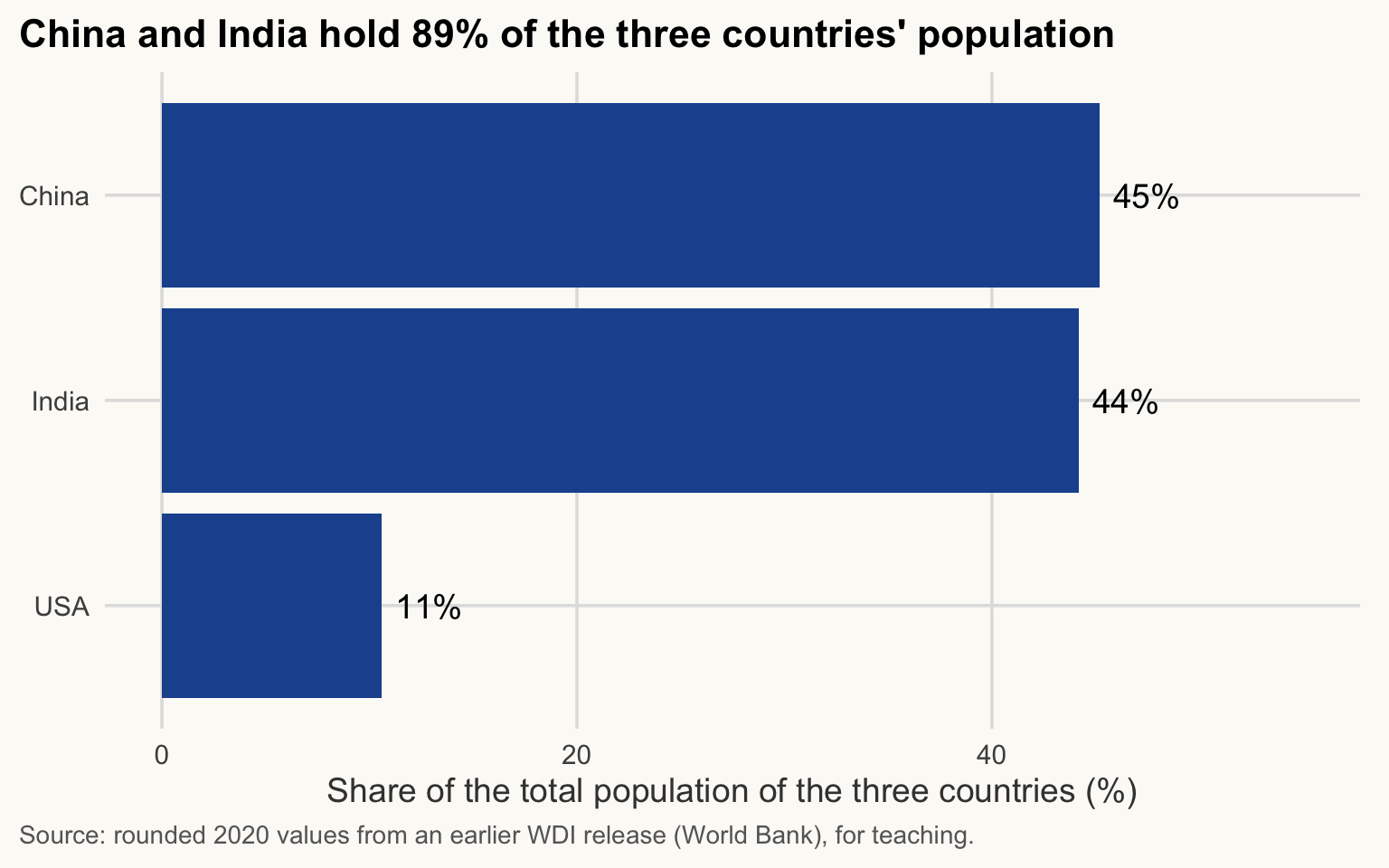
population + 2[1] 333 1413 1382population * 1000000 # millions to persons[1] 3.310e+08 1.411e+09 1.380e+09population / sum(population) # share of the total[1] 0.1060218 0.4519539 0.4420243Show the chart code (taught in Session 5)
tibble(country = countries, population = population,
       share = 100 * population / sum(population)) |>
  mutate(country = fct_reorder(country, share)) |>
  ggplot(aes(x = share, y = country)) +
  geom_col(fill = pal_cours[["principal"]]) +
  geom_text(aes(label = paste0(round(share), "%")), hjust = -0.2) +
  scale_x_continuous(limits = c(0, 55)) +
  labs(
    title = "China and India hold 89% of the three countries' population",
    x = "Share of the total population of the three countries (%)",
    y = NULL,
    caption = "Source: rounded 2020 values from an earlier WDI release (World Bank), for teaching."
  )
NoteIn plain words
A vectorised operation is a photocopier with a stamp: one instruction (/ sum(population)) is applied to every sheet at once.
Missing values
NA means “value not available”. It is not zero. Any calculation involving NA returns NA, because R cannot guess the missing value.
gini <- c(41.5, 38.2, NA, 35.7)
mean(gini)
[1] NAmean(gini, na.rm = TRUE) # na.rm = TRUE: drop NAs before computing[1] 38.46667is.na(gini)[1] FALSE FALSE TRUE FALSEsum(is.na(gini)) # how many missing values[1] 1
WarningCommon mistake
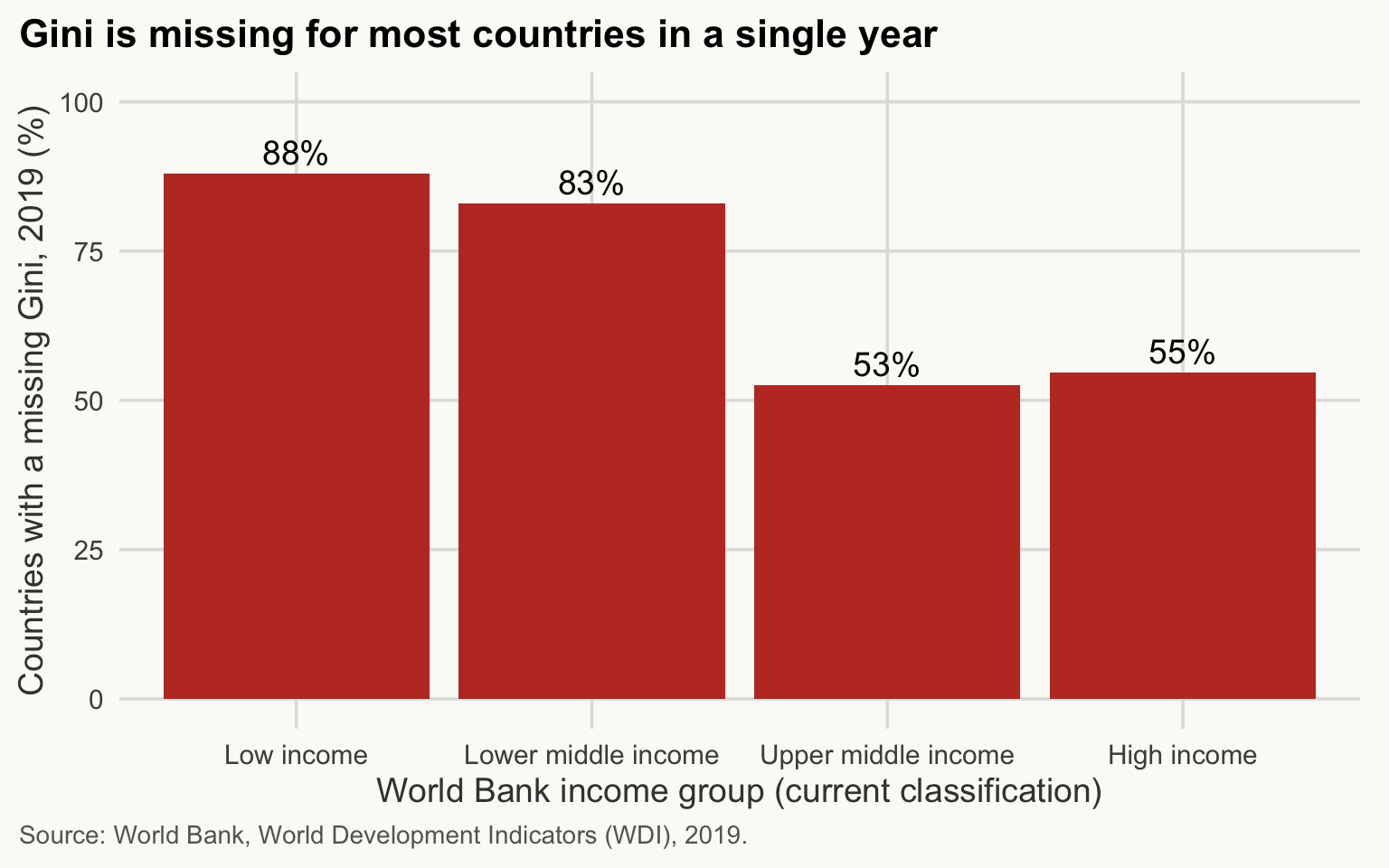
Using na.rm = TRUE as a reflex. Ask why the value is missing and whether dropping it biases the result. In WDI, Gini is missing for many poor countries, as the chart shows.
Show the chart code (taught in Session 5)
read_csv(here("data", "wdi_panel.csv"), show_col_types = FALSE) |>
  filter(year == 2019, !is.na(income)) |>
  summarise(share_na = 100 * mean(is.na(gini)), .by = income) |>
  mutate(income = factor(income, levels = c("Low income", "Lower middle income",
                                            "Upper middle income", "High income"))) |>
  ggplot(aes(x = income, y = share_na)) +
  geom_col(fill = pal_cours[["accent"]]) +
  geom_text(aes(label = paste0(round(share_na), "%")), vjust = -0.4) +
  scale_y_continuous(limits = c(0, 100)) +
  labs(
    title = "Gini is missing for most countries in a single year",
    x = "World Bank income group (current classification)",
    y = "Countries with a missing Gini, 2019 (%)",
    caption = "Source: World Bank, World Development Indicators (WDI), 2019."
  )
ImportantWhy it matters for development economics
Inequality data are scarcest where they matter most. Averaging only the countries that report a Gini describes the countries that measure inequality, not the world.
Data frames and tibbles
≈ 25 min After this section you can build a small table, explore it and compute a new column.
Data frame: a table in which each column is a vector, all of the same length.
A tibble is the tidyverse version of a data frame, with a cleaner display. We will use tibbles throughout.
Our common thread starts here: three countries, with rounded 2020 values (GDP in current US$ billions, population in millions; approximate figures for teaching, from an earlier release of the World Bank WDI). The current release, used from Session 2 on, gives slightly different numbers: the World Bank revises its series.
countries3 <- tibble(
  country    = c("United States", "China", "India"),
  gdp_bn     = c(20894, 14688, 2671),   # GDP, current US$ billions, rounded 2020
  pop_mn     = c(331, 1411, 1380),      # population, millions, rounded 2020
  high_income = c(TRUE, FALSE, FALSE)
)
countries3
# A tibble: 3 × 4
country gdp_bn pop_mn high_income
<chr> <dbl> <dbl> <lgl>
1 United States 20894 331 TRUE
2 China 14688 1411 FALSE
3 India 2671 1380 FALSE Exploring a data frame
nrow(countries3) # number of rows[1] 3ncol(countries3) # number of columns[1] 4names(countries3) # column names[1] "country" "gdp_bn" "pop_mn" "high_income"str(countries3) # structure: type of each columntibble [3 × 4] (S3: tbl_df/tbl/data.frame)
$ country : chr [1:3] "United States" "China" "India"
$ gdp_bn : num [1:3] 20894 14688 2671
$ pop_mn : num [1:3] 331 1411 1380
$ high_income: logi [1:3] TRUE FALSE FALSEsummary(countries3) # quick statistics per column country gdp_bn pop_mn high_income
Length : 3 Min. : 2671 Min. : 331.0 Mode :logical
N.unique : 3 1st Qu.: 8680 1st Qu.: 855.5 FALSE:2
N.blank : 0 Median :14688 Median :1380.0 TRUE :1
Min.nchar: 5 Mean :12751 Mean :1040.7
Max.nchar:13 3rd Qu.:17791 3rd Qu.:1395.5
Max. :20894 Max. :1411.0 head(countries3, 2) # first 2 rows# A tibble: 2 × 4
country gdp_bn pop_mn high_income
<chr> <dbl> <dbl> <lgl>
1 United States 20894 331 TRUE
2 China 14688 1411 FALSE Selecting columns and rows
countries3$gdp_bn # one column (a vector) with $[1] 20894 14688 2671countries3[1, ] # first row, all columns# A tibble: 1 × 4
country gdp_bn pop_mn high_income
<chr> <dbl> <dbl> <lgl>
1 United States 20894 331 TRUE countries3[ , "country"] # all rows, one column# A tibble: 3 × 1
country
<chr>
1 United States
2 China
3 India countries3[2, "pop_mn"] # one cell# A tibble: 1 × 1
pop_mn
<dbl>
1 1411countries3[countries3$pop_mn > 1380, ] # rows satisfying a condition# A tibble: 1 × 4
country gdp_bn pop_mn high_income
<chr> <dbl> <dbl> <lgl>
1 China 14688 1411 FALSE The pattern is data[rows, columns]. Leaving one side empty means “all”.
NoteIn plain words
Think of a spreadsheet: data[2, 3] is “row 2, column 3”. The comma separates rows (before) from columns (after).
Adding a column
countries3$gdp_pc <- countries3$gdp_bn * 1000 / countries3$pop_mn
countries3
# A tibble: 3 × 5
country gdp_bn pop_mn high_income gdp_pc
<chr> <dbl> <dbl> <lgl> <dbl>
1 United States 20894 331 TRUE 63124.
2 China 14688 1411 FALSE 10410.
3 India 2671 1380 FALSE 1936.Units: GDP in billions divided by population in millions gives thousands of dollars per person, so we multiply by 1000 to get US$ per person.
Sorting and filtering (base R)
# Sort by GDP per capita, highest first
countries3[order(countries3$gdp_pc, decreasing = TRUE), ]
# A tibble: 3 × 5
country gdp_bn pop_mn high_income gdp_pc
<chr> <dbl> <dbl> <lgl> <dbl>
1 United States 20894 331 TRUE 63124.
2 China 14688 1411 FALSE 10410.
3 India 2671 1380 FALSE 1936.# Keep only countries with more than 1,000 million inhabitants
countries3[countries3$pop_mn > 1000, ]# A tibble: 2 × 5
country gdp_bn pop_mn high_income gdp_pc
<chr> <dbl> <dbl> <lgl> <dbl>
1 China 14688 1411 FALSE 10410.
2 India 2671 1380 FALSE 1936.This works but is heavy to write. In session 3, dplyr will make it readable (arrange(), filter(), mutate()).
Running thread: GDP per capita of three countries
countries3[order(countries3$gdp_pc, decreasing = TRUE), c("country", "gdp_pc")]# A tibble: 3 × 2
country gdp_pc
<chr> <dbl>
1 United States 63124.
2 China 10410.
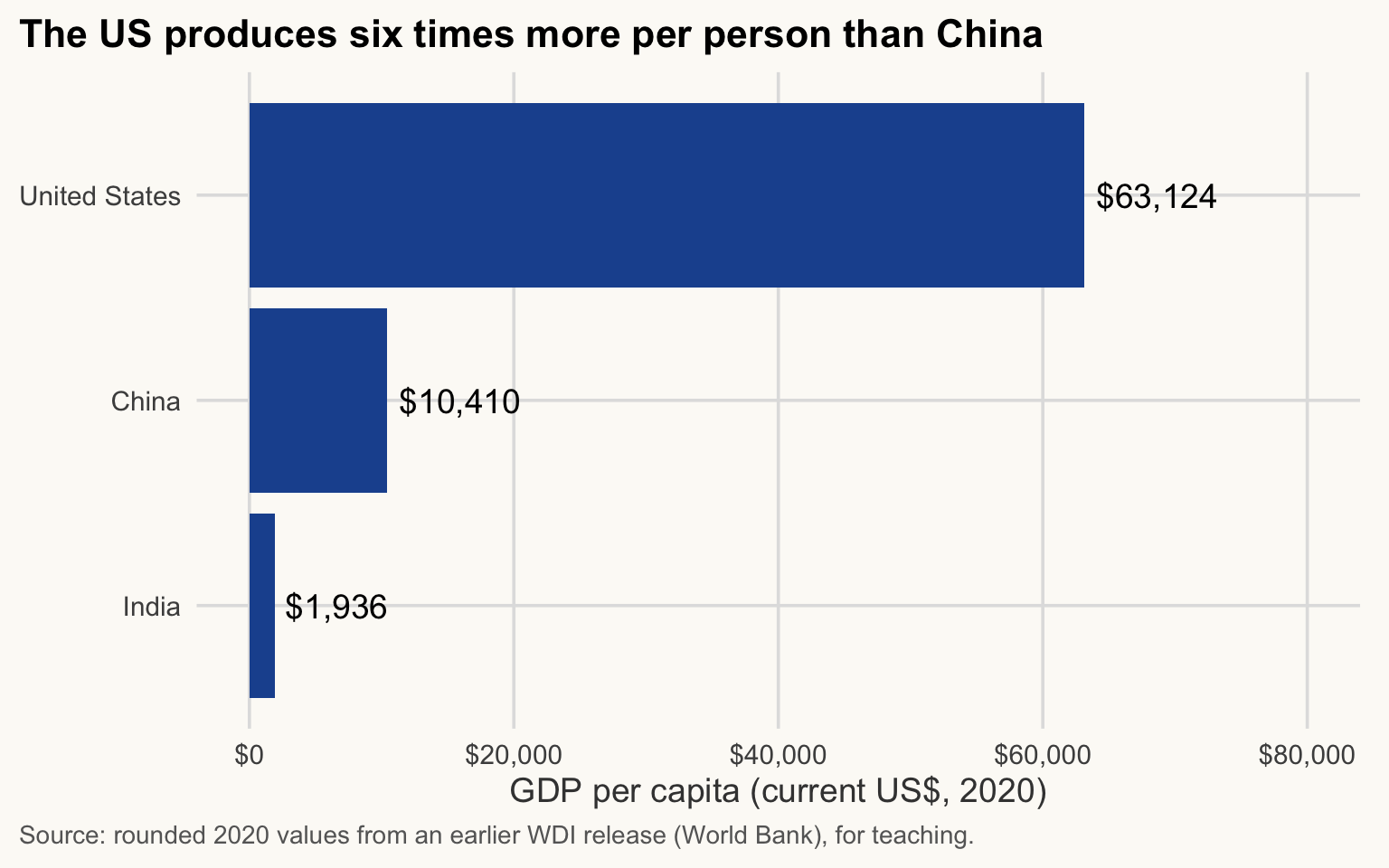
3 India 1936.The US produces about six times more per person than China and about thirty-three times more than India (rounded 2020 values, current US$, so not adjusted for price differences between countries). Starting from session 2, we use the full World Bank data set with all countries.
Show the chart code (taught in Session 5)
countries3 |>
  mutate(country = fct_reorder(country, gdp_pc)) |>
  ggplot(aes(x = gdp_pc, y = country)) +
  geom_col(fill = pal_cours[["principal"]]) +
  geom_text(aes(label = label_dollar()(round(gdp_pc))), hjust = -0.1) +
  scale_x_continuous(limits = c(0, 80000), labels = label_dollar()) +
  labs(
    title = "The US produces six times more per person than China",
    x = "GDP per capita (current US$, 2020)",
    y = NULL,
    caption = "Source: rounded 2020 values from an earlier WDI release (World Bank), for teaching."
  )
ImportantKey idea
GDP per capita = GDP / population. The total tells you the size of an economy; the ratio tells you how much it produces per person. With similar populations, China’s total GDP (5.5 times India’s) translates into a per-person gap of the same size.
The pipe |>
≈ 10 min After this section you can read and write a chain of steps with the pipe, and run it one step at a time.
The pipe |> passes the result on its left as the first argument of the function on its right. Code reads left to right, like a recipe:
flowchart LR
    A["c(1, 4, 9)"] -->|"then sum"| B["14"] -->|"then sqrt"| C["3.74"]
sqrt(sum(c(1, 4, 9))) # nested: read from the inside out[1] 3.741657c(1, 4, 9) |> sum() |> sqrt() # piped: "take c(1, 4, 9), then sum, then sqrt"[1] 3.741657
NoteIn plain words
Read |> as “and then”: take the vector, and then sum it, and then take the square root.
Same result. From session 2 on, most of our code uses the pipe (shortcut Ctrl/Cmd + Shift + M).
When a chain fails, run it one step at a time. Select the code up to the end of one step (for example c(1, 4, 9) |> sum()) and run only the selection with Ctrl/Cmd + Enter. Look at the result, then add the next step. The first step whose result surprises you is where the problem is. Session 3 practises this on longer chains.
c(1, 4, 9) # step 1: the data[1] 1 4 9c(1, 4, 9) |> sum() # steps 1 and 2[1] 14c(1, 4, 9) |> sum() |> sqrt() # the full chain[1] 3.741657Exercises
≈ 10 min After these exercises you can apply every tool of the session on your own.
Exercises 1.1 and 1.2 are in the sections above. Here, do 1.5 and 1.6 in class. 1.3 and 1.4 repeat objects and operators: do them at home. 1.7 is Optional: going further; 1.8 and 1.9 are for homework.
TipExercise 1.3
Create an object my_age with your age, an object my_name with your name, and an object is_student with a logical value. Display the three, then check the class of each.
NoteShow solution
my_age <- 25
my_name <- "Pierre"
is_student <- TRUE

my_age
[1] 25my_name[1] "Pierre"is_student[1] TRUEclass(my_age)[1] "numeric"class(my_name)[1] "character"class(is_student)[1] "logical"
TipExercise 1.4
Create x <- 12 and y <- 5. Compute their sum, difference, product and quotient. Then check whether x is greater than y and whether x is divisible by y (hint: remainder %%).
NoteShow solution
x <- 12
y <- 5

x + y
[1] 17x - y[1] 7x * y[1] 60x / y[1] 2.4x > y[1] TRUEx %% y == 0 # FALSE: the remainder is 2[1] FALSE
TipExercise 1.5
Open the help page of round(). What does the argument digits do, and what is its default value? Then round pi to 3 decimals.
NoteShow solution
?rounddigits is the number of decimal places; the default is 0.
round(pi, digits = 3)[1] 3.142
TipExercise 1.6
Create a numeric vector gdp_growth with the values 2.3, 5.1, NA, 3.8, -0.4 (annual growth rates in %). Compute its mean with and without the missing value, then select the years with growth above 2.
NoteShow solution
gdp_growth <- c(2.3, 5.1, NA, 3.8, -0.4)

mean(gdp_growth)                 # NA
[1] NAmean(gdp_growth, na.rm = TRUE) # 2.7[1] 2.7# Careful: comparing NA with 2 gives NA, so remove the NA first
gdp_growth[!is.na(gdp_growth) & gdp_growth > 2][1] 2.3 5.1 3.8
TipExercise 1.7 (Optional: going further)
Create the vector 1:10 and then, with a single operation each, (a) the vector of its squares, (b) only the even numbers (hint: %% 2 == 0), (c) the odd numbers from 1 to 9 with seq().
NoteShow solution
v <- 1:10

v^2
[1] 1 4 9 16 25 36 49 64 81 100v[v %% 2 == 0][1] 2 4 6 8 10seq(1, 9, by = 2)[1] 1 3 5 7 9
TipExercise 1.8
Create a data frame students with three columns name, age, is_student and four rows (invent them). Then: (a) display the age column, (b) display the first row, (c) keep the rows with age strictly greater than 20, whatever their student status, (d) sort by age.
NoteShow solution
students <- tibble(
  name       = c("Alice", "Bob", "Charlie", "Dalia"),
  age        = c(19, 24, 31, 22),
  is_student = c(TRUE, TRUE, FALSE, TRUE)
)

students$age                       # (a)
[1] 19 24 31 22students[1, ] # (b)# A tibble: 1 × 3
name age is_student
<chr> <dbl> <lgl>
1 Alice 19 TRUE students[students$age > 20, ] # (c) condition on age only# A tibble: 3 × 3
name age is_student
<chr> <dbl> <lgl>
1 Bob 24 TRUE
2 Charlie 31 FALSE
3 Dalia 22 TRUE students[order(students$age), ] # (d)# A tibble: 4 × 3
name age is_student
<chr> <dbl> <lgl>
1 Alice 19 TRUE
2 Dalia 22 TRUE
3 Bob 24 TRUE
4 Charlie 31 FALSE
TipExercise 1.9
Using countries3, add a column gdp_share equal to each country’s share of the three countries’ total GDP, in %. Then display the countries sorted by gdp_share, highest first.
NoteShow solution
countries3$gdp_share <- 100 * countries3$gdp_bn / sum(countries3$gdp_bn)

countries3[order(countries3$gdp_share, decreasing = TRUE),
           c("country", "gdp_share")]
# A tibble: 3 × 2
country gdp_share
<chr> <dbl>
1 United States 54.6
2 China 38.4
3 India 6.98Key takeaways
- Work in an RStudio Project, keep data in
data/, and build paths withhere::here(). Never usesetwd()with a path from your own computer. - Write code in a script, run it with
Ctrl/Cmd + Enter, and comment the why. - R is object-based:
name <- valuestores anything (a number, a vector, a table, a result, a function) and typing the name recalls it. The three basic types are numeric, character and logical. Do not name objects after functions (sum,mean,summary). - The script is the truth, the environment a temporary copy. Restart R (
Ctrl/Cmd + Shift + F10) and rerun the whole script to prove it works alone; never restore.RDataat startup. -
Install a package once (
install.packages(), in the console), load it in each script (library(), at the top). - Read errors calmly: object not found (typo), unexpected symbol (syntax), could not find function (typo or package not loaded).
?functionopens the help page. - An error stops R; a warning means R finished but the result needs checking; a message is information. A
+in the console means an unfinished line: press Escape. - Ask answerable questions: goal, smallest failing code, exact message, what you expected.
- Operations on vectors are vectorised;
NAis contagious, so usena.rm = TRUEknowingly. - A data frame is a set of vectors of equal length:
data$col,data[rows, cols]. GDP per capita = GDP / population. - The pipe
|>feeds the result of one step into the next:x |> f() |> g(). When a chain fails, run it one step at a time.