Six sessions to learn R: import, manipulate, describe, visualise and report development data.
Six sessions to learn R from scratch, for Master GPE students (development economics). No prerequisites: you start by installing R and finish with a reproducible report built on World Bank data.
Common thread: growth, health and inequality, what does the data say about developing countries?
R and RStudio
Import
Manipulate
Describe
Visualise
Report
Import data, manipulate it, describe it, visualise it, then report it: each session adds one link to the chain.
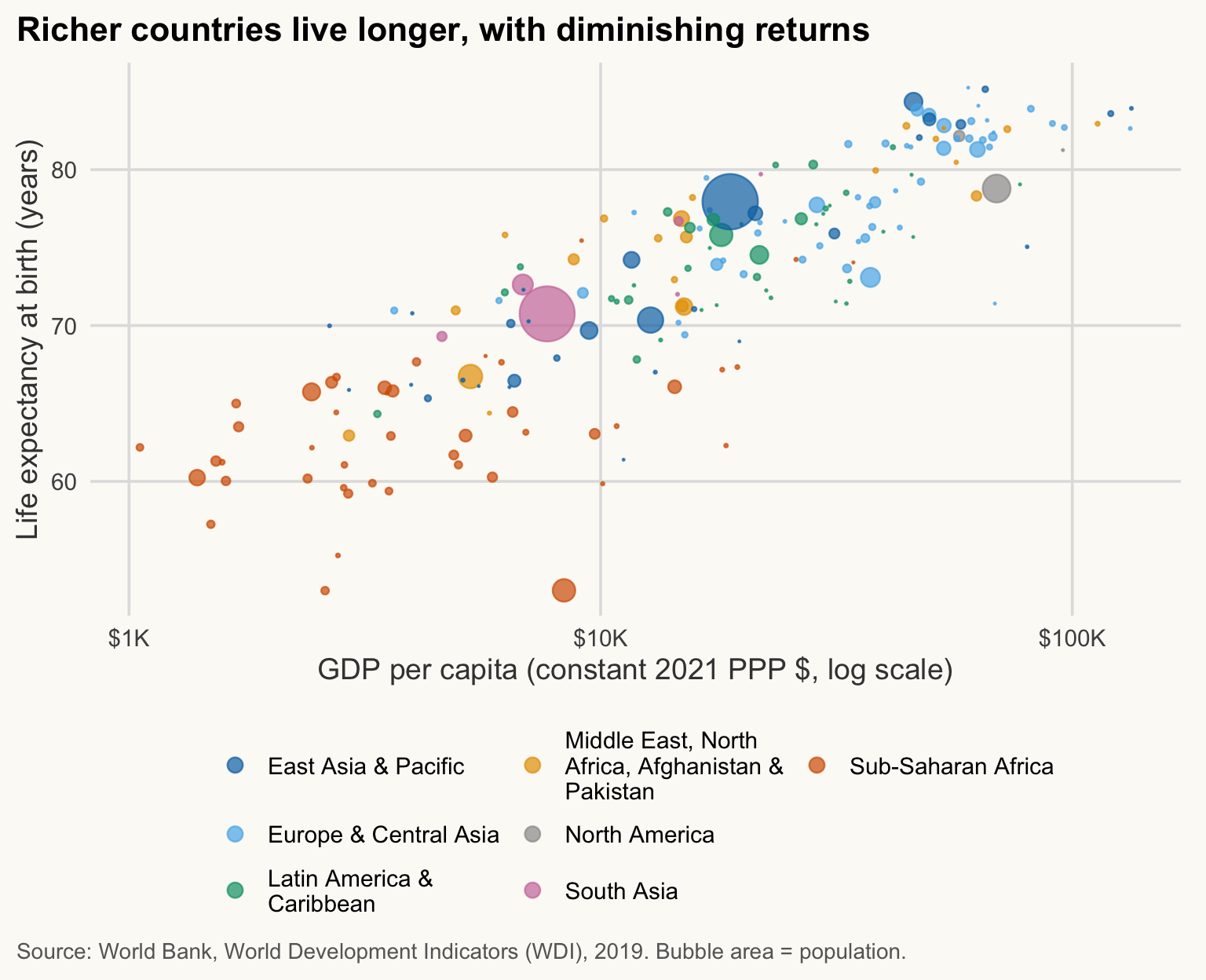
By Session 5 you will produce charts like this one: richer countries live longer, but the gain flattens out (the “Preston curve”). Every point is a country; the area shows its population.
Show the code (you will write this in Session 5)
wdi <-read_csv(here("data", "wdi_panel.csv"), show_col_types =FALSE)# CAF life expectancy is unreliable in this WDI release (14.7 in 2009, 18.8 in 2022): exclude every yearwdi <- wdi |>mutate(life_exp =if_else(iso3c =="CAF", NA_real_, life_exp))wdi |>filter(year ==2019, !is.na(gdp_pc_ppp), !is.na(life_exp), !is.na(region)) |>ggplot(aes(x = gdp_pc_ppp, y = life_exp, size = population, colour = region)) +geom_point(alpha =0.7) +scale_x_log10(labels =label_dollar(scale_cut =cut_short_scale())) +scale_size_area(max_size =12, guide ="none") +scale_colour_manual(values = pal_regions, labels =label_wrap(25)) +guides(colour =guide_legend(nrow =3, override.aes =list(size =3))) +labs(title ="Richer countries live longer, with diminishing returns",x ="GDP per capita (constant 2021 PPP $, log scale)",y ="Life expectancy at birth (years)",colour =NULL,caption ="Source: World Bank, World Development Indicators (WDI), 2019. Bubble area = population." )
Every session follows the same plan: objectives, explanations with code, exercises, then “Key takeaways”.
Type the code yourself in RStudio rather than copying it: that is how you learn.
Solutions are collapsed: try first, then open to compare.
An error is not a failure: read the message, it almost always says what is wrong.
AI and code
AI assistants can explain an error message or an unfamiliar function. They must not replace your learning. Always run the suggested code and understand every line before using it: code that runs is not necessarily correct.
Content licensed CC BY-NC-ND 4.0, like pierrebeaucoral.github.io. Last updated: October 2026.